1. Produs terminatview
The Sharp EL-531TG-GY is a scientific calculator designed for students and professionals requiring advanced mathematical functions. It features a 2-line display and Multi-Line Playback, facilitating the input and review of complex equations. This model is suitable for general math, algebra, geometry, trigonometry, statistics, biology, chemistry, and general science applications.
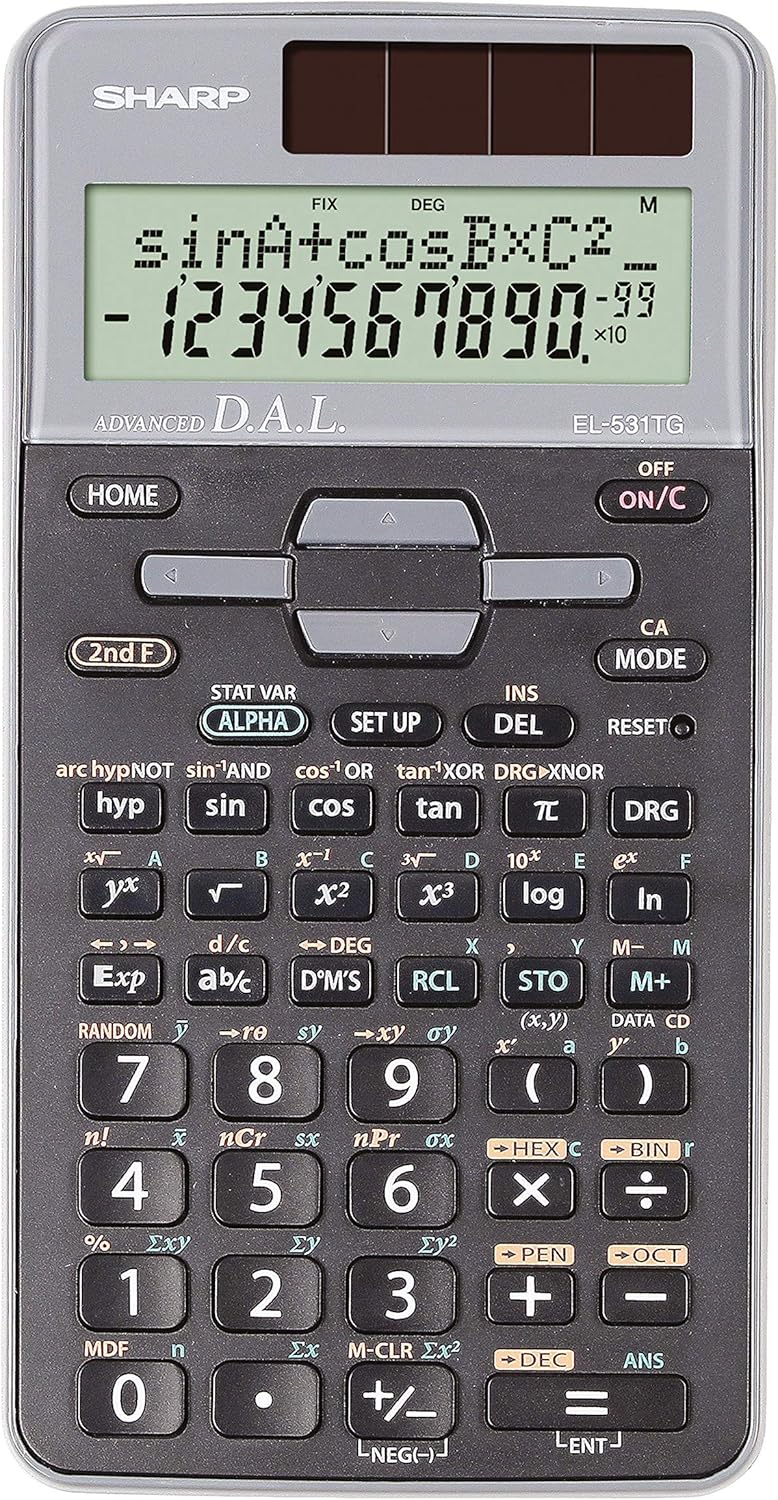
Figura 1: Față view of the Sharp EL-531TG-GY Scientific Calculator, showing the display, keypad, and solar panel.
2. Configurare și utilizare inițială
Sursa de alimentare 2.1
The EL-531TG-GY calculator operates using both solar power and a single LR44 button cell battery. The solar panel provides power in well-lit environments, while the battery ensures operation in low-light conditions or when solar power is insufficient. An LR44 battery is included with the calculator.
2.2 Pornirea/Oprirea
- To turn the calculator ON, apăsați tasta ON/C cheie.
- To turn the calculator OFF, apăsați tasta A doua linie de atac tasta urmată de OFF key (which is typically the same as ON/C).
2.3 Initial Display Settings
Upon first use or after a reset, the calculator will typically default to certain settings (e.g., DEG for angle units). Refer to Section 3.3 for details on changing mode settings.
3. Instrucțiuni de utilizare
3.1 Operații aritmetice de bază
Introduceți numerele folosind tastatura numerică. Folosiți +, -, ×, și ÷ tastele pentru adunare, scădere, înmulțire și împărțire, respectiv. Apăsați = pentru a obține rezultatul.
3.2 Funcții științifice
The calculator performs over 273 advanced scientific functions. Many functions are accessed by pressing the A doua linie de atac tasta dinaintea tastei funcționale dorite.
- Funcții trigonometrice: Utilizare păcat, cos, bronzat. Inverse functions (sin⁻¹, cos⁻¹, bronz⁻¹) sunt accesate prin A doua linie de atac.
- Funcții logaritmice: Utilizare jurnal (baza 10) și ln (logaritm natural).
- Puteri și rădăcini: Utilizare x², √, x³, ³√.
- Fracții: Utilizați d/c tastă pentru introducerea și conversia fracțiilor.
3.3 Mode Settings (DEG/RAD/GRAD)
To change the angle unit mode (Degrees, Radians, Gradians):
- Apăsați tasta DRG cheie.
- Apăsați în mod repetat DRG to cycle through DEG (Degrees), RAD (Radians), and GRAD (Gradians). The current mode is indicated on the display.
3.4 Funcții de memorie
The calculator includes memory functions for storing and recalling values.
- STO (Store): Presa STO followed by a variable key (e.g., A, B) to store the displayed value.
- RCL (Rechemare): Presa RCL followed by the variable key to recall the stored value.
- M+ (Memorie Plus): Adaugă valoarea afișată în memoria independentă.
- M- (Minusul memoriei): Scade valoarea afișată din memoria independentă.
3.5 Multi-Line Playback
The 2-line display allows for Multi-Line Playback, enabling users to review previous calculations and expressions. Use the directional arrow keys (up/down) to scroll through past entries and results. This feature is useful for checking work or re-using parts of previous calculations.
4. Întreținere
4.1 Curățare
To clean the calculator, wipe the surface gently with a soft, dry cloth. Do not use abrasive cleaners, solvents, or excessive moisture, as these can damage the display or internal components.
4.2 Înlocuirea bateriei
The calculator uses one LR44 button cell battery. If the display becomes dim or erratic in low-light conditions, the battery may need replacement. To replace the battery:
- Asigurați-vă că calculatorul este oprit.
- Localizați compartimentul bateriilor pe spatele calculatorului.
- Carefully open the compartment cover.
- Scoateți vechea baterie LR44 și introduceți una nouă, asigurându-vă că polaritatea este corectă (+/-).
- Închideți bine capacul compartimentului bateriei.
4.3 Depozitare
When not in use, store the calculator in a cool, dry place away from direct sunlight and extreme temperatures. The hard cover included with the calculator provides protection from scratches and minor impacts.
5. Depanare
5.1 Probleme de afișare
- Afișaj gol sau întunecat: Ensure sufficient light for the solar panel. If the issue persists, replace the LR44 battery.
- Erratic Display: This may indicate a low battery. Replace the LR44 battery.
5.2 Incorrect Results
- Check Mode Settings: Verify that the angle unit (DEG, RAD, GRAD) is set correctly for trigonometric calculations.
- Input Error: Review your input using the Multi-Line Playback feature to ensure the expression was entered correctly.
- Memory Contents: If using memory functions, ensure the stored values are correct.
5.3 Calculator Not Responding
If the calculator becomes unresponsive, try performing a reset. Locate the RESET button (often a small recessed button requiring a thin object like a paperclip to press). Pressing this button will clear all memory and return the calculator to its factory default settings.
6. Specificații

Figura 2: Față view of the Sharp EL-531TG-GY Scientific Calculator, illustrating its dimensions.
| Caracteristică | Descriere |
|---|---|
| Numărul de model | SH-EL531TGGY |
| Tip de afișare | 2-line LCD with Multi-Line Playback |
| Funcții | Over 273 advanced scientific functions |
| Sursa de alimentare | Solar and 1 x LR44 battery (included) |
| Material | Plastic |
| Dimensiuni (L x l x H) | 16.1 x 8 x 1.5 cm (aprox.) |
| Greutate | 100 g (aprox.) |

Figura 3: lateral view of the Sharp EL-531TG-GY Scientific Calculator, showing its slim profile.
7. Garanție și asistență
7.1 Informații despre garanție
This product is covered by a manufacturer's warranty. Please refer to the warranty card included with your purchase or visit the official Sharp webpentru termenii și condițiile detaliate de garanție specifice regiunii dumneavoastră.
7.2 Asistență pentru clienți
For technical assistance, troubleshooting not covered in this manual, or service inquiries, please contact Sharp customer support. Contact information can typically be found on the Sharp official website-ul sau pe ambalajul produsului.


