1. Introducere
Mulțumesc pentru achizițieasing the Capello Play it All Bluetooth Wireless Home Stereo Speaker CI302. This device offers versatile audio playback options including Bluetooth wireless streaming, CD player functionality, and FM digital radio. This manual provides detailed instructions for setup, operation, maintenance, and troubleshooting to ensure optimal performance and longevity of your speaker system.
2. Informații importante privind siguranța
- Citiți toate instrucțiunile înainte de a utiliza dispozitivul.
- Păstrați acest manual pentru referințe viitoare.
- Nu expuneți unitatea la ploaie sau umezeală pentru a preveni pericolele de incendiu sau șoc.
- Asigurați o ventilație corespunzătoare; nu blocați nicio deschidere de ventilație.
- Așezați unitatea pe o suprafață stabilă, plană.
- Utilizați numai atașamente/accesorii specificate de producător.
- Deconectați unitatea în timpul furtunilor cu descărcări electrice sau când nu este utilizată pentru perioade lungi de timp.
- Pentru toate lucrările de întreținere, adresați personalului de service calificat.
3. Conținutul pachetului
Vă rugăm să verificați dacă toate articolele sunt prezente:
- Capello Play it All Bluetooth Wireless Home Stereo Speaker CI302
- Telecomanda
- Adaptor de curent alternativ
- Manual de utilizare (acest document)
4. Produs terminatview
Familiarize yourself with the main components and controls of your Capello Play it All speaker.
Faţă View

Figura 4.1: Faţă view of the Capello Play it All speaker, showing the speaker grille, digital clock display, and subtle branding.
Comenzile panoului superior

Figura 4.2: Top panel of the Capello Play it All speaker, illustrating the CD compartment, 'capello' logo, and various control buttons including PRESET, MODE, PAIRING, PROGRAM/CLOCK SET, SKIP, PLAY/PAUSE, STOP, REPEAT, and VOLUME.
- PRESETARE +/-: Navigate through saved FM radio stations.
- Mod de administrare: Switch between Bluetooth, CD, FM Radio, and Line-In modes.
- ÎMPLINIRE: Inițiați modul de asociere Bluetooth.
- PROGRAM/CLOCK SET: Program CD tracks or set the clock.
- SKIP ◀◀ / ▶▶: Skip tracks on CD or adjust FM frequency.
- PLAY/PAUSE ▶▶: Play or pause CD playback.
- STOP ■: Stop CD playback.
- REPETA: Repeat current track or all tracks on CD.
- VOL +/-: Reglați nivelul volumului.
- DESCHIDE - INCHIDE: Deschideți sau închideți compartimentul pentru CD-uri.
- AȘTEPTARE: Power on/off the unit.
Rear Panel (Typical)
The rear panel typically includes the AC power input, FM antenna connection, and Line-In jack.
5. Configurare
5.1 Conexiune la alimentare
- Connect the AC power adapter to the DC IN jack on the rear of the speaker.
- Conectați celălalt capăt al adaptorului la o priză standard de perete.
- The unit will enter standby mode, and the digital clock display will illuminate.
5.2 Configurarea antenei FM
For optimal FM radio reception, extend the FM wire antenna fully and position it for the best signal. Avoid placing it near other electronic devices that may cause interference.
5.3 Setarea ceasului
- În modul de așteptare, țineți apăsată tasta PROGRAM/CLOCK SET buton.
- The hour digits will begin to flash. Use the SKIP ◀◀ / ▶▶ butoane pentru a regla ora.
- Presa PROGRAM/CLOCK SET din nou pentru a confirma ora.
- The minute digits will flash. Use the SKIP ◀◀ / ▶▶ butoane pentru reglarea minutelor.
- Presa PROGRAM/CLOCK SET one last time to save the setting.
6. Instrucțiuni de utilizare
6.1 Pornire/Oprire și selectare mod
- Apăsați tasta AȘTEPTARE button on the unit or the remote control to turn the speaker on or off.
- Apăsați tasta MOD button repeatedly to cycle through available modes: Bluetooth, CD, FM Radio, and Line-In.
6.2 Streaming wireless Bluetooth
- Turn on the speaker and select Bluetooth mode using the MOD button. The display will show 'BT' and flash, indicating it's in pairing mode.
- Pe dispozitivul compatibil Bluetooth (smartphone, tabletă, computer), activați Bluetooth și căutați dispozitivele disponibile.
- Select 'Capello CI302' (or similar) from the list of devices.
- Once paired, the speaker will emit a confirmation tone, and 'BT' on the display will stop flashing.
- You can now play audio from your device through the speaker. Use your device or the speaker's controls for volume and track navigation.
6.3 Redare CD
- Apăsați tasta DESCHIS/ÎNCHIS buton pentru a deschide compartimentul CD-ului.
- Carefully place an audio CD (CD, CD-R/-RW) with the label side facing up into the compartment.
- Închideți compartimentul CD-ului. Aparatul va citi discul.
- If not already in CD mode, press the MOD pentru a selecta modul CD.
- Apăsați tasta REDARE/PAUZĂ pentru a porni redarea.
- Utilizare SKIP ◀◀ / ▶▶ to skip tracks, STOP ■ to stop, and REPETA to cycle through repeat options.
6.4 FM Digital Radio
- Apăsați tasta MOD button to select FM radio mode. The current frequency will be displayed.
- Auto scanare: Țineți apăsat butonul REDARE/PAUZĂ button to automatically scan and save available FM stations as presets.
- Reglare manuală: Presa SKIP ◀◀ / ▶▶ briefly to fine-tune the frequency. Press and hold to scan for the next strong station.
- Accessing Presets: Utilizați PRESETARE +/- butoane pentru a parcurge posturile salvate.
6.5 Line-In Operation
- Connect an audio cable (not included) from the headphone jack or line-out of an external audio device to the LINE-IN jack on the speaker.
- Apăsați tasta MOD button to select Line-In mode.
- Play audio from your connected device. Volume can be controlled via the speaker or the external device.
6.6 Încărcare USB
The speaker features a USB port for charging compatible devices (e.g., smartphones, tablets). Connect your device's USB charging cable (not included) to the USB port on the speaker. The speaker does not need to be in a specific mode for USB charging to function.
6.7 Utilizarea telecomenzii
The included remote control provides convenient access to all functions. Ensure the remote has working batteries and is pointed towards the front of the speaker.
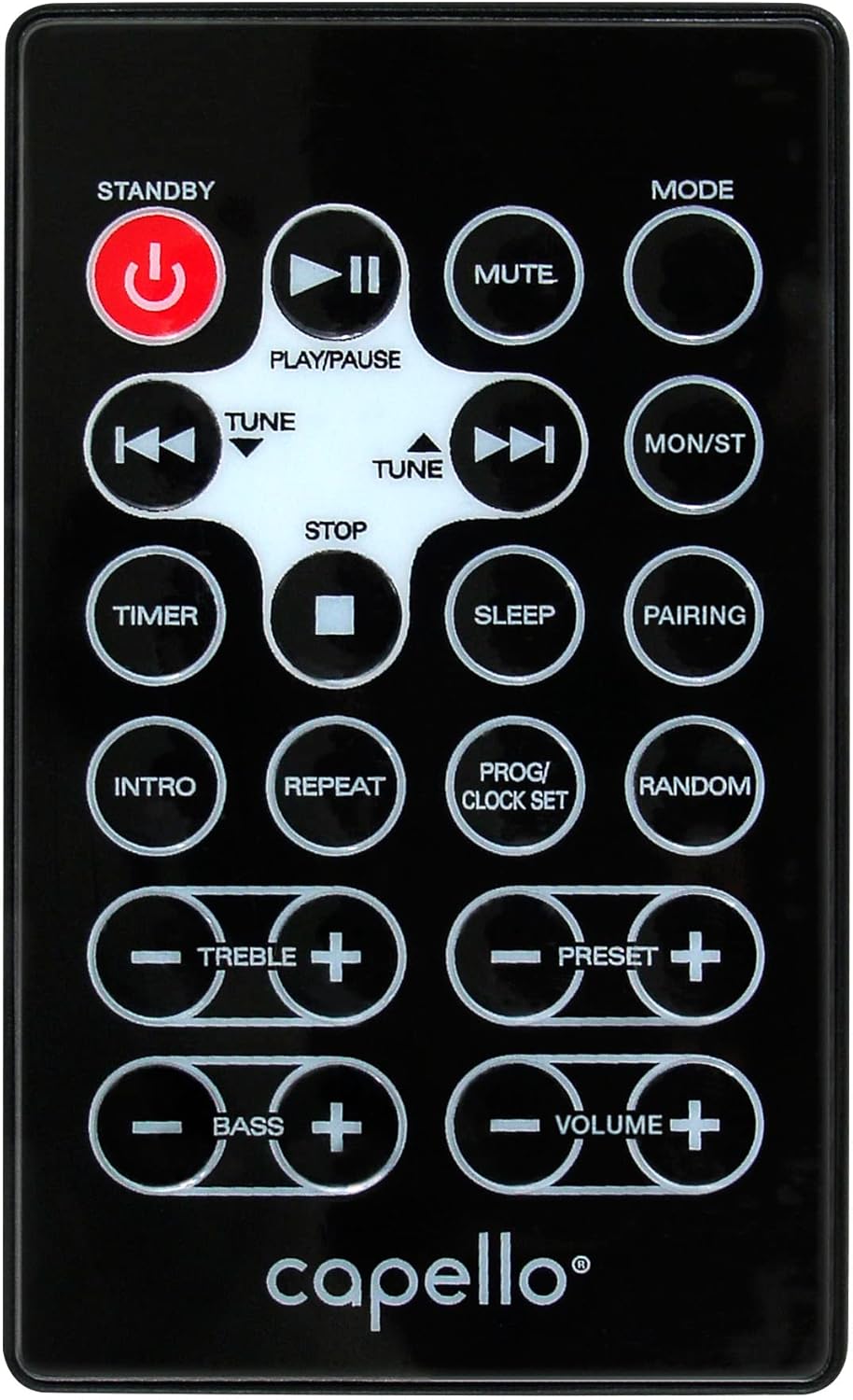
Figura 6.1: Layout of the remote control for the Capello Play it All speaker, showing buttons for Standby, Play/Pause, Mute, Mode, Skip/Tune, Stop, Timer, Sleep, Pairing, Intro, Repeat, Program/Clock Set, Random, Treble, Bass, and Volume controls.
- AȘTEPTARE: Pornire/oprire.
- REDARE/PAUZĂ: Redați sau întrerupeți sunetul.
- MUT: Dezactivați sau dezactivați sunetul.
- Mod de administrare: Cycle through input modes.
- SKIP/TUNE ◀◀ / ▶▶: Skip tracks or tune radio frequency.
- STOP: Opriți redarea.
- TIMER: Setați cronometrul de repaus.
- DORMI: Activate sleep function.
- ÎMPLINIRE: Inițiați asocierea Bluetooth.
- INTRODUCERE: Play the first few seconds of each CD track.
- REPETA: Repetați piesa curentă sau toate piesele.
- PROG/CLOCK SET: Program CD tracks or set clock.
- ALEATORIU: Play CD tracks in random order.
- TREBLE +/-: Reglați nivelurile înaltelor.
- BASS +/-: Reglați nivelurile basului.
- VOLUM +/-: Reglați volumul general.
7. Întreținere
7.1 Curățare
- Deconectați întotdeauna unitatea de la priză înainte de curățare.
- Folosiți o lavetă moale și uscată pentru a șterge suprafețele exterioare.
- Nu utilizați agenți de curățare abrazivi, ceară sau solvenți, deoarece aceștia pot deteriora finisajul.
- Pentru lentila CD-ului, folosiți un disc specializat de curățare a lentilelor CD-urilor.
7.2 Depozitare
If storing the unit for an extended period, unplug it from the power source and store it in a cool, dry place away from direct sunlight and extreme temperatures.
8. Depanare
| Problemă | Cauza posibila | Soluţie |
|---|---|---|
| Fără putere | Cablul de alimentare nu este conectat; priza nu este activă. | Ensure power cord is securely plugged in; try a different outlet. |
| Nici un sunet | Volume too low; incorrect mode selected; external device muted. | Increase volume; select correct input mode; check external device volume/mute. |
| CD-ul sare sau nu este redat | Dirty or scratched CD; CD inserted incorrectly; dirty CD lens. | Clean or replace CD; insert CD label-side up; use a CD lens cleaner. |
| Asocierea Bluetooth eșuează | Device too far; Bluetooth not enabled on device; speaker not in pairing mode. | Move device closer; enable Bluetooth; ensure speaker is in BT pairing mode. |
| Recepție FM slabă | Antena nu este extinsă; interferențe. | Fully extend and reposition FM antenna; move away from other electronics. |
| Telecomanda nu funcționează | Batteries depleted; obstruction; not pointed at sensor. | Replace batteries; remove obstructions; point remote directly at the unit. |
9. Specificații
| Caracteristică | Caietul de sarcini |
|---|---|
| Marca | Capello |
| Numărul de model | CI302 |
| Tehnologia de conectivitate | Bluetooth |
| Tip difuzor | Stereo |
| Mod ieșire audio | Stereo |
| Formate audio acceptate | CD, MP3 |
| Putere nominală de ieșire a difuzoarelor | 10 wați |
| Putere maximă de ieșire difuzoare | 10 wați |
| Configurarea canalului de sunet surround pentru difuzor | 2.0 |
| Tipul sursei de alimentare | Electric cu fir |
| Dispozitive compatibile | Laptop, Smartphone, Tabletă |
| Caracteristici speciale | Digital Display, Portable, USB Port |
| Tip material | Plastic |
| Tip de montare | Blatul mesei |
| Greutatea articolului | 2.57 kilograme |
| Dimensiuni pachet | 38.3 x 24.2 x 18.5 cm |
| Baterii incluse | Nu |
| Bateriile necesare | Nu |
10. Garanție și asistență
This product is covered by a limited warranty. Please refer to the warranty card included in your package for specific terms and conditions. For technical support or customer service inquiries, please contact Capello customer support through their official website-ul sau informațiile de contact furnizate împreună cu documentația de achiziție.


