Introducere
This manual provides detailed instructions for the installation, operation, and maintenance of your FVTLED WiFi RGBW LED Controller. This controller is designed for wireless smart control of FVTLED RGBW LED Deck lights via a dedicated mobile application on Android and iOS devices. Please read this manual thoroughly before use to ensure proper functionality and safety.
Informații de siguranță
- Asigurați-vă că sursa de alimentare este deconectată înainte de instalare sau întreținere.
- This controller is designed for use with FVTLED RGBW LED Deck lights only. Do not connect to other lighting systems.
- Verificați volul corecttage (120 volți) și apătage (15 watts) compatibility.
- Țineți dispozitivul departe de apă și umiditate excesivă.
- Do not attempt to disassemble or modify the controller. Refer all servicing to qualified personnel.
Conținutul pachetului
Vă rugăm să verificați pachetul pentru următoarele articole:
- 1 x FVTLED WiFi RGBW LED Controller
- 1 x Remote Control (Batteries not included: Requires 2 AAA batteries)
- Manual de utilizare (acest document)
Produs terminatview
The FVTLED WiFi RGBW LED Controller allows you to manage your FVTLED RGBW deck lights with ease, offering both a physical remote control and a comprehensive mobile application for advanced features.

Image: FVTLED WiFi RGBW LED Controller and its accompanying remote control.

Image: Detailed layout of the remote control buttons, indicating functions such as ON/OFF, brightness adjustment, color temperature control, and RGB color cycling.
Înființat
1. Conexiunea cablajului
The controller features two connection ends:
- The 2-pin end connects to your power supply.
- The 5-pin end connects directly to your FVTLED RGBW LED deck lights.
Ensure all connections are secure and properly aligned before applying power.
2. Mobile Application Download
To utilize the smart control features, download the official FVTLED application. Caută "FVTLED" in your device's app store:
- Pentru dispozitive Android: Magazin Google Play
- Pentru dispozitive iOS: Apple App Store

Image: Visual guide for downloading the FVTLED application and an overview of its key features, including 16 million colors, music sync, voice control, and scheduling.
3. Connecting the Controller to Wi-Fi
Follow these steps within the FVTLED app to connect your controller to your home Wi-Fi network:
- Open the FVTLED app.
- Înscrieți-vă for a new account or Log in daca ai deja unul.
- From the main screen, tap the "Add device" button (often represented by a '+' icon).
- The app will automatically search for nearby devices. Select your controller (e.g., "DeviceBCF2").
- Introdu numele și parola rețelei Wi-Fi când ți se solicită.
- Once connected, you can name your device and assign it to a specific room for better organization.

Image: Step-by-step screenshots illustrating the process of signing up, logging in, adding a device, connecting to Wi-Fi, and organizing the device within the FVTLED app.
Operarea controlerului
1. Utilizarea telecomenzii
The included remote control provides basic functions:
- ON/OFF: Aprindeți sau stingeți luminile.
- Luminozitate: Adjust light intensity (10 levels of dimming).
- Temperatura de culoare: Adjust between warm white (3000K), neutral white (4000K), and cool white (6500K).
- RGB Buttons: Cycle through various RGB colors and modes (three speeds for color cycling).
- Mod lumină nocturnă: Activates a low-intensity light setting.
2. Using the FVTLED Mobile App
The mobile app unlocks the full potential of your RGBW LED Controller:
- 16 milioane de culori: Select any color from a vast spectrum.
- Brightness & Saturation Control: Reglați fin intensitatea luminii și vibranța culorilor.
- Modul muzical: Lights can synchronize with music played through your device.
- Control vocal: Integrate with smart home systems (Wi-Fi, Alexa, Google Assistant) for voice commands.
- Cronometru și program: Set automated on/off times and lighting scenes.
- moduri multiple: Access various pre-programmed lighting effects and scenes.

Image: A user demonstrating control of green deck lights using the FVTLED mobile application on a smartphone.
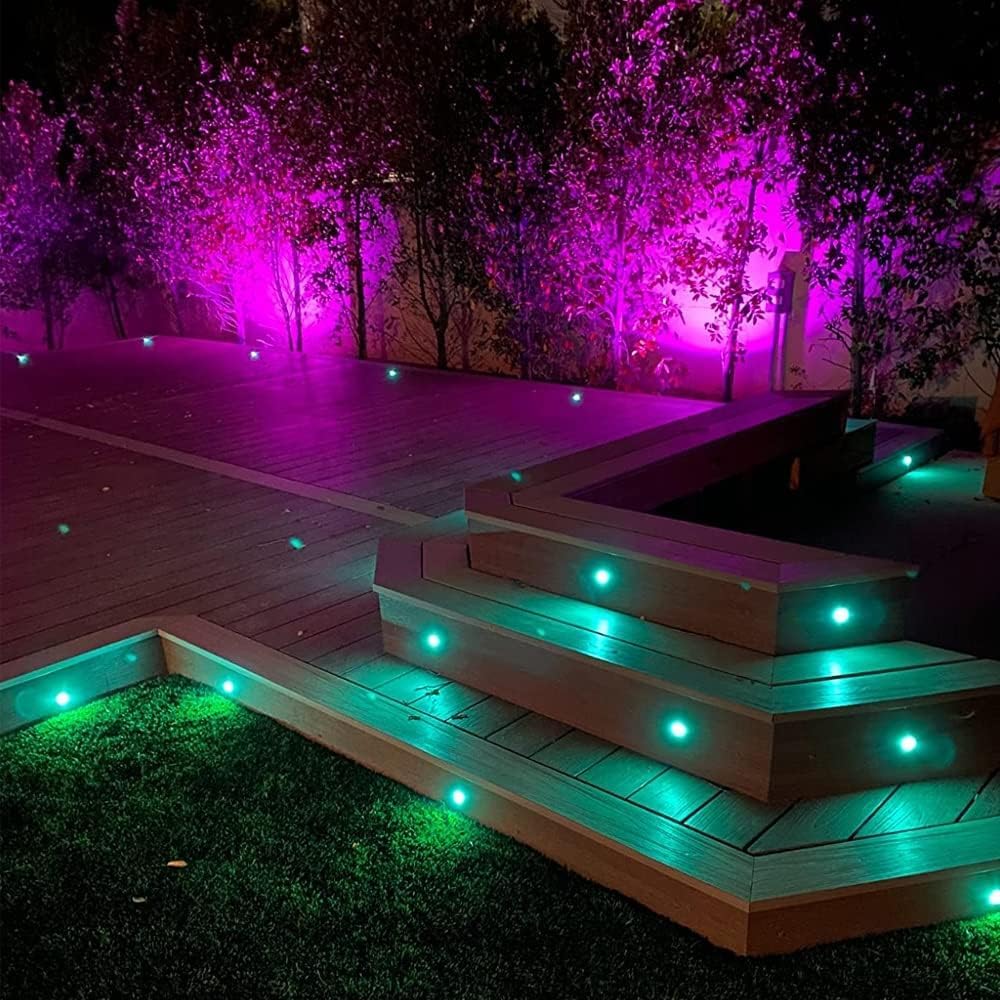
Image: An outdoor deck illuminated with FVTLED RGBW lights displaying vibrant purple and green colors, showcasing the controller's capabilities.

Image: An outdoor deck and stairs illuminated with warm white FVTLED deck lights, providing a cozy ambiance.

Image: A spacious outdoor deck area featuring FVTLED deck lights displaying a range of vibrant colors, demonstrating the RGB capabilities.
Întreţinere
The FVTLED WiFi RGBW LED Controller requires minimal maintenance:
- Păstrați controlerul curat și fără praf și resturi. Folosiți o cârpă moale și uscată pentru curățare.
- Ensure the controller is installed in a location that is protected from direct exposure to harsh weather conditions, although it is designed for outdoor use with appropriate protection.
- Regularly check wiring connections for any signs of wear or damage.
- Replace remote control batteries (2 x AAA) as needed to ensure proper function.
Depanare
| Problemă | Cauza posibila | Soluţie |
|---|---|---|
| Luminile nu se aprind. | No power to controller; Loose connections; Incorrect wiring; Faulty lights. | Check power supply connection. Ensure 2-pin connector is secure. Verify 5-pin connector to lights is secure. Confirm lights are functional. |
| Controller not connecting to Wi-Fi. | Incorrect Wi-Fi password; Out of Wi-Fi range; Router issues. | Double-check Wi-Fi password. Move controller closer to router. Restart your Wi-Fi router. Ensure 2.4GHz network is used if applicable. |
| Telecomanda nu funcționează. | Dead batteries; Remote out of range; Obstruction. | Replace AAA batteries. Ensure remote is within effective range of the controller. Remove any physical obstructions between remote and controller. |
| Lights not responding to app commands. | Controller offline; App glitch; Network interference. | Check app to confirm controller is online. Restart the app. Restart the controller by disconnecting and reconnecting power. Check for Wi-Fi interference. |
Specificații
| Caracteristică | Detaliu |
|---|---|
| Numărul de model | Z0039 |
| Marca | FVTLED |
| Producător | SEVEN COLORS LIGHTING TECHNOLOGY CO., LTD |
| Culoare | Wifi RGBW Controller |
| Sursa de alimentare | Sursă de alimentare DC |
| Voltage | 120 volți |
| Wattage | 15 wați |
| Greutatea articolului | 1.58 uncii |
| Dimensiuni pachet | 7 x 6.26 x 0.89 inci |
| Conectivitate | Wifi |
| Compatibilitate | Android, iOS, Alexa, Google Assistant |
| Componente incluse | WiFi RGB controller and RGBW LED lights (controller only in this package) |
| Data primului disponibil | 16 octombrie 2015 |
Garanție și suport
For warranty information and customer support, please refer to the official FVTLED website or contact the manufacturer directly. Details regarding product registration, warranty claims, and technical assistance can typically be found through these channels.
Producător: SEVEN COLORS LIGHTING TECHNOLOGY CO., LTD
Pentru asistență suplimentară, vă rugăm să vizitați FVTLED Store on Amazon.
