Introducere
This manual provides essential instructions for the safe and effective use of your Maxell 199720 Safe Soundz Hearing Protection Headphones. These headphones are designed to protect young users' ears from harmful noise levels by limiting sound output and blocking unwanted external sounds.

Image: Maxell 199720 Safe Soundz Headphones in teal and blue, showcasing the foldable design.
Informații de siguranță
- These headphones are designed with an 85 decibel maximum sound output to ensure safe listening levels for children.
- Always supervise children when using hearing protection devices.
- Do not modify the headphones or attempt to bypass the volume limiting feature.
- A nu se lăsa la îndemâna copiilor foarte mici pentru a preveni riscul de sufocare cu piese mici.
- Clean only with a dry, soft cloth. Avoid liquids.
Conținutul pachetului
La deschiderea pachetului, vă rugăm să vă asigurați că sunt prezente toate articolele:
- Maxell Safe Soundz Headphones
- Cablu de încărcare

Image: Maxell Safe Soundz Headphones shown within their open retail packaging, revealing the headphones and an included white charging cable.
Înființat
1. Reglarea potrivirii
The headphones are designed to be foldable and adjustable for a comfortable fit. Gently extend or retract the headband on both sides until the earcups comfortably cover the ears without excessive pressure.
2. Taxă inițială
Connect the provided charging cable to the charging port on the headphones and the other end to a USB power source. Allow the headphones to fully charge before first use. An indicator light will typically show charging status.
3. Conectarea la o sursă audio
- Asigurați-vă că sunt încărcate și oprite căștile.
- Press and hold the power button (or pairing button) until the indicator light flashes, indicating pairing mode.
- On your audio device (smartphone, tablet, etc.), go to Bluetooth settings and search for available devices.
- Select "Maxell Safe Soundz" (or similar name) from the list to connect.
- Once connected, the indicator light will typically stop flashing or change color.
Instrucțiuni de operare
Pornire/Oprire
Press and hold the power button for approximately 3-5 seconds to turn the headphones on or off. An audible cue or indicator light will confirm the status.
Controlul volumului
Use the volume buttons (+/-) on the headphones to adjust the listening level. Note that the headphones have a built-in volume limiting feature to prevent sound output from exceeding 85 decibels, ensuring safe listening for children.
Controlul redării
- Redare/Pauză: Press the multi-function button (often the power button or a dedicated play/pause button) once.
- Următoarea piesă: Double-press the multi-function button or use a dedicated 'next' button.
- Pista anterioară: Triple-press the multi-function button or use a dedicated 'previous' button.
Managementul apelurilor
- Răspundeți/Terminați apelul: Apăsați o dată butonul multifuncțional.
- Respinge apelul: Țineți apăsat butonul multifuncțional timp de 2 secunde.
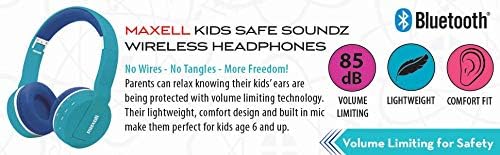
Image: A banner highlighting key features of the Maxell Kids Safe Soundz Wireless Headphones, including 85 dB volume limiting for safety, lightweight design, and comfort fit.
Întreţinere
- curatenie: Use a soft, dry, lint-free cloth to clean the headphones. Do not use liquid cleaners, aerosols, or solvents.
- Depozitare: Când nu le utilizați, depozitați căștile într-un loc răcoros și uscat, ferit de lumina directă a soarelui și de temperaturi extreme. Designul pliabil permite depozitarea compactă.
- Îngrijirea bateriei: To prolong battery life, avoid fully discharging the battery frequently. Charge regularly, even if not used for extended periods.
Depanare
- Fără sunet:
- Asigurați-vă că sunt pornite și încărcate căștile.
- Check if the headphones are properly paired/connected to the audio source.
- Verify the volume on both the headphones and the audio source is turned up.
- Cannot Pair (Wireless):
- Asigurați-vă că căștile sunt în modul de asociere (indicatorul luminos clipește).
- Asigurați-vă că Bluetooth este activat pe dispozitivul audio.
- Move the headphones closer to the audio device.
- Turn off and on both the headphones and the audio device, then try pairing again.
- Ștergeți conexiunile Bluetooth anterioare de pe dispozitiv dacă sunt stocate prea multe.
- Calitate slabă a sunetului:
- Verificați dacă există probleme la sursa audio.
- Ensure there are no obstructions between the headphones and the audio source.
Specificații
| Numărul de model | 199720 |
| Marca | Maxell |
| Dimensiunile produsului | 7 x 3 x 10.25 inci |
| Greutatea articolului | 8.8 uncii |
| Maximum Sound Output | 85 de decibeli |
| Reducerea zgomotului | Blocks up to 95% of unwanted noise |
| Conectivitate | Wireless (Bluetooth) |
| Data primului disponibil | 9 octombrie 2017 |
Informații despre garanție
Maxell products typically come with a limited warranty. Please refer to the warranty card included with your product or visit the official Maxell webConsultați site-ul pentru termenii și condițiile detaliate ale garanției. Păstrați dovada achiziției pentru solicitările de garanție.
Sprijin
For further assistance, technical support, or to inquire about replacement parts, please contact Maxell customer service. You can typically find contact information on the Maxell official website-ul sau pe ambalajul produsului.
Maxell Oficial Website: www.maxell.com


