Introducere
Thank you for choosing the Capello Extra Large Display Digital Alarm Clock. This manual provides detailed instructions to help you set up, operate, and maintain your new alarm clock. Designed for clarity and ease of use, this clock features a large digital display and a stylish wood-grain finish, making it a perfect addition to any bedroom or living space.
Produs terminatview
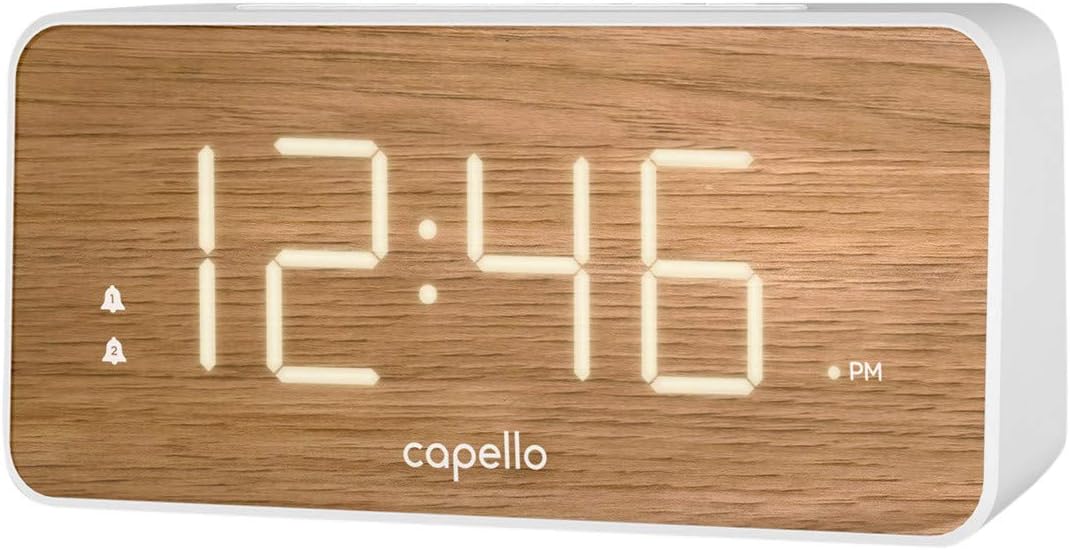
The Capello Digital Alarm Clock (Model: 43213-14795) features an extra-large digital display for easy readability from across the room. Its elegant white and pine D-frame design with a wood-grain finish complements various interior styles. The clock is equipped with intuitive controls for setting time and alarms, ensuring a user-friendly experience.
Înființat
Conexiune de alimentare
The alarm clock requires a continuous power supply via its included AC adapter for full functionality. Insert the adapter into a standard wall outlet and connect it to the clock's power input port. For backup during power outages, install 2 AAA batteries (not included) into the battery compartment located on the underside of the unit. These batteries will preserve time and alarm settings but will not power the display or alarm functions during an outage.
Setarea orei
- Țineți apăsat butonul SETAREA OREI button (or similar button, refer to specific button labels on your unit) until the hour digits begin to flash.
- Utilizați ORĂ button to adjust the hour. Pay attention to the AM/PM indicator.
- Apăsați tasta SETAREA OREI Apăsați din nou butonul pentru a trece la cifrele minutelor.
- Utilizați MIN pentru a regla minutele.
- Presa SETAREA OREI încă o dată pentru a confirma și a ieși din modul de setare a orei.
Setarea alarmei
This clock supports dual alarms.
- Țineți apăsat butonul ALARMA 1 apăsați butonul până când cifrele orei alarmei clipesc.
- Utilizați ORĂ şi MIN pentru a seta ora de alarmă dorită pentru Alarma 1.
- Presa ALARMA 1 again to confirm. The alarm indicator for Alarm 1 will illuminate.
- Repeat steps 1-3 for ALARMA 2 if a second alarm is desired.
- To activate/deactivate an alarm, simply press the corresponding ALARMA 1 or ALARMA 2 button. The alarm indicator will show its status.
Instrucțiuni de operare
Funcția de amânare
Când sună alarma, apăsați butonul mare PUI DE SOMN button located on the top of the clock. This will temporarily silence the alarm for approximately 9 minutes, allowing for extra rest. The alarm will sound again after the snooze period ends.
Oprirea alarmei
To turn off the alarm completely after it sounds, press the corresponding ALARMA 1 or ALARMA 2 button. The alarm indicator will turn off, signifying that the alarm is deactivated for the next day.
Luminozitatea afișajului
The display brightness can be adjusted to suit your preference. Locate the APRINDE or DIMMER button (often represented by a sun icon) on the top panel. Press this button repeatedly to cycle through different brightness levels (e.g., High, Medium, Low, Off).
Întreţinere
To ensure the longevity and optimal performance of your Capello Digital Alarm Clock, follow these simple maintenance guidelines:
- curatenie: Wipe the clock's surface with a soft, dry cloth. Do not use abrasive cleaners, waxes, or solvents as they may damage the finish.
- Plasare: Așezați ceasul pe o suprafață stabilă și plană, ferită de lumina directă a soarelui, surse de căldură și umiditate excesivă.
- Înlocuire baterie: Replace backup batteries annually or when the display shows signs of dimming during a power outage. Asigurați polaritatea corectă atunci când introduceți baterii noi.
Depanare
If you encounter any issues with your alarm clock, please refer to the following common problems and solutions:
| Problemă | Soluție posibilă |
|---|---|
| Afișajul este gol sau întunecat. | Ensure the AC adapter is securely plugged into both the clock and a working wall outlet. Check the display brightness setting using the LIGHT/DIMMER button. |
| Alarma nu sună. | Verify that the alarm is activated (alarm indicator is lit). Ensure the alarm time is set correctly (AM/PM). Check if the volume is set to an audible level. |
| Timpul este incorect. | Reset the time following the 'Setting the Time' instructions. If using backup batteries, ensure they are fresh and correctly installed. |
| Butoanele nu răspund. | Unplug the AC adapter, remove backup batteries, wait for 1 minute, then reconnect power. This performs a soft reset. |
Specificații
- Marca: Capello
- Număr de model: 43213-14795
- Culoare: Alb
- Tip de afișare: Digital
- Stil: Modern
- Caracteristica speciala: Large Display, Alarm
- Dimensiuni produs: 8.74 cm lățime x 5.83 cm înălțime
- Sursa de alimentare: AC Powered (with battery backup for settings)
- Material: Plastic
- Greutatea articolului: 1.01 lire sterline
Videoclipuri oficiale despre produse
În acest moment, nu sunt disponibile videoclipuri oficiale de la vânzător pentru acest articol.
Garanție și suport
For warranty information and customer support, please refer to the manufacturer's official documentation included with your product or visit the Capello website-ul. Păstrați chitanța de achiziție pentru cererile de garanție.


