1. Introducere
Thank you for choosing the PatrolEyes PE-DV5-2 Body Camera. This device is designed for professional use, offering high-definition video recording, advanced night vision capabilities, and integrated GPS for reliable evidence collection. This manual will guide you through the setup, operation, and maintenance of your new body camera to ensure optimal performance and longevity.
2. Conținutul pachetului
Vă rugăm să verificați dacă toate articolele sunt prezente în coletul dumneavoastră:
- PatrolEyes PE-DV5-2 Body Camera
- Battery (Included Components)
- Cablu de date/încărcare USB
- Încărcătoare de perete
- Clip de montare
- Manual de utilizare (acest document)
3. Piese și comenzi
Familiarize yourself with the various parts and controls of your PatrolEyes PE-DV5-2 body camera.

Figura 3.1: Faţă view of the PatrolEyes PE-DV5-2 body camera, highlighting the central camera lens, surrounding infrared (IR) lights for night vision, and the PatrolEyes logo at the bottom. The device has a rugged, black casing.

Figura 3.2: Front-side perspective of the PatrolEyes PE-DV5-2 body camera, providing a clearer view of the camera lens and the array of control buttons located on the side panel, including the yellow button at the top.

Figura 3.3: Latura view of the PatrolEyes PE-DV5-2 body camera, prominently featuring the red record button and the covered USB port for charging and data transfer.
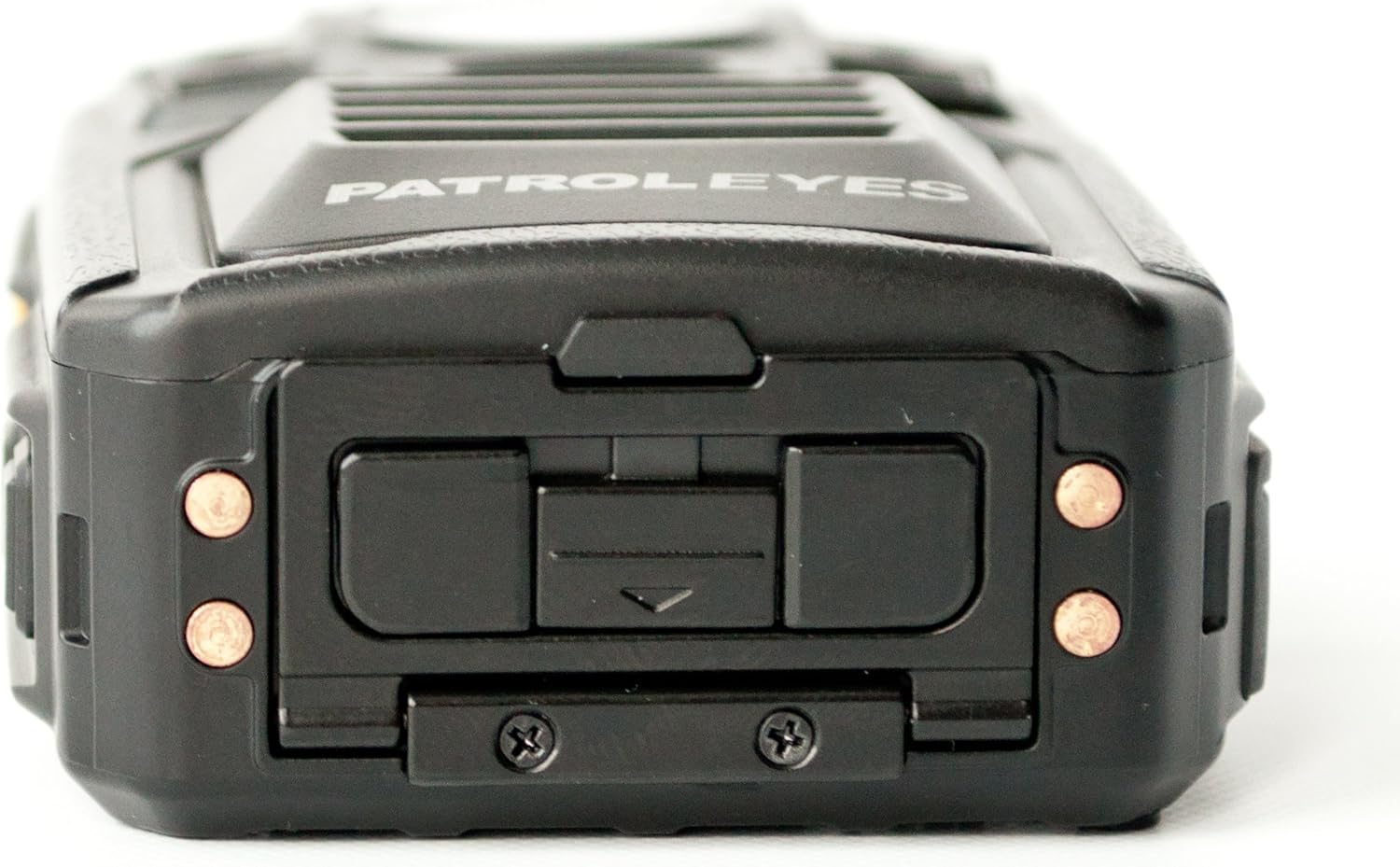
Figura 3.4: Top view of the PatrolEyes PE-DV5-2 body camera, displaying the GPS indicator light and other top-mounted features.

Figura 3.5: Fund view of the PatrolEyes PE-DV5-2 body camera, revealing the charging contacts designed for use with a docking station.
4. Noțiuni introductive
4.1. Încărcarea bateriei
Before first use, fully charge the camera's battery. The camera comes with a rechargeable battery.
- Connect the USB charging cable to the camera's USB port.
- Plug the other end of the USB cable into the wall charger and then into a power outlet.
- Indicatorul luminos de încărcare se va aprinde. Își va schimba culoarea sau se va stinge după finalizarea încărcării.
Alternatively, use a compatible docking station (sold separately) for charging.
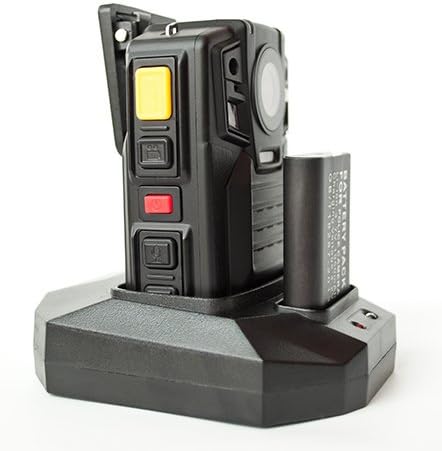
Figura 4.1: The PatrolEyes body camera securely placed in its docking station, which also features a dedicated slot for charging an additional battery pack.

Figura 4.2: Spate view of the PatrolEyes docking station, clearly showing the power input port and the USB data port for connecting to a computer.
4.2. Pornire/Oprire
- Pentru a porni: Press and hold the Power button for a few seconds until the device vibrates and the indicator lights turn on.
- Pentru a opri: Press and hold the Power button until the device vibrates and the indicator lights turn off.
4.3. Attaching the Mounting Clip
Attach the provided mounting clip to the back of the camera. This allows you to securely fasten the camera to your uniform or gear.
5. Operarea camerei
5.1. Înregistrarea videoclipurilor
The camera supports video capture resolutions of 1080p, 480p, and 720p.
- Asigurați-vă că camera este pornită.
- Apăsați butonul dedicat Butonul de înregistrare (often red) once to start video recording. The recording indicator light will flash.
- Apăsați tasta Butonul de înregistrare again to stop recording. The indicator light will stop flashing.
5.2. Realizarea fotografiilor
The camera has an effective still resolution of 33 MP.
- While in standby mode or during video recording, press the Buton foto once to capture a still image.
5.3. Viziune nocturnă (IR)
The camera features auto IR night vision with a range of 30 feet, utilizing infrared light sources.
- The camera is equipped with automatic infrared (IR) activation. In low-light conditions, the IR lights will automatically turn on to provide clear night vision footage.
5.4. Funcționalitatea GPS
The integrated GPS module automatically records location data with your video footage. Ensure the camera has a clear view cerului pentru o achiziție optimă a semnalului GPS.
5.5. Redare
Poți review recorded videos and photos directly on the camera's screen.
- Enter Playback mode via the menu or a dedicated button (refer to on-screen prompts).
- Navigați prin files using the directional buttons.
- Press the OK/Select button to play a video or view o fotografie.
5.6. Conectarea la un computer
A transfera files, connect the camera to a computer using the provided USB cable.
- Porniți camera.
- Conectați camera la computer utilizând cablul USB.
- Camera va apărea ca o unitate de disc amovibilă pe computer.
- You can now access and transfer video and photo files.
6. Întreținere și îngrijire
6.1. Curatenie
- Ștergeți corpul camerei cu o lavetă moale șiamp pânză. Nu utilizați substanțe chimice dure sau produse de curățare abrazive.
- Pentru lentilă, folosiți o lavetă și o soluție specială pentru curățarea lentilelor pentru a evita zgârieturile.
6.2. Depozitare
- Depozitați camera într-un loc răcoros și uscat, ferit de lumina directă a soarelui și de temperaturi extreme.
- Ensure the battery is partially charged (around 50%) if storing for extended periods to preserve battery life.
6.3. Îngrijirea bateriei
- Evitați descărcarea completă frecventă a bateriei.
- Folosiți doar accesoriile de încărcare originale sau aprobate.
7. Depanare
| Problemă | Cauza posibila | Soluţie |
|---|---|---|
| Camera nu pornește. | Baterie descărcată sau deloc. | Încărcați complet bateria. |
| Nu pot înregistra videoclipuri/face fotografii. | Storage full. | Transfer files to a computer and delete them from the camera. |
| Calitate video/imagine slabă. | Lentilă murdară; condiții de lumină slabă. | Clean the lens; ensure IR is active in low light. |
| GPS-ul nu primește semnal. | Obstrucționat view al cerului; utilizare în interior. | Mutați-vă într-o zonă deschisă în aer liber. |
| Camera nu este recunoscută de computer. | Faulty USB cable; driver issue. | Try a different USB port/cable; ensure camera is powered on. |
8. Specificații
| Caracteristică | Detaliu |
|---|---|
| Numărul de model | PE-DV5-2 |
| Rezoluție captură video | 1080p, 480p, 720p |
| Rezoluție statică efectivă | 33 MP |
| Frame Rate | 30 fps |
| Gama de vedere nocturnă | 30 picioare |
| Tehnologia de conectivitate | Wireless (Wi-Fi) |
| Sursa de alimentare | Alimentat cu baterie |
| Componente incluse | Baterie |
| Evaluarea internațională de protecție | IP54 |
| Caracteristici speciale | Senzor de mișcare, Viziune nocturnă |
| Utilizare în interior/exterior | În interior, în aer liber |
| Producător | Ochii de patrulă |
| Prima dată disponibilă | 14 mai 2017 |
9. Informații despre garanție
PatrolEyes products typically come with a limited manufacturer's warranty. Please refer to the warranty card included with your purchase or visit the official PatrolEyes webConsultați site-ul pentru termenii și condițiile detaliate ale garanției. Păstrați dovada achiziției pentru solicitările de garanție.
10. Asistență pentru clienți
For technical assistance, troubleshooting beyond this manual, or inquiries about your PatrolEyes PE-DV5-2 body camera, please contact PatrolEyes customer support. Contact information can typically be found on the manufacturer's website-ul sau pe ambalajul produsului.
Resurse online: Visit the official PatrolEyes website pentru întrebări frecvente, actualizări de software și materiale de asistență suplimentare.


