Introducere
This manual provides essential information for the safe and efficient operation of your Epson Home Cinema 3100 1080p 3LCD Home Theater Projector. Please read it thoroughly before use and retain it for future reference.
Înființat
Despachetare și configurare inițială
Scoateți cu grijă toate componentele din ambalaj. Asigurați-vă că sunt prezente următoarele articole:
- Proiector Epson Home Cinema 3100
- Cablu de alimentare
- Telecomanda cu baterii
- Ghid de instalare rapidă
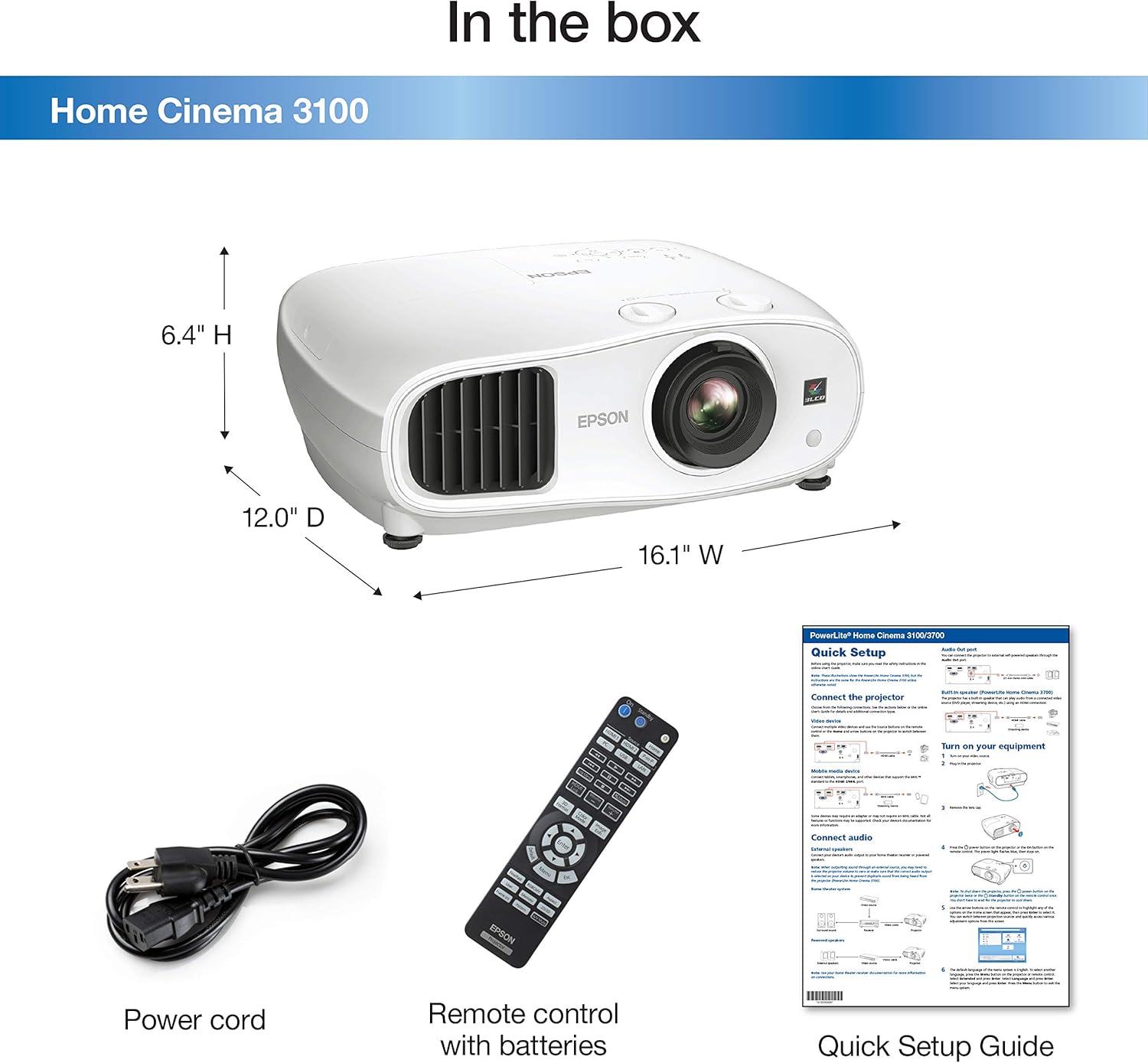
Descrierea imaginii: A white Epson Home Cinema 3100 projector is shown alongside its accessories: a black power cord, a black remote control with various buttons, and a folded quick setup guide. The image also indicates the projector's dimensions: 16.1" W, 12.0" D, 6.4" H.
Place the projector on a stable, level surface. Ensure adequate ventilation around the unit. Connect the power cord to the projector and then to a power outlet.

Descrierea imaginii: A white Epson Home Cinema 3100 projector is displayed from a front-angle perspective, highlighting its lens, ventilation grilles, and control buttons on the top surface.
Operațiunea
Pornire/Oprire
Press the power button on the projector or the remote control to turn the unit on. Press it again to turn off. Allow the projector to cool down completely before unplugging or moving.
Conectarea dispozitivelor
The Home Cinema 3100 supports various input sources. Connect your devices using the appropriate ports on the rear of the projector.

Descrierea imaginii: An illustration detailing the compatibility and connectivity options for the Epson Home Cinema 3100. It shows icons for various devices like tablets, smartphones, laptops, game consoles, Amazon Fire TV Stick, Chromecast, Blu-ray/DVD players, Sat/Cable boxes, Roku, Apple TV, and digital cameras. Below these, the projector's rear panel is depicted with its input ports: 1x HDMI1, 1x HDMI2/MHL, 1x D-sub 15 pin (Computer), 1x USB connector Type A, 1x Mini USB (service only), and 1x Audio out.
Conexiune HDMI: For most modern devices (Blu-ray players, game consoles, streaming sticks), use an HDMI cable to connect to the HDMI1 or HDMI2/MHL port.
Conexiune la computer: Use a D-sub 15 pin cable for connecting a computer.
Ajustarea imaginii
Ajustați imaginea proiectată pentru o calitate optimă viewing using the following controls:
- Inel de focalizare: Rotiți inelul de focalizare în jurul obiectivului pentru a îmbunătăți claritatea imaginii.
- Maneta de zoom: Use the zoom lever to adjust the image size without moving the projector.
- Schimbarea obiectivului: The projector features vertical (±60%) and horizontal (±24%) lens shift for flexible positioning. Use the dedicated dials to move the image up, down, left, or right without tilting the projector.

Descrierea imaginii: This diagram shows how the Epson Home Cinema 3100 projector can project different screen sizes (80", 100", 120") from various distances (8', 10', 12'). It visually demonstrates the flexibility in placement and image size adjustment.
Redare video
The Epson Home Cinema 3100 is designed to deliver a high-quality viewing experience for various content, including movies and games.
Descrierea videoclipului: This video demonstrates the Epson Home Cinema 3100 projector in a home setting, showcasing its use for gaming and general entertainment. It highlights the projector's ability to create a large, immersive viewexperiență.
Întreţinere
Curățarea proiectorului
Regular cleaning helps maintain optimal performance. Use a soft, dry cloth to wipe the exterior of the projector. For the lens, use a lens cleaning cloth and solution specifically designed for optical surfaces. Avoid abrasive cleaners or solvents.
Lamp Înlocuire
Proiectorul lamp are o durată de viață finită. Când lamp reaches the end of its life, a warning message will appear. Refer to the Quick Setup Guide or Epson's official support resources for detailed instructions on how to safely replace the lamp. Always use genuine Epson replacement lamps.
Depanare
Probleme comune și soluții
- Nicio imagine:
- Asigurați-vă că proiectorul este pornit și că sursa de intrare este selectată corect.
- Check all cable connections (HDMI, D-sub) between the projector and the source device.
- Verify the source device is powered on and outputting a signal.
- Imagine neclară:
- Reglați inelul de focalizare de pe lentila proiectorului.
- Asigurați-vă că suprafața de proiecție este plană și că proiectorul este stabil.
- Fără sunet:
- Check the audio settings on your source device and ensure the volume is not muted.
- If using external speakers, verify their connection and power.
- The projector has an audio output port; ensure it's connected to an audio system if you are not using the projector's internal speaker.
- Avertisment de supraîncălzire:
- Ensure the projector's ventilation vents are not blocked.
- Folosiți proiectorul într-o zonă bine ventilată.
- Clean any dust accumulation from the vents.
Specificații
| Caracteristică | Detaliu |
|---|---|
| Marca | Epson |
| Numărul de model | HC3100 |
| Rezoluția afișajului | 1920 x 1080 (Full HD 1080p) |
| Luminozitatea culorii | 2,600 lumeni |
| Luminozitate albă | 2,600 lumeni |
| Raportul de contrast dinamic | Până la 60,000:1 |
| Tehnologia de conectivitate | HDMI |
| Caracteristica specială | Ready for 3D |
| Utilizări recomandate | Jocuri, Home Cinema |
| Dimensiunile produsului | 16.1 x 12 x 6.4 inci |
| Greutatea articolului | 14.6 lire sterline |
| Zgomot ventilator | 24 dB – 35 dB |
Garanție și suport
Informații despre garanție
Your Epson Home Cinema 3100 projector is covered by a limited warranty. Please refer to the warranty card included with your product or visit the official Epson website-ul pentru termeni și condiții detaliate.
Asistență pentru clienți
For technical assistance, troubleshooting, or service inquiries, please contact Epson customer support. Contact information can be found on the Epson website sau în documentația produsului dumneavoastră.


