Introducere
The Saramonic SR-TM7 is a professional super-cardioid broadcast shotgun condenser microphone designed to deliver clear, broadcast-quality audio. It is suitable for use with video cameras, audio recorders, and DSLR/mirrorless cameras equipped with XLR adapters. Its long-shotgun design is optimized for capturing sound from a distance. This manual provides detailed instructions for the proper use and maintenance of your SR-TM7 microphone.
Informații de siguranță
- Do not expose the microphone to water or excessive humidity.
- Evitați să scăpați microfonul sau să îl supuneți la impacturi puternice.
- Do not attempt to disassemble or modify the microphone.
- Țineți microfonul departe de câmpuri magnetice puternice.
- Use only the specified charging cable for the built-in battery.
Conținutul pachetului
Verificați dacă toate articolele sunt prezente în colet:
- Saramonic SR-TM7 Microphone
- Cablu Micro USB
- Mic Clip with Camera Shoe Mount
- Parbriz din spumă
- Cablu XLR
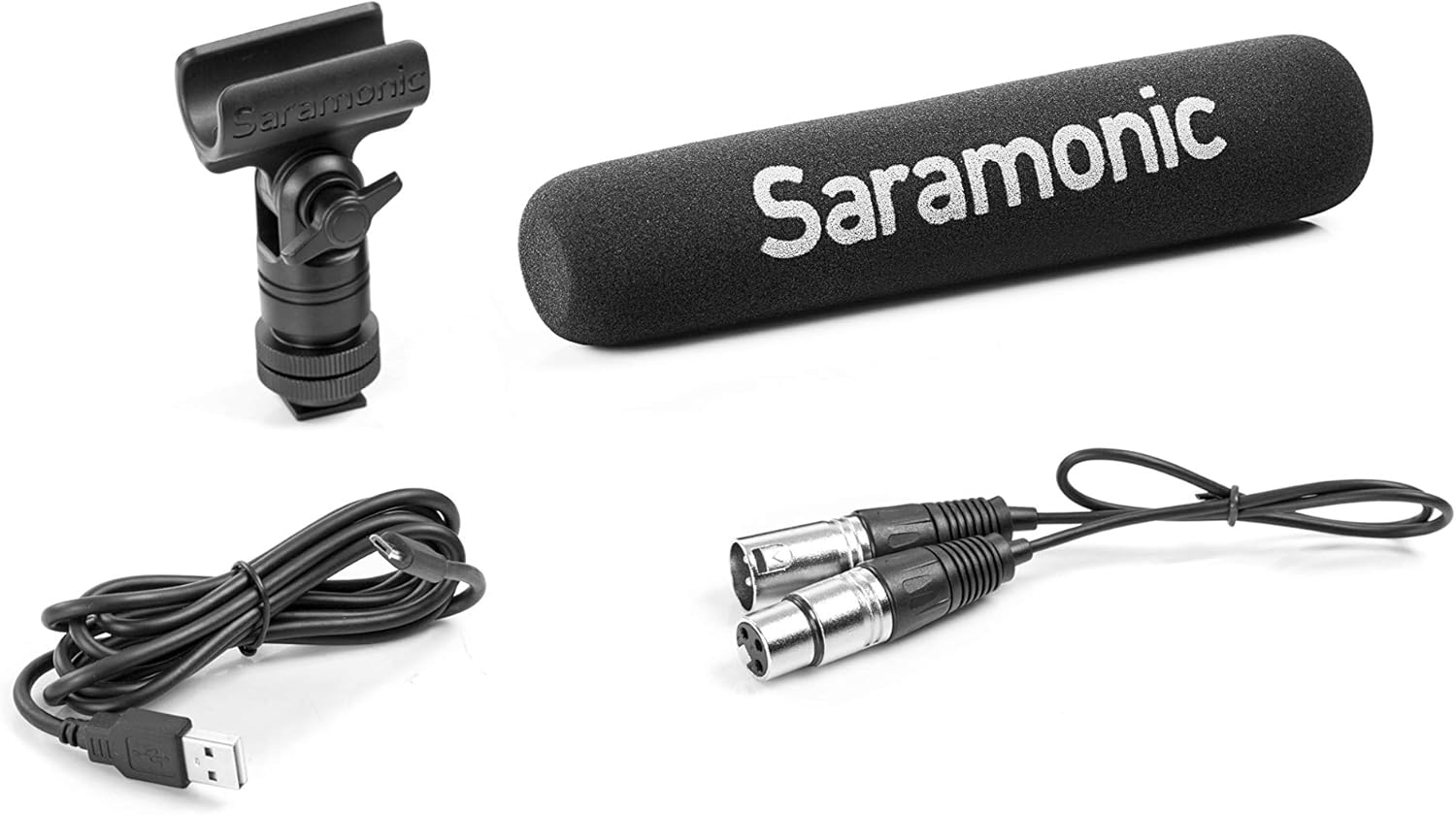
Image: Saramonic SR-TM7 microphone with its accessories, including an XLR cable, a Micro USB charging cable, a mic clip, and a foam windscreen.
Produs terminatview
The SR-TM7 features several controls and indicators for optimal audio capture.

Image: Saramonic SR-TM7 microphone with foam windscreen. The image highlights the control panel with buttons for high-pass filter, PAD, high frequency boost, and power.
- Capsula microfonului: The primary sound capture component.
- Digital High-Pass Filter (75Hz/150Hz): Reduces low-frequency noise.
- -10dB PAD Switch: Attenuates input signal for loud sound sources.
- +6dB High Frequency Boost Switch: Enhances clarity and sharpness of audio.
- Buton de alimentare PORNIT/OPRIT: Activează și dezactivează microfonul.
- Ieșire XLR: Standard 3-pin XLR connector for audio output.
- Port de încărcare micro-USB: Pentru reîncărcarea bateriei interne.
Înființat
- Atașați clema microfonului: Secure the SR-TM7 microphone into the provided mic clip. The mic clip can then be mounted onto a camera shoe mount or other compatible stand.
- Conectați cablul XLR: Connect one end of the supplied XLR cable to the microphone's XLR output and the other end to your camera, audio recorder, or XLR adapter.
- Apply Foam Windscreen: For indoor use or light wind conditions, slide the foam windscreen over the microphone capsule to reduce plosives and minor wind noise. For outdoor use in windy conditions, a high-wind furry windscreen (e.g., TM-WS7, sold separately) is recommended.
- Pornire: Press the ON/OFF power button to activate the microphone. The button will illuminate to indicate power status and battery level.

Image: The Saramonic SR-TM7 microphone integrated into a camera setup, demonstrating its typical use for video production.
Operarea microfonului
Powering the Microphone
The SR-TM7 can be powered by its internal rechargeable lithium battery or by 48V phantom power from your connected device. The power button's illumination indicates the power source and battery life.
- Baterie internă: Provides up to 150 hours of operation.
- Puterea fantomă: If connected to a device supplying 48V phantom power, the microphone will automatically draw power from it.
Folosind butoanele de control
The SR-TM7 features five illuminated buttons for easy adjustment, even in low-light conditions. The microphone digitally controls the on-board filters and saves your settings when powered off.
- -10dB PAD: Press this button to reduce the input sensitivity by 10dB. This is useful when recording very loud sound sources to prevent distortion.
- +6dB High Frequency Boost: Activate this feature to enhance the sharpness and clarity of the audio, particularly useful for dialogue.
- Low-Cut Filters (75Hz and 150Hz): Two separate buttons allow you to engage a low-cut filter at either 75Hz or 150Hz. These filters help to eliminate distracting low-frequency noises such as rumble from vehicles, air conditioners, or footsteps, making dialogue more intelligible.
Baterie și încărcare
The SR-TM7 is equipped with a built-in lithium battery. The Micro-USB charging port is integrated into the XLR connector for convenience.
- Încărcare: Connect the supplied Micro-USB cable to the charging port on the microphone and to a standard USB power source (e.g., computer USB port, USB wall adapter).
- Indicator de încărcare: The power button's color will change to indicate charging status and battery life. Refer to the microphone's specific LED indicators for detailed status.
- Durata de viață a bateriei: A full charge provides approximately 150 hours of continuous operation.
Întreţinere
- curatenie: Folosiți o lavetă moale și uscată pentru a curăța corpul microfonului. Nu utilizați agenți de curățare lichizi sau solvenți.
- Depozitare: Când nu este utilizat, depozitați microfonul într-un mediu uscat și fără praf, de preferință în ambalajul original sau într-o husă de protecție.
- Îngrijirea bateriei: For long-term storage, ensure the battery is partially charged (around 50%) to prolong its lifespan. Avoid fully discharging the battery for extended periods.
Depanare
| Problemă | Cauza posibila | Soluţie |
|---|---|---|
| Fără ieșire audio | Microphone not powered on; XLR cable not connected properly; Low battery; Phantom power not enabled on recording device. | Ensure microphone is powered on; Check XLR cable connections; Charge the battery; Enable 48V phantom power on your recording device if using. |
| Audio distorsionat | Input signal too high (clipping); Microphone too close to sound source. | Activate the -10dB PAD switch; Increase distance from sound source; Adjust input gain on your recording device. |
| Excessive low-frequency noise | Environmental rumble; Proximity effect. | Engage the 75Hz or 150Hz low-cut filter; Move microphone away from noise sources. |
Specificații
- Factor de formă a microfonului: Pușcă
- Model polar: Super-cardioid
- Raspuns in frecventa: 20 Hz - 20 kHz
- Raport semnal-zgomot: 80 dB
- Sensibilitate audio: 10 de decibeli
- Sursa de alimentare: Built-in Lithium Ion Battery / 48V Phantom Power
- Durata de viață a bateriei: Approximately 150 hours (internal battery)
- Tip conector: XLR, Micro USB (for charging)
- Dimensiuni (L x l x H): 17.72 x 3.35 x 6.89 inci (dimensiunile produsului)
- Greutatea articolului: 8.1 uncii (0.23 kilograme)
- Material: Durable Metal Construction (body), Foam (windscreen)
- Componente incluse: Micro USB cable, Mic Clip, Foam windshield, XLR cable
Garanție și suport
For warranty information and technical support, please refer to the official Saramonic website-ul web sau contactați distribuitorul local. Păstrați dovada achiziției pentru solicitările de garanție.
Saramonic Official Website: www.saramonic.com


