1. Introducere
The Logitech Z625 THX Certified 2.1 Speaker System is designed to deliver a powerful audio experience for various entertainment needs, including gaming, movies, and music. This system features two satellite speakers and a subwoofer, providing 400 Watts Peak power for crisp sound and deep bass. It supports multiple input options, allowing connection to up to three compatible devices simultaneously.

Image 1.1: The Logitech Z625 THX Certified 2.1 Speaker System, showcasing the subwoofer and two satellite speakers.
2. Ce se află în cutie
Carefully unpack the contents of your Logitech Z625 speaker system. The package should contain the following items:
- Subwoofer
- Două difuzoare satelit
- Cablu audio de 3.5 mm
- Cablu optic
- Ghid de pornire rapidă

Image 2.1: Contents of the Logitech Z625 package, showing the subwoofer, satellite speakers, and connection cables.
3. Instrucțiuni de configurare
Follow these steps to set up your Logitech Z625 speaker system:
- Plasare: Position the subwoofer on the floor, ideally near a wall for enhanced bass. Place the two satellite speakers on either side of your monitor or television, ensuring they are equidistant from your listening position for optimal stereo imaging.
- Conectați difuzoarele satelit: Conectați cablurile de la boxele satelit la porturile corespunzătoare din spatele subwooferului. Asigurați o conexiune sigură.
- Conectați sursa audio: The Z625 system supports multiple input options. Choose the appropriate cable for your device:
- Intrare de 3.5 mm: Use the included 3.5mm audio cable to connect your computer, smartphone, or other devices with a 3.5mm audio output to the AUX input on the right satellite speaker or the 3.5mm input on the subwoofer.
- Intrare optică: Use an optical cable (included) to connect your television, game console, or other devices with an optical audio output to the OPTICAL input on the subwoofer.
- Intrare RCA: Use an RCA cable (not included) to connect devices with RCA audio outputs to the RCA inputs on the subwoofer.
- Conexiune de alimentare: Plug the subwoofer's power cable into a wall outlet.
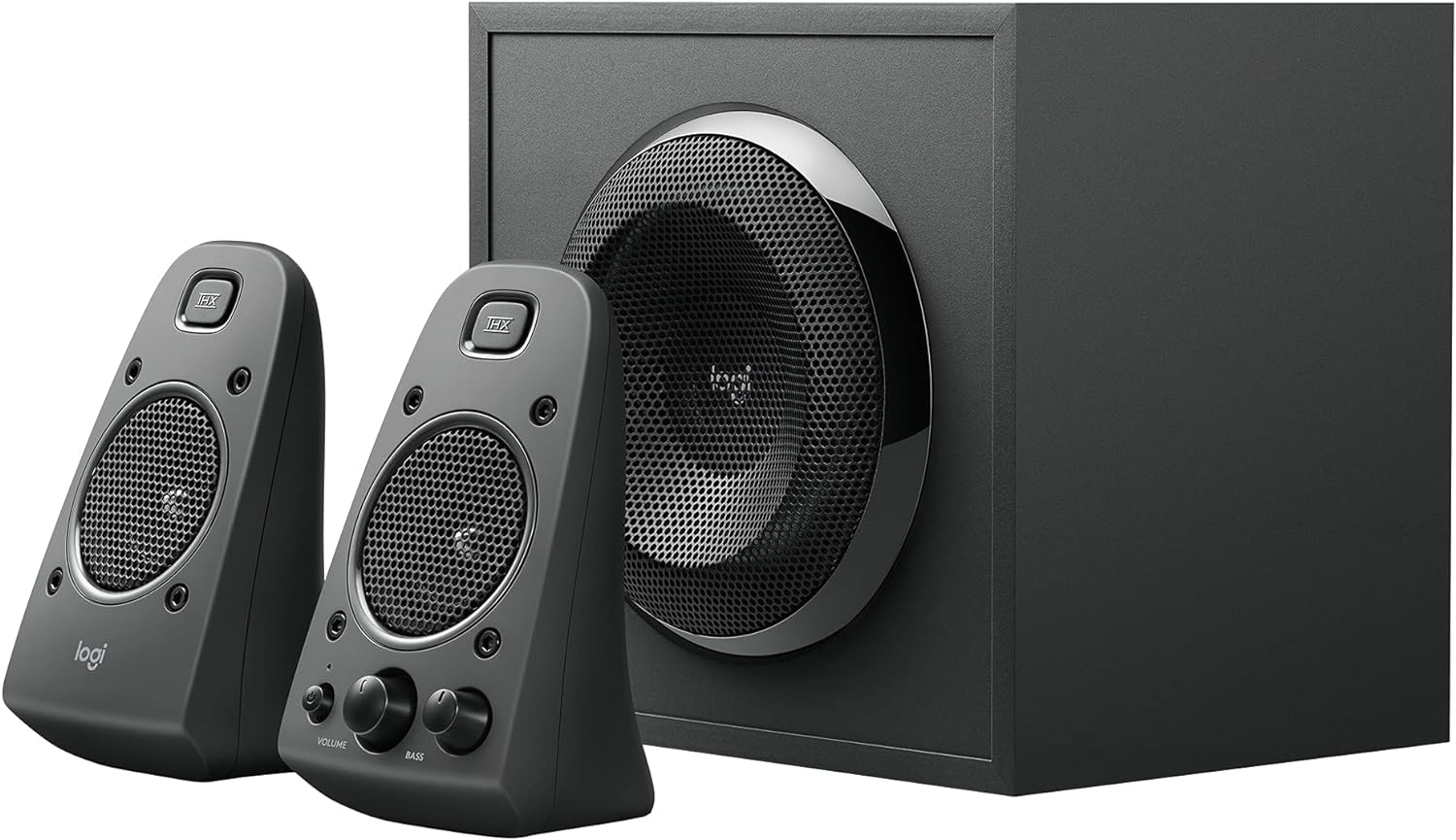
Image 3.1: Rear panel of the Z625 subwoofer, illustrating the various audio input options and satellite speaker connections.
4. Instrucțiuni de utilizare
All primary controls for the Logitech Z625 system are conveniently located on the right satellite speaker.
- Buton de alimentare: Press the power button to turn the speaker system on or off. An indicator light will confirm the power status.
- Controlul volumului: Rotate the large volume knob to adjust the overall audio level.
- Controlul basului: Rotate the bass knob to increase or decrease the subwoofer's output. Adjust this to your preference for optimal bass response.
- Jack pentru căști: Connect headphones to this 3.5mm jack for private listening. When headphones are connected, audio output from the speakers will be muted.
- Intrare auxiliara: This 3.5mm input allows for quick connection of portable audio devices.
The system supports simultaneous connection of up to three devices. To switch between audio sources, simply play audio from the desired connected device. The system will automatically prioritize the active input.

Image 4.1: Controls located on the right satellite speaker of the Z625 system.
5. Întreținere
Pentru a asigura longevitatea și performanța optimă a sistemului de boxe Logitech Z625, urmați aceste instrucțiuni de întreținere:
- curatenie: Use a soft, dry cloth to clean the surfaces of the speakers and subwoofer. Avoid using liquid cleaners or abrasive materials, as these can damage the finish or internal components.
- Ventilare: Ensure that the subwoofer and satellite speakers have adequate ventilation. Do not block any vents, especially on the subwoofer, to prevent overheating.
- Mediu: Keep the speaker system away from direct sunlight, excessive heat, humidity, and dust. Avoid placing it near strong magnetic fields.
- Organizare de cabluri: Periodically check all cable connections to ensure they are secure and free from damage. Avoid bending cables sharply.
6. Depanare
If you encounter issues with your Logitech Z625 speaker system, refer to the following common troubleshooting steps:
- Fără putere:
- Ensure the power cable is securely plugged into both the subwoofer and a working wall outlet.
- Verify that the power button on the right satellite speaker is pressed.
- Fără sunet:
- Check all audio cable connections (3.5mm, optical, RCA) between the speaker system and your audio source.
- Increase the volume on both the speaker system and your audio source device.
- Ensure no headphones are plugged into the headphone jack on the right satellite speaker.
- Confirm that the correct audio output is selected on your source device (e.g., PC sound settings, TV audio output).
- Sunet distorsionat sau neclar:
- Reduce the volume on both the speaker system and your audio source.
- Adjust the bass control knob on the right satellite speaker.
- Test with a different audio source or cable to rule out source-specific issues.
- Sunet intermitent:
- Verificați dacă există conexiuni de cablu slăbite.
- Ensure the speaker system is not in standby mode. If it enters standby, power cycling the unit may resolve the issue.
For more detailed troubleshooting or persistent issues, please refer to the official Logitech support resources or the complete user guide PDF.
7. Specificații
| Caracteristică | Caietul de sarcini |
|---|---|
| Marca | Logitech |
| Numele modelului | Z625 Powerful THX Sound |
| Numărul de model al articolului | 980-001258 |
| Tip difuzor | Monitor, Satellite |
| Configurare canal de sunet surround | 2.1 |
| Tehnologia de conectivitate | Auxiliary, Optical, RCA |
| Mod ieșire audio | Stereo, Surround |
| Putere maximă de ieșire difuzor | 400 de wați de vârf / 200 de wați RMS |
| Raspuns in frecventa | 35 Hz - 20 kHz |
| Vol. De intraretage | 120 volți |
| Dispozitive compatibile | Personal Computer, Phones, Television, Gaming Consoles |
| Metoda de control | Touch (on right satellite) |
| Dimensiunile produsului | 10.4" D x 11.9" L x 11.1" H |
| Greutatea articolului | 18.1 lire sterline |
| Material | Plastic, Lemn |
| Culoare | Negru |
8. Garanție și asistență
The Logitech Z625 THX Certified 2.1 Speaker System comes with a Garanție limitată. For specific terms and conditions of your warranty, please refer to the documentation included with your product or visit the official Logitech website-ul.
For further assistance, detailed product information, or to download the complete user guide, please visit the official Logitech support page:
Descărcați Ghidul oficial al utilizatorului (PDF)
De asemenea, puteți vizita Magazinul Logitech pe Amazon pentru mai multe produse și informații.


