1. Introducere
Thank you for choosing the Mastech MS-6450 Laser Distance Meter. This manual provides essential information for the safe and efficient operation, maintenance, and troubleshooting of your device. Please read this manual thoroughly before using the meter and keep it for future reference.
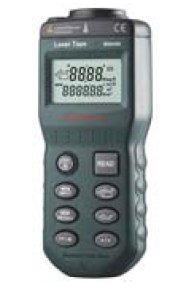
Figure 1: Mastech MS-6450 Laser Distance Meter. This image shows the compact black device with a digital display and multiple control buttons on its front face.
2. Informații de siguranță
Respectați întotdeauna următoarele măsuri de siguranță pentru a preveni vătămările corporale și deteriorarea dispozitivului:
- Nu priviți direct în raza laser.
- Nu dezasamblați sau modificați dispozitivul.
- Țineți dispozitivul departe de apă și temperaturi extreme.
- Utilizați numai baterii specificate.
- Păstrați dispozitivul într-un loc uscat și răcoros atunci când nu este utilizat.
3. Configurare
3.1. Instalarea bateriei
- Localizați capacul compartimentului bateriei pe spatele dispozitivului.
- Deschideți capacul.
- Insert the required batteries (refer to specifications for type) observing the correct polarity (+/-).
- Închideți bine capacul compartimentului bateriei.
3.2. Pornirea inițială
Apăsați tasta PUTERE button to turn on the device. The display will illuminate, showing the current measurement mode and battery status.
4. Instrucțiuni de utilizare
4.1. Măsurare de bază
- Îndreptați diafragma laserului spre suprafața țintă.
- Apăsați tasta CITIRE apăsați butonul o dată pentru a activa laserul.
- Apăsați tasta CITIRE button again to take a measurement. The distance will be displayed on the screen.
4.2. Moduri de măsurare
The MS-6450 supports various measurement modes. Use the MOD pentru a le parcurge:
- Măsurare unică: Măsurarea standard a distanței.
- Măsurare continuă: Displays real-time distance as the device moves.
- Măsurarea zonei: Measure length and width to calculate area.
- Măsurarea volumului: Measure length, width, and height to calculate volume.
- Măsurarea lui Pitagora: Indirect measurement using the Pythagorean theorem.
4.3. Conversie de unitate
Apăsați tasta UNITATE button to switch between measurement units (e.g., meters, feet, inches).
5. Întreținere
5.1. Curatenie
Wipe the device with a soft, dry cloth. Do not use abrasive cleaners or solvents. Keep the laser lens clean for accurate measurements.
5.2. Depozitare
When not in use for extended periods, remove the batteries to prevent leakage. Store the device in its original packaging or a protective case in a cool, dry environment.
6. Depanare
| Problemă | Cauza posibila | Soluţie |
|---|---|---|
| Dispozitivul nu pornește. | Low or dead batteries; Incorrect battery polarity. | Înlocuiți bateriile; Verificați orientarea bateriilor. |
| Măsurători inexacte. | Dirty laser lens; Unstable measurement surface; Environmental interference. | Clean lens; Ensure stable target; Avoid strong light sources. |
| Afișajul afișează „Eroare”. | Measurement out of range; Obstruction. | Ensure target is within range; Remove obstructions. |
7. Specificații
- Model: MS-6450
- Interval de măsurare: Refer to product packaging for specific range. Typical range for similar devices is 0.05m to 40m.
- Precizia măsurătorilor: Refer to product packaging for specific accuracy. Typical accuracy for similar devices is ±2mm.
- Clasa laser: Clasa II
- Tip laser: 635nm, <1mW
- Unități: Meters (m), Feet (ft), Inches (in)
- Tip baterie: Refer to product packaging for specific battery type. Commonly uses AAA batteries.
- Temperatura de functionare: Refer to product packaging for specific operating temperature. Typical range is 0°C to 40°C.
- Dimensiuni: Refer to product packaging for specific dimensions.
- Greutate: Refer to product packaging for specific weight.
8. Informații despre garanție
Mastech products are designed for durability and quality. This product typically comes with a standard manufacturer's warranty against defects in materials and workmanship. Please refer to your purchase documentation or the official Mastech website for specific warranty terms and conditions applicable to your region. Keep your proof of purchase for warranty claims.
9. Asistență pentru clienți
For technical assistance, troubleshooting beyond this manual, or service inquiries, please contact Mastech customer support. You can typically find contact information on the official Mastech website or through your local distributor. When contacting support, please have your product model (MS-6450) and serial number (if applicable) ready.
Official Mastech Website: www.mastech.com


