1. Introducere
This manual provides essential information for the proper handling, installation, and maintenance of your Samsung DC92-00621C PCB Sub Assembly. This component is an authorized Original Equipment Manufacturer (OEM) part designed to fit various Samsung brand dryer models. It serves as a critical electronic control board within the appliance.
Please read this manual thoroughly before attempting any installation or service to ensure safe and correct operation.
2. Informații de siguranță
AVERTISMENT: Risc de electrocutare sau vătămare corporală.
- Always disconnect power to the appliance before installing, removing, or servicing this part. Failure to do so can result in serious injury or death.
- Installation should only be performed by a qualified technician. Improper installation can lead to appliance malfunction, damage, or personal injury.
- Purtați echipament individual de protecție (EIP) adecvat, cum ar fi mănuși și ochelari de protecție, în timpul instalării.
- Handle the PCB with care to avoid damage from electrostatic discharge. It is recommended to use an anti-static wrist strap.
- Păstrați toate materialele de ambalare la îndemâna copiilor.
3. Conținutul pachetului
Verificați dacă pachetul dumneavoastră conține următorul articol:
- One (1) Samsung DC92-00621C PCB Sub Assembly
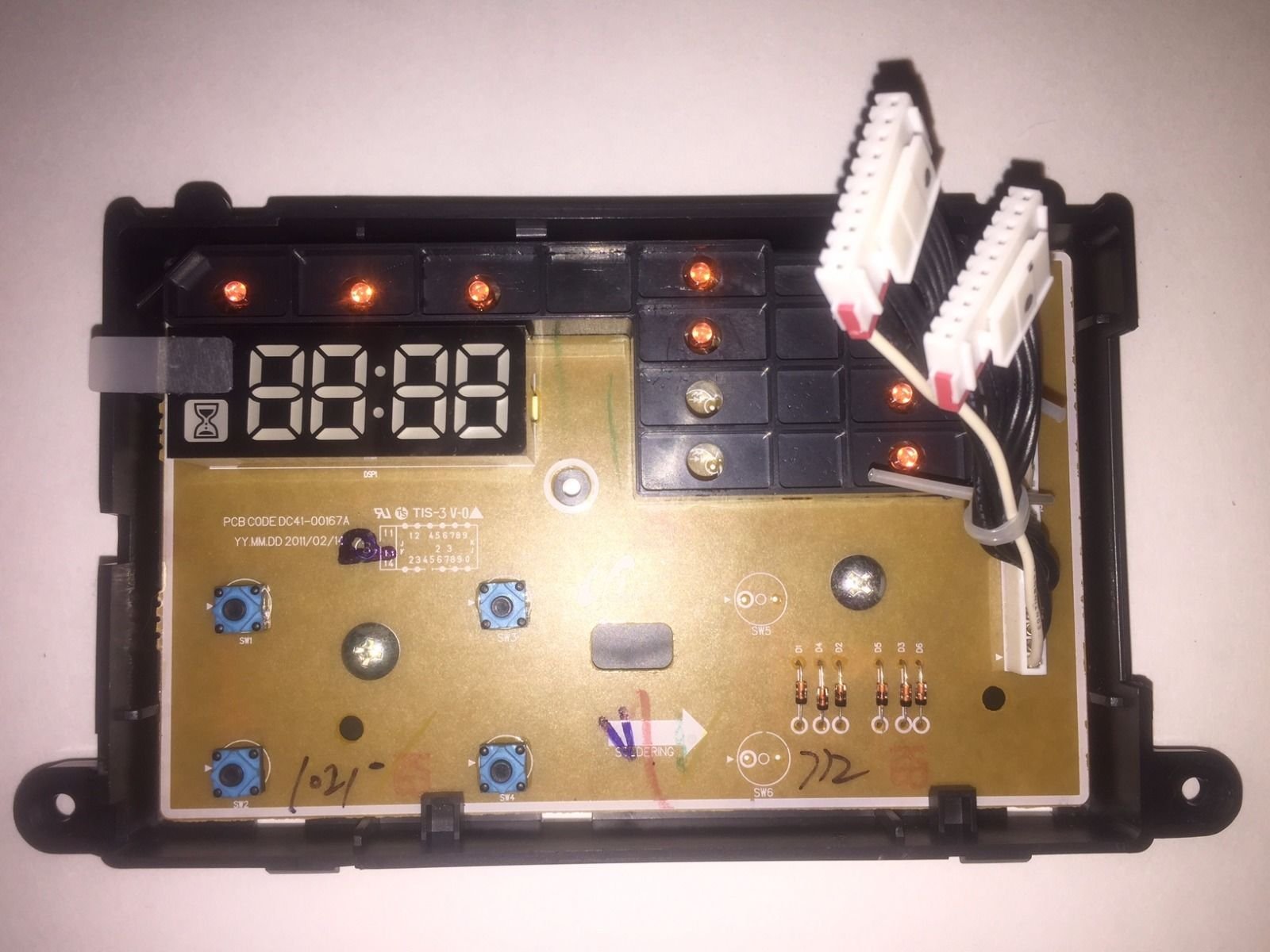
Image: The Samsung DC92-00621C PCB Sub Assembly, an electronic control board for dryers.
4. Configurare și instalare
The Samsung DC92-00621C PCB Sub Assembly is a replacement part for specific Samsung dryer models. Due to the complexity of appliance repair and the electrical nature of this component, professional installation is strongly recommended.
Instrucțiuni generale de instalare (pentru tehnicieni calificați):
- Deconectați alimentarea: Ensure the dryer is completely disconnected from its power source (unplugged or circuit breaker off) before beginning.
- Accesați PCB-ul existent: Carefully disassemble the dryer panels as required to gain access to the existing PCB sub assembly. Refer to your specific dryer model's service manual for detailed instructions.
- Conexiuni document: Before disconnecting any wires, take clear photos or make detailed diagrams of all wire connections to the old PCB. This is crucial for correct reassembly.
- Îndepărtați placa de circuit imprimat veche: Disconnect all wiring harnesses and mounting screws securing the old PCB. Carefully remove it.
- Instalați un nou PCB: Position the new DC92-00621C PCB Sub Assembly in place and secure it with the appropriate mounting screws.
- Reconectați cablajul: Using your documented connections, carefully reconnect all wiring harnesses to the new PCB. Ensure all connections are secure and correctly seated.
- Reasamblați uscătorul: Reassemble the dryer panels, ensuring all components are properly aligned and secured.
- Funcționalitate de testare: Restore power to the dryer and perform a test cycle to verify proper operation of the appliance.
5. Instrucțiuni de utilizare
The DC92-00621C PCB Sub Assembly is an internal electronic component of your Samsung dryer. It does not have direct user-operable controls. Its function is to manage and control various operations of the dryer, such as motor control, heating elements, sensor inputs, and user interface commands.
Once correctly installed, the PCB operates automatically as part of the dryer's system. Refer to your dryer's user manual for instructions on how to operate the appliance itself.
6. Întreținere
The DC92-00621C PCB Sub Assembly is designed to be maintenance-free under normal operating conditions. No routine user maintenance is required for this component.
- Păstrați uscat: Ensure the environment around the PCB remains dry and free from moisture to prevent damage.
- Curăţenie: If the dryer interior is being cleaned, ensure no liquids come into contact with the PCB. Dust accumulation on the PCB is generally not an issue, but excessive buildup can be carefully removed with compressed air by a qualified technician.
- Evitați impactul fizic: Protect the PCB from any physical impact or vibration that could damage its components or connections.
7. Depanare
If your dryer is experiencing issues after the installation of a new PCB, or if you suspect the PCB is malfunctioning, consider the following general troubleshooting steps. For detailed diagnostics, consult a qualified appliance technician.
- Fără putere: Ensure the dryer is properly plugged into a working outlet and the circuit breaker has not tripped.
- Cablare incorectă: Double-check all wire connections to the PCB against your documentation or the dryer's service manual. Loose or incorrect connections are a common cause of malfunction.
- Compatibilitate componente: Verify that the DC92-00621C is the correct PCB sub assembly for your specific Samsung dryer model.
- Coduri de eroare: If your dryer displays an error code, refer to your dryer's user manual or service manual for the meaning of the code and recommended solutions.
- Diagnostic profesional: If issues persist, it is highly recommended to contact a certified appliance technician for diagnosis and repair. Attempting complex repairs without proper training can be dangerous and may void warranties.
8. Specificații
| Caracteristică | Caietul de sarcini |
|---|---|
| Marca | Samsung |
| Numărul de model | DC92-00621C |
| Tipul piesei | PCB Sub Assembly (Dryer Replacement Part) |
| Greutatea articolului | 3.52 uncii |
| Dimensiunile produsului | 8 x 4 x 4 inci |
| Bateriile necesare | Nu |
| Componente incluse | appliance-replacement-parts |
9. Informații despre garanție
Warranty coverage for the Samsung DC92-00621C PCB Sub Assembly is typically provided by the manufacturer or the seller at the point of purchase. Specific warranty terms, conditions, and duration may vary.
Please retain your proof of purchase and refer to the warranty documentation provided with your original appliance or contact Samsung customer service or your retailer for detailed warranty information.
10. Suport
For technical assistance, installation questions, or to report a suspected defect, please contact:
- Serviciul Clienți Samsung: Consultați site-ul oficial Samsung website pentru informații de contact specifice regiunii dvs.
- Centre de service autorizate: Locate an authorized Samsung service center for professional repair and support.
- Comerciantul dvs.: Contact the retailer from whom you purchased the part for initial support or warranty claims.


