1. Introducere
Thank you for choosing the Sencor SES 9350CH Automatic Espresso/Cappuccino Machine. This manual provides essential information for the safe and efficient use, maintenance, and troubleshooting of your new appliance. Please read these instructions carefully before first use and keep them for future reference.
2. Instrucțiuni de siguranță
Respectați întotdeauna măsurile de siguranță de bază atunci când utilizați aparate electrice pentru a reduce riscul de incendiu, electrocutare și vătămare corporală.
- Asigurați-vă că voltagIndicat pe aparat corespunde volumului de rețea localtage înainte de conectare.
- Nu scufundați aparatul, cablul de alimentare sau ștecherul în apă sau în orice alt lichid.
- Nu lăsați aparatul la îndemâna copiilor.
- Nu utilizați aparatul dacă cablul de alimentare sau ștecherul sunt deteriorate sau dacă aparatul funcționează defectuos sau a fost deteriorat în vreun fel.
- Always place the appliance on a stable, flat, heat-resistant surface, away from hot surfaces or open flames.
- Procedați cu precauție când manipulați componente fierbinți și abur.
- Unplug the appliance from the mains socket before cleaning and when not in use.
- Folosiți numai accesorii recomandate de producător.
3. Produs terminatview
Familiarize yourself with the main components of your Sencor SES 9350CH machine.

Figura 3.1: Față view of the Sencor SES 9350CH Automatic Espresso/Cappuccino Machine, showing the color LCD display, coffee spout, and integrated milk system.
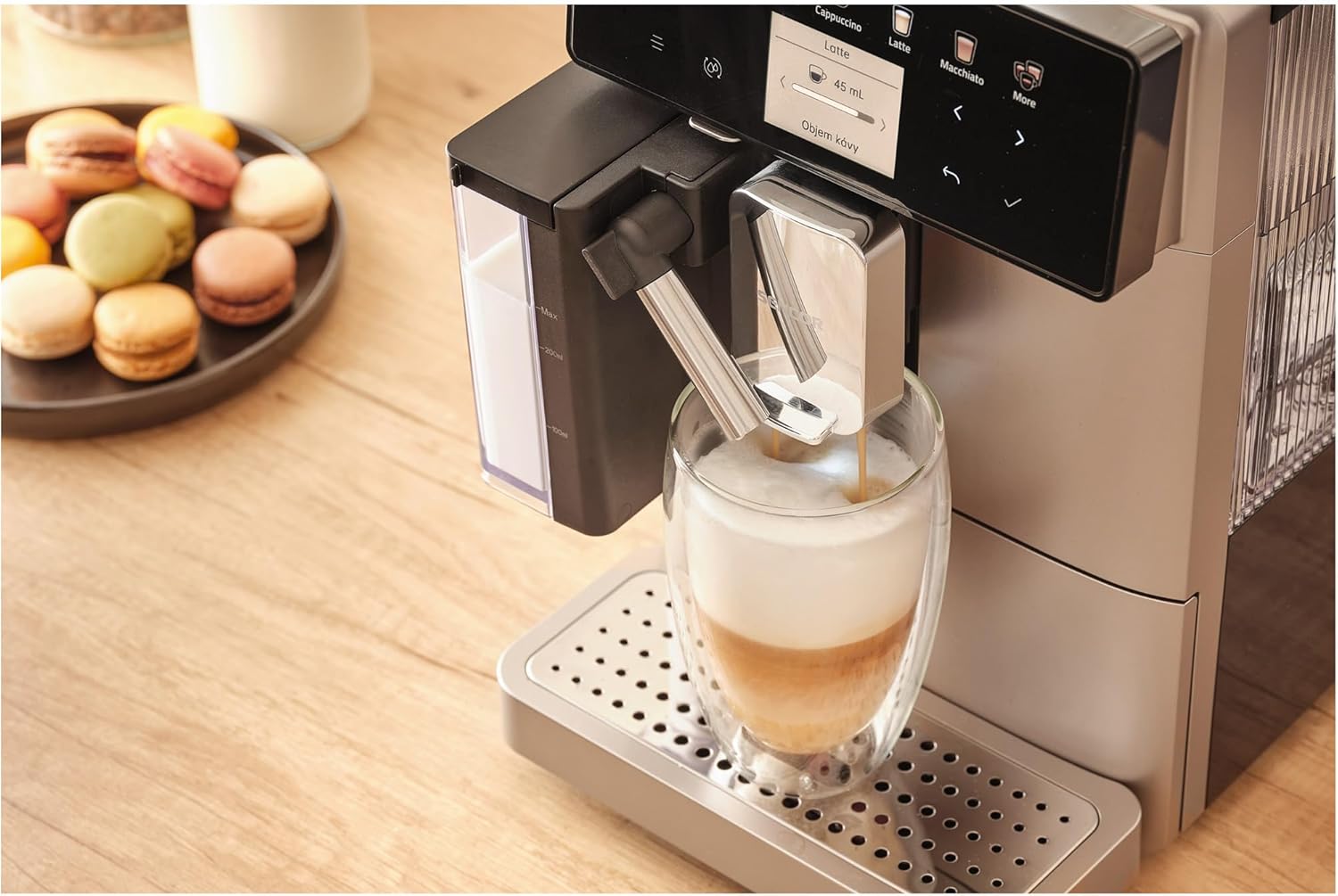
Figura 3.2: Prim-plan view of the EasyLatte milk system and adjustable coffee spout, demonstrating milk frothing directly into a glass.
Componente cheie:
- Ecran LCD color: Intuitive interface for beverage selection and machine status.
- Buncăr pentru boabe de cafea: Located at the top, for whole coffee beans (200g capacity).
- Rezervor de apă: Removable, 1.3-liter capacity, typically located at the side or back.
- EasyLatte Milk System: Integrated milk container (300ml) for automatic milk frothing.
- Duză de cafea: Înălțime reglabilă pentru a se potrivi diferitelor dimensiuni de cupe.
- Jgheab de cafea măcinată: Pentru utilizarea cafelei premăcinate.
- Tavă de scurgere: Colectează excesul de lichid, poate fi detașat pentru curățare.
- Recipient pentru zat de cafea: Collects used coffee pucks, removable for emptying.
4. Configurare
4.1 Pregătirea pentru prima utilizare
- Despachetarea: Scoateți cu grijă mașina din ambalaj. Îndepărtați toate foliile de protecție și materialele de ambalare.
- Plasare: Place the machine on a stable, level surface. Ensure adequate ventilation around the appliance.
- Curățați componente: Wash the water tank, milk container, and drip tray with warm water and a mild detergent. Rinse thoroughly and dry.
- Umpleți rezervorul de apă: Fill the removable 1.3-liter water tank with fresh, cold tap water up to the MAX level. Reinsert it securely.
- Umpleți buncărul de boabe: Open the lid of the coffee bean hopper and fill it with fresh whole coffee beans (up to 200g). Close the lid.
- Conectare alimentare: Conectați cablul de alimentare la o priză de perete cu împământare.
4.2 Ciclul inițial de clătire
Upon first power-on, the machine will guide you through an initial rinse cycle to prime the system and clean internal components. Follow the instructions on the color LCD display.
5. Instrucțiuni de utilizare
The Sencor SES 9350CH offers a wide range of 15 beverages and intuitive controls via its color LCD display.
5.1 Prepararea espresso-ului sau a cafelei
- Asigurați-vă că rezervorul de apă este umplut și că recipientul pentru boabe conține boabe de cafea.
- Așezați o ceașcă sub duza de cafea. Reglați înălțimea duzei dacă este necesar.
- On the LCD display, select your desired beverage (e.g., "Espresso" or "Coffee").
- You can adjust coffee strength and volume using the on-screen options. The machine also features a coffee cup size memory function.
- Press the "Start" button (often indicated by a play icon or a specific beverage button) to begin brewing.
- The machine will grind the beans, pre-brew (for fuller flavor), and dispense the coffee.
5.2 Prepararea băuturilor pe bază de lapte (de exemplu, cappuccino, latte)
- Fill the 300ml EasyLatte milk container with fresh, cold milk. Attach it securely to the machine.
- Place a suitable cup or glass under the coffee and milk spouts.
- Select your desired milk-based beverage (e.g., "Cappuccino," "Latte," "Macchiato") from the LCD display.
- The machine will automatically froth the milk and dispense it, followed by the coffee, creating a layered drink.
- After preparing milk-based drinks, the machine may prompt for a quick milk system rinse. Follow the on-screen instructions.
5.3 Utilizarea cafelei măcinate
Dacă preferați să utilizați cafea premăcinată, urmați acești pași:
- Asigurați-vă că mașina este pornită și pregătită.
- Open the lid of the ground coffee chute (usually located near the bean hopper).
- Add one scoop of pre-ground coffee (do not overfill).
- Select the "Ground Coffee" option on the display, then choose your desired beverage.
- Press "Start" to brew.
5.4 Funcția de apă caldă
For tea or Americano, select the "Hot Water" function on the display. Place a cup under the hot water spout and press "Start."
6. Întreținere
Regular cleaning and maintenance ensure optimal performance and longevity of your Sencor SES 9350CH.
6.1 Curățare zilnică
- Tavă de colectare a picăturilor și recipient pentru zaț de cafea: Empty and rinse daily. The machine will signal when the grounds container needs emptying.
- Sistem de lapte: After each milk-based beverage, perform the quick rinse cycle. For thorough cleaning, disassemble the milk container and rinse all parts with warm water.
- Exterior: Ștergeți exteriorul mașinii cu o lavetă moale șiamp pânză.
6.2 Curățenie săptămânală/la două săptămâni
- Unitate de preparare: The integrated professional brewing unit is typically self-cleaning or easily removable for rinsing under tap water. Refer to the on-screen instructions for specific guidance.
- Rezervor de apă: Clătiți bine rezervorul de apă.
6.3 Detartraj
The machine features an indicator and a dedicated descaling program. When prompted by the "Descaling Indicator," follow the on-screen instructions to perform the descaling process using a suitable descaling solution (not included). Regular descaling is crucial for preventing mineral buildup and maintaining machine performance.

Figura 6.1: lateral view of the Sencor SES 9350CH, illustrating its compact design and access points for maintenance.
7. Depanare
This section addresses common issues you might encounter with your Sencor SES 9350CH machine.
| Problemă | Cauza posibila | Soluţie |
|---|---|---|
| Nu se distribuie cafea. | Water tank empty; machine not primed; brewing unit blocked. | Fill water tank; perform initial rinse cycle; clean brewing unit. |
| Cafeaua este prea slabă/tare. | Incorrect grind setting; insufficient coffee dosage; wrong beverage selection. | Adjust grind setting (9 levels available); increase coffee dosage via display; select appropriate beverage. |
| Laptele nu face spumă corect. | Milk system dirty; milk type/temperature incorrect; milk container not properly attached. | Clean milk system thoroughly; use fresh, cold, full-fat milk; ensure milk container is securely attached. |
| Apare mesajul „Detartrare”. | Aparatul necesită detartrare. | Perform the descaling program as instructed on the display. |
| Machine displays an error code. | Problemă internă specifică. | Refer to the full instruction manual for a list of error codes and their solutions. If the problem persists, contact customer support. |
8. Specificații
| Marca | SENCOR |
| Numărul de model | SES 9350CH |
| Culoare | Negru |
| Dimensiuni produs (L x A x H) | 21.5 x 34 x 45.5 cm |
| Capacitatea rezervorului de apă | 1.3 litri |
| Capacitatea buncărului pentru boabe de cafea | 200 g |
| Putere | 1400 wați |
| Voltage | 240 volți |
| Presiunea pompei | 19 bar |
| Greutatea articolului | 9.5 kilograme |
| Caracteristica specială | Compact design, Portable |
| Componente incluse | Manual de instructiuni |
9. Garanție și asistență
For detailed warranty information and customer support, please refer to the warranty card included with your product or contact Sencor customer service. Keep your proof of purchase for any warranty claims.


