1. Introducere
This manual provides detailed instructions for the installation, configuration, and operation of your TOTOLINK A3002RU-V2 Dual-Band Gigabit Wireless Router. The A3002RU-V2 is designed to deliver high-speed wireless connectivity and robust network performance for homes and offices. It complies with the latest IEEE 802.11ac Wave 2 standards, supporting simultaneous dual-band operation (2.4 GHz and 5 GHz) for a combined Wi-Fi speed of up to 1167 Mbps. Equipped with full gigabit WAN and LAN ports, it ensures fast wired connections, while its multi-functional USB 2.0 port offers versatile capabilities such as FTP, Samba, and DLNA server functions, as well as device charging.
2. Conținutul pachetului
Please verify that all items are present in your package. If any item is missing or damaged, contact your retailer for assistance.
- TOTOLINK A3002RU-V2 Wireless Router
- Adaptor de alimentare
- Ethernet (RJ-45) Cable
- Ghid de instalare rapidă
3. Produs terminatview
Familiarize yourself with the physical components of your TOTOLINK A3002RU-V2 router.

Figura 3.1: Față și sus view of the TOTOLINK A3002RU-V2 router, showing the four external antennas and ventilation design.

Figura 3.2: Rear panel of the TOTOLINK A3002RU-V2 router, displaying the power switch, DC input, Reset button, USB 2.0 port, WAN port, and four LAN ports.
3.1. Porturi și butoane
- Comutator pornire/oprire: Toggles the router's power.
- DC In: Se conectează la adaptorul de alimentare furnizat.
- Buton RST (Resetare): Press and hold for approximately 5-10 seconds to restore factory default settings.
- Port USB 2.0: For connecting USB storage devices to enable FTP, Samba, or DLNA server functions, or for charging compatible devices.
- Port WAN (galben): Se conectează la modemul sau la rețeaua furnizorului de servicii de internet.
- Porturi LAN (portocaliu): Se conectează la dispozitive cu fir, cum ar fi computere, televizoare inteligente sau console de jocuri.
4. Configurare
4.1. Conexiune hardware
- Oprire: Asigurați-vă că modemul și routerul sunt oprite.
- Conectați modemul la router: Connect one end of the Ethernet cable to the LAN port of your modem and the other end to the WAN (yellow) port of the TOTOLINK A3002RU-V2 router.
- Conectare alimentare: Connect the power adapter to the DC In port of the router and plug it into a power outlet.
- Pornire: Power on your modem first, then power on the TOTOLINK A3002RU-V2 router using the On/Off switch. Wait for the indicator lights to stabilize, typically indicating a successful connection.
- Conectați dispozitivele (opțional): Pentru conexiuni prin cablu, conectați computerul sau alte dispozitive de rețea la oricare dintre LAN (orange) ports using Ethernet cables.
4.2. Configurație inițială (Web Interfață)
To configure your router, you will need to access its webinterfață de management bazată pe -.
- Conectați-vă la router: Connect your computer to the router either via an Ethernet cable to a LAN port or wirelessly using the default Wi-Fi network name (SSID) and password found on the router's label.
- Deschide Web Browser: Lansați a web browser (de exemplu, Chrome, Firefox, Edge).
- Access Login Page: În bara de adrese, tastați
http://192.168.1.1(or the IP address specified on the router's label) and press Enter. - Log in: Enter the default username and password. These are typically
adminfor both, but refer to the router's label or quick installation guide for exact credentials. - Urmați Expertul de configurare: Upon successful login, you will likely be guided through a Quick Setup Wizard to configure your internet connection type, Wi-Fi network name (SSID), and password. It is highly recommended to change the default Wi-Fi password and router login password for security.
5. Instrucțiuni de utilizare
5.1. Configurarea rețelei wireless
The A3002RU-V2 operates on two frequency bands simultaneously:
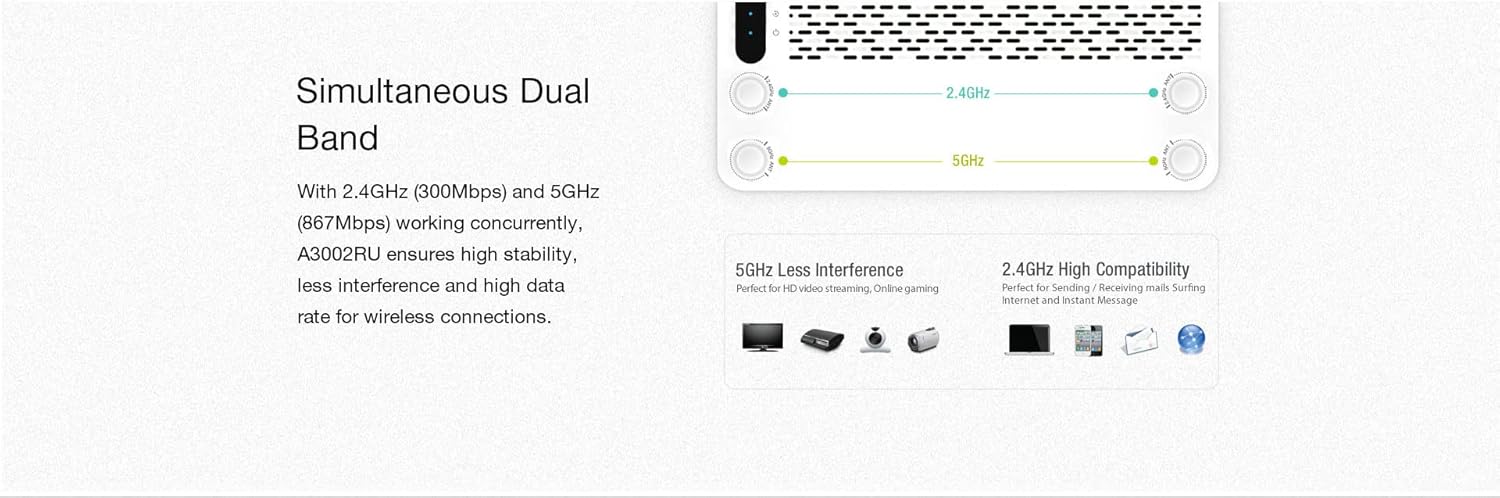
Figura 5.1: Illustration of the router's simultaneous dual-band capability, showing 2.4GHz for wider coverage and 5GHz for higher speed and less interference.
- Banda de 2.4 GHz: Offers wider coverage and better penetration through walls, suitable for general internet use, browsing, and connecting devices further away.
- Banda de 5 GHz: Oferă viteze mai mari și mai puține interferențe, ideal pentru activități care consumă multă lățime de bandă, cum ar fi streamingul video HD, jocurile online și conectarea dispozitivelor în apropierea routerului.
You can configure separate SSIDs and passwords for each band or use a single SSID with band steering enabled (if available in your firmware) through the router's web interface under the Wireless Settings section.
5.2. Multi-functional USB 2.0 Port
The USB 2.0 port on the rear panel offers several functionalities when a USB storage device (e.g., flash drive, external hard drive) is connected.

Figura 5.2: Visual representation of the USB 2.0 port's capabilities, including FTP server, Samba server, DLNA server, and USB charging.
- Server FTP: Vă permite să accesați files on the connected USB storage device from anywhere over the internet (requires proper configuration and port forwarding).
- Samba Server (Network Share): Enables local network users to access and share files on the connected USB storage device.
- DLNA Server: Allows compatible media players (e.g., smart TVs, game consoles) to stream multimedia content (photos, music, videos) directly from the connected USB storage device.
- Încărcare USB: The port can also be used to charge compatible smartphones or tablets.
These features can be configured and managed through the router's web interface, typically found under 'USB Application' or 'Storage Sharing' settings.
6. Întreținere
6.1. Actualizare firmware
Regularly updating the router's firmware can improve performance, add new features, and enhance security. Visit the official TOTOLINK website for the latest firmware version for your A3002RU-V2 model. The upgrade process is typically performed through the router's web interface under 'System Tools' or 'Firmware Upgrade'. Follow the instructions provided with the firmware file cu grijă.
6.2. Resetare din fabrică
A factory reset will revert all router settings to their default values. This can be useful for troubleshooting persistent issues or when preparing to transfer ownership of the router. To perform a factory reset:
- Cu routerul pornit, localizați RST butonul de pe panoul din spate.
- Use a paperclip or a thin object to press and hold the RST button for approximately 5-10 seconds until the indicator lights flash.
- Release the button and wait for the router to restart. All settings will be reset.
7. Depanare
Această secțiune abordează problemele frecvente pe care le puteți întâmpina cu routerul dumneavoastră.
- Fara acces la internet:
- Verificați dacă LED-ul portului WAN este aprins. Dacă nu, asigurați-vă că este conectat corect cablul Ethernet de la modem.
- Verificați dacă modemul funcționează corect.
- Conectați-vă la router web interface and check the WAN status. Ensure your internet connection settings (e.g., PPPoE, Dynamic IP) are correctly configured.
- Reporniți atât modemul, cât și routerul.
- Nu se poate conecta la Wi-Fi:
- Asigurați-vă că LED-ul Wi-Fi de pe router este aprins.
- Verify you are selecting the correct Wi-Fi network name (SSID) and entering the correct password.
- Mută-te mai aproape de router pentru a verifica dacă există probleme cu puterea semnalului.
- Reporniți routerul.
- Viteză Wi-Fi redusă:
- Ensure your device is connected to the 5 GHz band for optimal speed, especially for close-range use.
- Reduce interference by placing the router away from other electronic devices (microwaves, cordless phones).
- Consider changing the Wi-Fi channel in the router's settings to avoid congestion with neighboring networks.
- Verificați actualizările de firmware.
- Am uitat parola de conectare la router:
- Perform a factory reset (refer to Section 6.2) to revert to the default login credentials. Note that this will erase all your custom settings.
8. Specificații
Below are the technical specifications for the TOTOLINK A3002RU-V2 Dual-Band Gigabit Wireless Router.
| Caracteristică | Descriere |
|---|---|
| Marca | TOTOLINK |
| Numele modelului | A3002RU-V2 |
| standard wireless | IEEE 802.11ac Wave 2, 802.11a/b/g/n |
| Banda de frecventa | Bandă dublă (2.4 GHz și 5 GHz) |
| Viteza Wi-Fi | Up to 1167 Mbps (300 Mbps @ 2.4 GHz, 867 Mbps @ 5 GHz) |
| Antene | 4 x Antene omnidirecționale |
| Portul WAN | 1 x Gigabit Ethernet 10/100/1000 Mbps |
| Porturi LAN | 4 x Gigabit Ethernet 10/100/1000 Mbps |
| Port USB | 1 x USB 2.0 (for FTP, Samba, DLNA server, charging) |
| Tehnologia de conectivitate | Ethernet, Wi-Fi |
| Dispozitive compatibile | Laptop, Smartphone, Tabletă |
| Culoare | Negru |
| Sistem de operare | RouterOS (firmware based) |
| Alimentare electrică | Adaptor de alimentare extern |
9. Garanție și asistență
For warranty information and technical support, please refer to the warranty card included with your product or visit the official TOTOLINK website. Resursele de asistență includ de obicei întrebări frecvente, ghiduri de depanare și informații de contact pentru serviciul clienți.