1. Introducere
The CipherLab 8000 Series Pocket-Size Mobile Computer is designed for efficient data collection in various applications such as ticket dispensing, order pickup, route accounting, and inventory management. This compact device facilitates quick scanning and batch uploading of data, streamlining operations like shelf labeling. Its portable design allows for convenient carrying throughout the day, ready for immediate use.
The 8000 model operates on replaceable AAA batteries, while the 8001 model features a rechargeable battery. This manual provides instructions for the proper setup, operation, and maintenance of your CipherLab 8000 Series mobile computer.
2. Produs terminatview
The CipherLab 8000 Series mobile computer is a handheld device equipped with a linear imager scanner, a 21-key keypad, and an easy-to-read backlit LCD screen. It features an IRDA port for communication and requires a separate charge/communications cradle for data transfer and charging (for the 8001 model).

Figura 1: Faţă view of the CipherLab 8000 Series Mobile Computer, showing the screen, keypad, and scanner window.
Caracteristici cheie:
- User-friendly interface and easy-to-read backlit LCD screen.
- Infrared communications or cradle for batch data uploads.
- Lightweight and cost-effective design.
- Model 8000 operates on two AAA batteries.
- Integrated linear imager scanner for barcode reading.
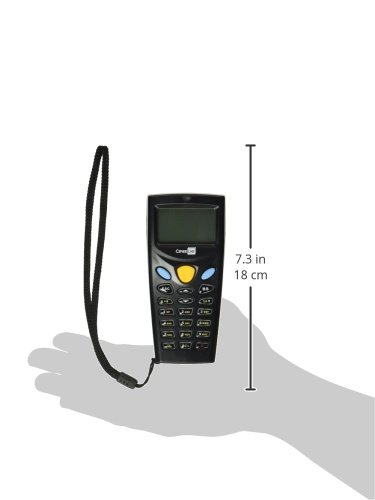
Figura 2: CipherLab 8000 Series Mobile Computer with approximate dimensions, illustrating its pocket-size form factor.
3. Configurare
3.1 Battery Installation (Model 8000)
- Localizați capacul compartimentului bateriei pe spatele dispozitivului.
- Glisați sau desfaceți capacul pentru a-l deschide.
- Insert two fresh AAA batteries, ensuring correct polarity (+/-).
- Puneți bine capacul compartimentului bateriei.
3.2 Charging (Model 8001)
The CipherLab 8001 model uses a rechargeable battery. To charge the device:
- Ensure the charge/communications cradle (sold separately) is connected to a power source.
- Carefully place the mobile computer into the cradle, ensuring proper alignment with the charging contacts.
- The charging indicator on the device or cradle will illuminate to confirm charging.
3.3 Instalarea software-ului și a driverelor
To enable data transfer and full functionality, specific software and drivers may be required for your host computer. Refer to the manufacturer's website for the latest drivers and application generator software. The charge/communications cradle is essential for connecting the device to a computer for data synchronization.
4. Instrucțiuni de utilizare
4.1 Pornire/Oprire
- To power on: Press and hold the power button (usually a dedicated key or a combination).
- To power off: Navigate to the power-off option in the menu or press and hold the power button until the device shuts down.
4.2 Basic Data Collection
The device typically operates in a batch mode for data collection.
- Scanare cod de bare: Point the scanner window at the barcode and press the scan button. The device will emit a beep upon successful scan.
- Enter Quantity: After scanning, use the numeric keypad to enter the corresponding quantity for the scanned item.
- Confirm Entry: Press an assigned confirmation key (e.g., a blue button or Enter key) to save the entry.
- Repeat for subsequent items.
4.3 Încărcarea datelor
Data collected on the mobile computer must be uploaded to a host system.
- Via Cradle: Place the mobile computer in its charge/communications cradle connected to your computer. Use the appropriate software (e.g., application generator) to initiate the data transfer.
- Via IRDA: For devices with an IRDA port, align the port with a compatible IRDA receiver on your host computer and use the software to transfer data.
4.4 Clearing Data
After successfully uploading data, it is recommended to clear the collected data from the device's memory to prepare for the next data collection session. This option is typically found within the device's utility or menu settings.
5. Întreținere
5.1 Curățare
- Folosiți o cârpă moale, fără scame dampened with water or a mild cleaning solution to wipe the exterior of the device.
- Do not use abrasive cleaners, solvents, or spray liquids directly onto the device.
- Keep the scanner window clean and free of dust or smudges for optimal performance.
5.2 Îngrijirea bateriei
- For Model 8000: Replace AAA batteries when the low battery indicator appears. Use high-quality alkaline or rechargeable AAA batteries.
- For Model 8001: Fully charge the device before first use and whenever the battery level is low. Avoid completely draining the rechargeable battery frequently to prolong its lifespan.
5.3 Depozitare
Store the device in a cool, dry place away from direct sunlight and extreme temperatures. If storing for an extended period, remove AAA batteries from Model 8000, and ensure Model 8001's rechargeable battery is partially charged (around 50%) to maintain battery health.
6. Depanare
6.1 Dispozitivul nu pornește
- Verificați bateriile: Ensure AAA batteries (Model 8000) are correctly inserted and have sufficient charge. For Model 8001, ensure the rechargeable battery is charged.
- Compartiment baterie: Verificați dacă capacul compartimentului bateriei este închis corect.
6.2 Scanning Issues
- Clean Scanner Window: Ensure the scanner window is clean and free of obstructions.
- Calitatea codului de bare: Verificați dacă codul de bare nu este deteriorat, pătat sau imprimat prost.
- Distanță/Unghi: Ajustați distanța și unghiul dintre scaner și codul de bare.
6.3 Probleme de transfer de date
- Cradle Connection: Ensure the charge/communications cradle is properly connected to both the power source and the host computer.
- Device in Cradle: Confirm the mobile computer is correctly seated in the cradle.
- Drivers/Software: Verify that the necessary drivers and application software are correctly installed on your computer. Refer to the CipherLab support website for updated software.
- IRDA Alignment: If using IRDA, ensure proper alignment between the device and the receiver.
6.4 Durată scurtă de viață a bateriei
- AAA Batteries (Model 8000): Use fresh, high-quality alkaline batteries. Consider rechargeable AAA batteries for frequent use.
- Rechargeable Battery (Model 8001): Ensure the battery is fully charged. Battery performance may degrade over time; consider replacing the battery if capacity significantly diminishes.
- Setări de iluminare de fundal: Reduce backlight brightness or set a shorter backlight timeout to conserve power.
7. Specificații
| Numărul de model al articolului | A8001RSC00001 |
| Producător | CipherLab |
| Dimensiuni pachet | 6.75 x 3.7 x 1.75 inci |
| Greutate | 4.34 uncii |
| Dispozitive compatibile | Desktop, Laptop |
| Sursa de alimentare | Battery Powered (AAA for 8000, Li-Ion for 8001) |
| Tehnologia de conectivitate | Wireless (via IRDA or cradle) |
8. Garanție și asistență
For warranty information, technical support, or service inquiries, please refer to the official CipherLab website or contact your authorized CipherLab reseller. Keep your purchase receipt and product serial number handy when contacting support.


