1. Introducere
The Brydge 7.9 Keyboard is designed to enhance the functionality of your iPad Mini (2019) or iPad Mini 4, transforming it into a versatile laptop-like device. This keyboard features a full QWERTY layout with backlit keys and dedicated iOS function keys, providing a comfortable and efficient typing experience. Constructed from 100% high-grade aluminum, it offers durability and a premium aesthetic that complements your iPad.
The patented hinges allow for a 180-degree viewing angle, securing your iPad in various positions. The keyboard connects wirelessly via Bluetooth and can be easily detached when not needed. Its slim and lightweight design ensures portability without compromising on build quality.

This manual provides detailed instructions for setting up, operating, and maintaining your Brydge 7.9 Keyboard.
2. Informații de siguranță
- Nu expuneți tastatura la lichide sau temperaturi extreme.
- Avoid dropping or subjecting the keyboard to severe impacts.
- A nu se lăsa la îndemâna copiilor.
- Folosiți doar cablul de încărcare furnizat sau un echivalent certificat.
- Do not attempt to disassemble or repair the keyboard yourself. This may void the warranty.
3. Ce se află în cutie
- Brydge 7.9 Keyboard
- Cablu de încărcare USB
- Manual de utilizare (acest document)
4. Configurare
4.1 Atașarea iPad-ului
- Ensure your iPad Mini (2019) or iPad Mini 4 is clean and free of debris.
- Gently align the iPad with the hinges of the Brydge keyboard.
- Carefully slide the iPad into the hinges until it is securely seated. The hinges are designed to hold the iPad firmly.

4.2 Încărcarea tastaturii
Before initial use, fully charge your Brydge keyboard. Connect the provided USB charging cable to the charging port on the keyboard and the other end to a USB power adapter (not included) or a computer's USB port. The charging indicator light will show the charging status.
4.3 Asociere Bluetooth
- Turn on the Brydge keyboard by pressing the power button.
- Pe iPad-ul dvs., accesați Setări > Bluetooth.
- Asigurați-vă că Bluetooth este activat pe iPad.
- On the Brydge keyboard, press and hold the Bluetooth key (often indicated by a Bluetooth symbol) for a few seconds until the Bluetooth indicator light flashes.
- On your iPad, select 'Brydge Keyboard' from the list of available devices.
- Follow any on-screen prompts to complete the pairing process. The indicator light on the keyboard will turn solid to confirm a successful connection.
5. Utilizarea tastaturii
5.1 General Typing
The Brydge 7.9 Keyboard provides a full QWERTY layout for comfortable and efficient typing. Keys offer a responsive tactile feedback.
5.2 Taste iluminate din spate
The keyboard features backlit keys with three adjustable brightness levels. To adjust the backlight, press the dedicated backlight key (often indicated by a sun or light bulb icon) repeatedly to cycle through the brightness settings or turn the backlight off.
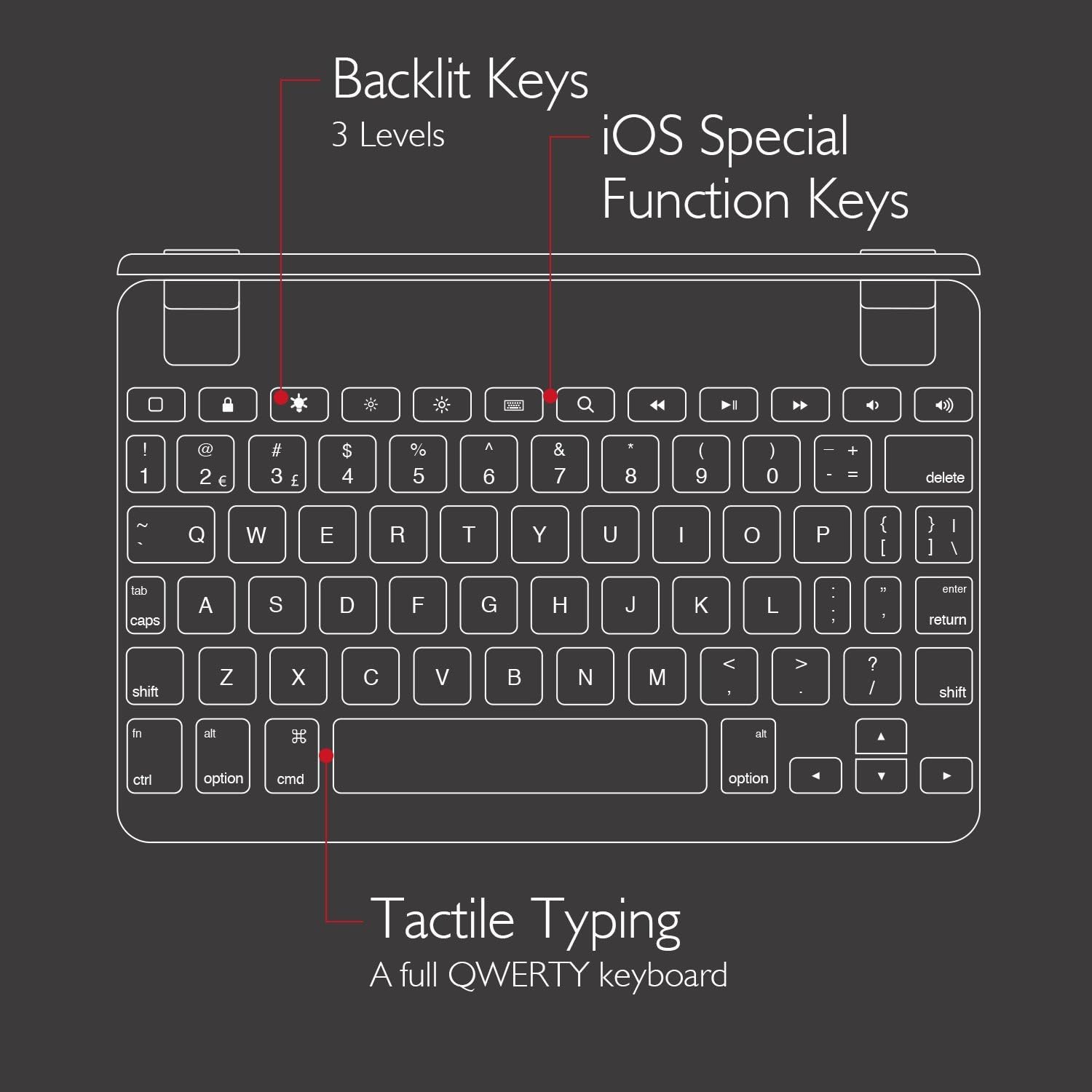
5.3 iOS Special Function Keys
The top row of the keyboard includes dedicated iOS special function keys for quick access to common iPad features, such as:
- Ecranul de pornire
- Reglarea luminozității ecranului
- Caută
- Comenzi de redare media (redare/pauză, piesa următoare/anterioră)
- Controlul volumului
- Ecran de blocare

5.4 180 de grade Viewing and Detachable Design
The keyboard's patented hinges allow the iPad to rotate up to 180 degrees, offering various viewing angles for typing, watching media, or presenting. The iPad can also be easily removed from the hinges if you prefer to use it as a standalone tablet.

6. Întreținere
6.1 Curățare
- To clean the keyboard, use a soft, lint-free cloth.
- Pentru pete persistente, d puținamproți cârpa cu apă sau cu un detergent ușor, neabraziv.
- Evitați să pulverizați substanțe de curățare direct pe tastatură.
- Ensure the keyboard is completely dry before use or charging.
6.2 Depozitare
When not in use, store the keyboard in a cool, dry place away from direct sunlight and extreme temperatures. If storing for an extended period, ensure the keyboard has a partial charge (around 50%) to preserve battery health.
7. Depanare
Tastatura 7.1 nu se conectează prin Bluetooth
- Asigurați-vă că tastatura este pornită și complet încărcată.
- Verificați dacă Bluetooth este activat pe iPad.
- Încearcă să anulezi asocierea și să reasociezi tastatura din setările Bluetooth ale iPad-ului.
- Reporniți atât iPad-ul, cât și tastatura Brydge.
- Move the keyboard closer to your iPad to rule out interference.
7.2 Tastele nu răspund
- Verificați dacă tastatura este conectată corect prin Bluetooth.
- Asigurați-vă că tastatura este încărcată.
- If specific keys are not working, try cleaning around the keys to remove any debris.
- Perform a hard reset on the keyboard (refer to manufacturer's website for specific instructions if needed, as this model may not have a dedicated reset button).
7.3 Iluminarea de fundal nu funcționează
- Ensure the keyboard is sufficiently charged, as low battery can disable backlighting.
- Press the backlight key to cycle through brightness levels.
8. Specificații
| Marca | Brydge |
| Numărul de model | BRY5103 |
| Dispozitive compatibile | iPad Mini (2019), iPad Mini 4 |
| Tehnologia de conectivitate | Bluetooth |
| Descrierea tastaturii | Fără fir |
| Caracteristici speciale | Backlit, Rechargeable, 180-degree rotating hinges, Detachable |
| Material | 100% High-Grade Aluminum |
| Culoare | Gold (as per product listing, other colors may vary) |
| Greutatea articolului | Aproximativ 11 uncii (312 grame) |
| Dimensiunile produsului (Lxlxh) | 7.9 x 5.3 x 0.3 inchi (20.07 x 13.46 x 0.76 cm) |
| Sursa de alimentare | Alimentat cu baterie (1 baterie litiu-ion inclusă) |

9. Garanție și asistență
9.1 Informații despre garanție
Specific warranty details for your Brydge 7.9 Keyboard may vary by region and retailer. Please refer to the warranty card included with your product or visit the official Brydge website-ul pentru cele mai actualizate informații despre garanție.
9.2 Asistență pentru clienți
For technical assistance, troubleshooting, or general inquiries, please contact Brydge customer support through their official website. You may also find additional resources, FAQs, and support articles online.


