1. Introducere
This manual provides detailed instructions for the installation, operation, and maintenance of your Commax Videophone Series Door Camera, model DRC-40K. Please read this manual thoroughly before using the product to ensure correct usage and to prevent damage. Keep this manual for future reference.
2. Măsuri de siguranță
- Asigurați-vă că sursa de alimentare este deconectată înainte de instalare sau întreținere pentru a preveni electrocutarea.
- Do not expose the unit to direct sunlight, high temperatures, or high humidity.
- Avoid installing the unit in areas with excessive dust or corrosive gases.
- Use only the specified power supply (DC 12V, supplied from the monitor) to prevent damage.
- Nu dezasamblați și nu modificați unitatea. Apelați la personal calificat pentru orice service.
- Țineți unitatea departe de apă și alte lichide.
3. Conținutul pachetului
Verificați dacă toate articolele sunt prezente în colet:
- Commax DRC-40K Door Camera Unit
- Șuruburi și ancore de montare
- Manual de instrucțiuni (acest document)
4. Produs terminatview
The Commax DRC-40K is a videophone door camera designed for surface mount installation. It features a camera for video communication, a speaker and microphone for audio, a call button for initiating communication, and an embedded night LED for improved visibility in low-light conditions.

Figura 1: Față view of the Commax DRC-40K Door Camera. This image displays the camera lens, speaker grille, microphone, and the circular call button at the bottom. An LED indicator is visible at the top left.
Componente cheie:
- Obiectivul camerei: Captures video feed of the visitor.
- Difuzor/Microfon: Permite comunicarea audio bidirecțională.
- Buton de apelare: Pressed by visitors to initiate a call to the indoor monitor.
- Embedded Night LED: Automatically activates in low light for clear night vision.
5. Instalare și configurare
The DRC-40K is designed for surface mount installation. Ensure the installation location is secure, protected from direct heavy rain, and provides a clear view of the visitor.
5.1 Montarea unității
- Choose a suitable location near your entrance, typically at eye level.
- Mark the drilling points for the mounting screws using the unit as a template.
- Faceți găuri și introduceți ancore de perete dacă este necesar.
- Secure the mounting bracket (if separate) or the unit directly to the wall using the provided screws.
5.2 Conexiuni de cablare
The DRC-40K requires connection to an indoor monitor and, optionally, to a door release mechanism. All wiring should be performed with the power supply disconnected.
- To Monitor (Main Unit): Connect the 4-wire cable from the door camera to the corresponding terminals on your Commax indoor monitor. Pay close attention to polarity (+/-) as indicated on both devices. The door camera receives its 12V DC power supply directly from the monitor.
- To Door Release (Optional): Connect the 2-wire cable from the door camera to your electronic door lock or gate release mechanism. These connections are typically non-polarity specific.
Important: Ensure all connections are secure and insulated to prevent short circuits. Refer to your indoor monitor's manual for specific wiring diagrams.
6. Funcționare
Once installed and powered, the Commax DRC-40K operates in conjunction with your indoor videophone monitor.
- Inițierea unui apel: A visitor presses the call button on the door camera. This sends a signal to the indoor monitor, which will ring and display the visitor's image.
- Comunicare bidirecțională: From the indoor monitor, you can answer the call to establish two-way audio and video communication with the visitor.
- Eliberarea ușii: If connected to a door release mechanism, you can unlock the door remotely from the indoor monitor during a call.
- Vedere de noapte: The embedded night LED automatically activates in low-light conditions, providing clear images of visitors even in the dark.
7. Întreținere
Regular maintenance ensures optimal performance and longevity of your door camera.
- curatenie: Gently wipe the camera lens and the unit's surface with a soft, dry cloth. Do not use abrasive cleaners, solvents, or excessive moisture.
- Inspecţie: Periodically check the wiring connections for any signs of wear or damage. Ensure the unit is securely mounted.
- Protecția mediului: While designed for outdoor use, extreme weather conditions can affect performance. Ensure the unit is not directly exposed to prolonged heavy rain or snow.
8. Depanare
If you encounter issues with your DRC-40K door camera, refer to the following common problems and solutions:
- Nicio imagine pe monitor:
- Check the 4-wire connection between the door camera and the monitor for proper polarity and secure connection.
- Ensure the indoor monitor is powered on.
- No Sound (or poor sound quality):
- Verificați dacă toate conexiunile cablurilor sunt sigure.
- Check for obstructions over the speaker or microphone.
- Door Release Not Working:
- Confirm the 2-wire connection to the door release mechanism is correct and secure.
- Ensure the door release mechanism itself is functional.
- Butonul de apel nu răspunde:
- Check the 4-wire connection to the monitor.
- Asigurați-vă că butonul nu este blocat fizic.
If problems persist, contact Commax customer support or a qualified technician.
9. Specificații
Detailed technical specifications for the Commax DRC-40K Door Camera:
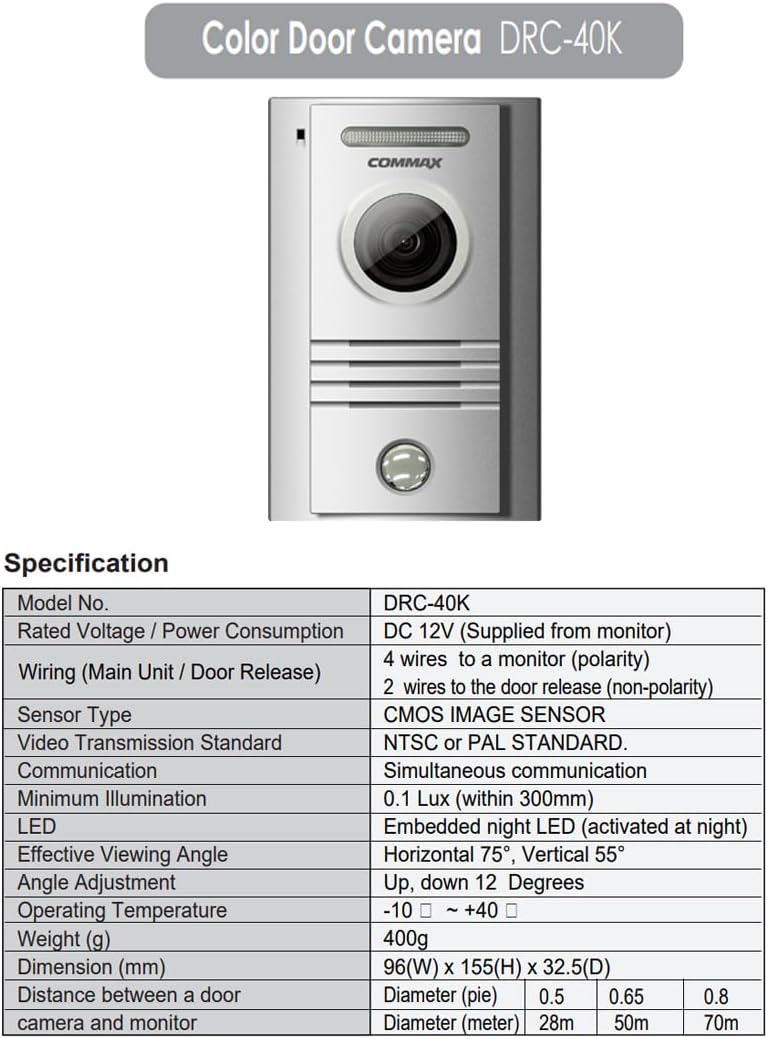
Figure 2: Technical specifications table for the Commax DRC-40K Door Camera.
| Caietul de sarcini | Detaliu |
|---|---|
| Model nr. | DRC-40K |
| Vol. EvaluattagConsum de energie | DC 12V (Supplied from monitor) |
| Wiring (Main Unit / Door Release) | 4 wires to a monitor (polarity) 2 wires to the door release (non-polarity) |
| Tip senzor | SENSOR DE IMAGINE CMOS |
| Standard de transmisie video | NTSC or PAL STANDARD |
| Comunicare | Comunicare simultană |
| Iluminare minima | 0.1 Lux (within 300mm) |
| LED | Embedded night LED (activated at night) |
| Eficient Viewunghiul ing | Orizontală 75°, verticală 55° |
| Reglarea unghiului | Up, down 12 Degrees |
| Temperatura de operare | -10 ℃ ~ + 40 ℃ |
| Greutate (g) | 400 g |
| Dimensiune (mm) | 96 (L) x 155 (Î) x 32.5 (D) |
| Distanța dintre camera ușii și monitor | Diameter (meter): 0.5, 0.65, 0.8 Diameter (meter): 28m, 50m, 70m |
10. Informații despre garanție
Warranty information for the Commax DRC-40K Door Camera is typically provided with the product packaging or can be found on the official Commax website. Please retain your proof of purchase for warranty claims. Specific warranty terms and conditions may vary by region.
11. Informații de asistență
For technical support, service, or further inquiries regarding your Commax DRC-40K Door Camera, please visit the official Commax website-ul web sau contactați departamentul de asistență pentru clienți. Datele de contact pot fi găsite de obicei pe site-ul producătorului. website-ul sau în ambalajul produsului.


