1. Introducere
This user manual provides detailed instructions for the setup, operation, maintenance, and troubleshooting of your Telefunken MC1003N DAB+ Music System. Please read this manual thoroughly before using the device to ensure proper functionality and to maximize your listening experience. Keep this manual for future reference.
2. Instrucțiuni importante de siguranță
- Sursa de alimentare: Conectați unitatea numai la o priză de curent alternativ cu volumul specificat.tage.
- Ventilare: Asigurați o ventilație adecvată. Nu blocați orificiile de ventilație.
- Apă și umiditate: Nu expuneți unitatea la ploaie, umezeală sau lichide care picură/stropi. Nu așezați obiecte umplute cu lichide pe unitate.
- Căldură: Țineți unitatea departe de surse de căldură, cum ar fi calorifere, registre de căldură, sobe sau alte aparate (inclusiv ampliificatori) care produc căldură.
- curatenie: Deconectați unitatea de la priza de perete înainte de curățare. Folosiți o cârpă moale și uscată. Nu utilizați produse de curățare lichide sau aerosoli.
- Service: Nu încercați să reparați singur acest produs. Consultați toate lucrările de service către personalul calificat de service.
3. Conținutul pachetului
Verificați dacă toate articolele enumerate mai jos sunt incluse în pachetul dumneavoastră:
- Telefunken MC1003N Compact Music System
- Telecomanda
- Adaptor de alimentare
- Manual de utilizare (acest document)
4. Produs terminatview
Familiarize yourself with the various parts and controls of your Telefunken MC1003N music system.
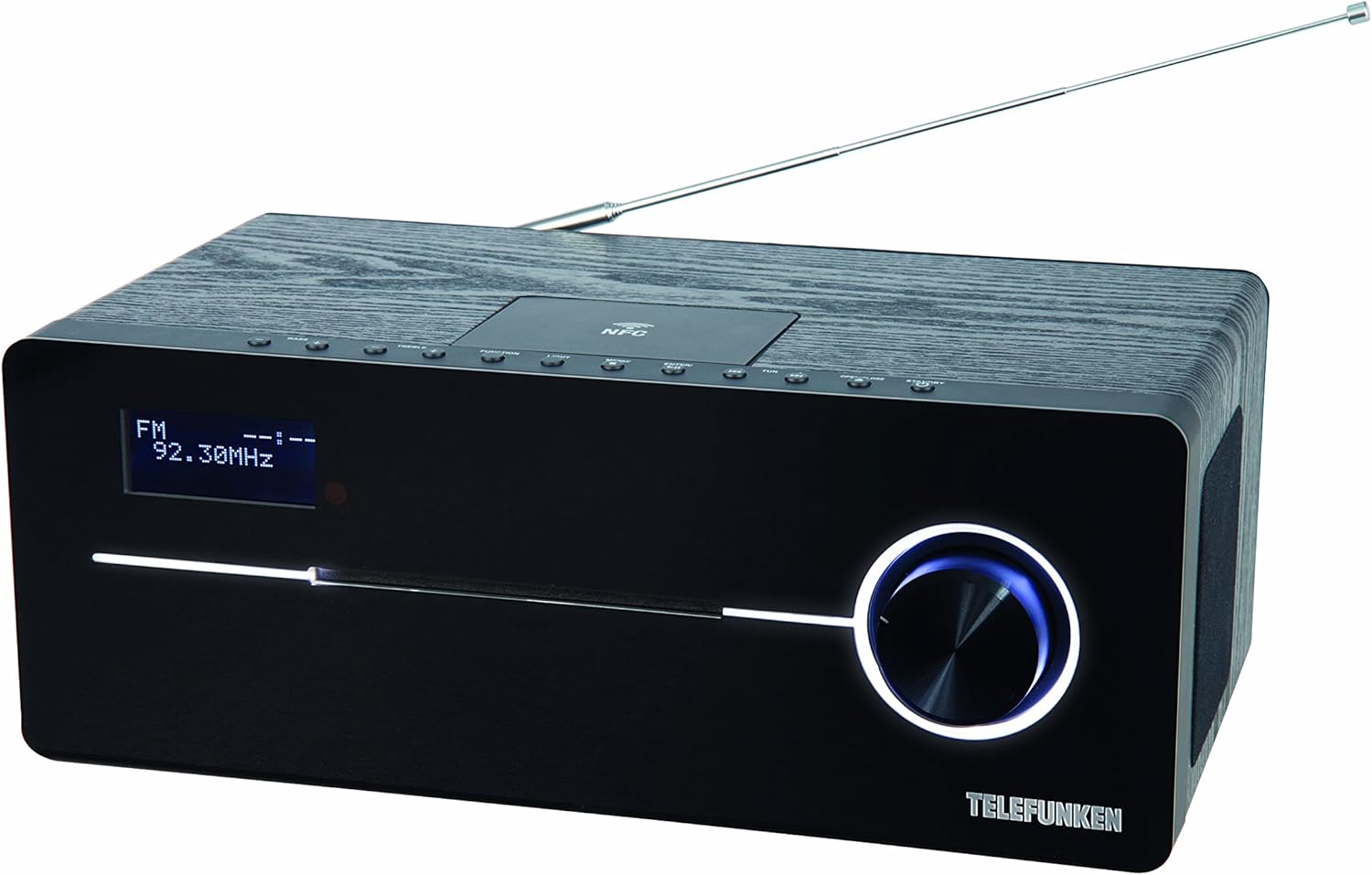
This image displays the Telefunken MC1003N compact music system. The front panel features a digital display showing 'FM 92.30MHz', a large illuminated control knob on the right, and a CD tray slot. The top panel includes several small control buttons and an NFC tag area. A telescopic antenna extends from the rear top of the unit.
4.1 Panoul frontal
- Ecran digital: Shows current mode, frequency, track information, and menu options.
- CD Tray Slot: For inserting and ejecting audio CDs.
- Buton de control: Multi-functional knob for volume adjustment, menu navigation, and selection.
4.2 Panoul superior
- Buton Pornire/Standby: Pornește sau oprește unitatea.
- Buton de funcție: Switches between input modes (DAB+, FM, CD, Bluetooth, USB, AUX-in).
- Buton luminos: Controls display backlight or illumination.
- Buton de meniu: Accesează setările și opțiunile sistemului.
- Enter/Pair Button: Confirms selections or initiates Bluetooth pairing.
- TUN+/- Buttons: Tunes radio frequencies or navigates tracks/folders.
- Buton Deschidere/Închidere: Deschide și închide tava pentru CD-uri.
- NFC Tag Zonă: Pentru asociere rapidă cu dispozitive compatibile NFC.
4.3 Rear Panel / Side Connections
- Antena telescopica: Pentru recepție radio DAB+ și FM.
- Putere de intrare: Conectează adaptorul de alimentare.
- AUX-in (3.5mm): Conectează dispozitive audio externe.
- Port USB: Conectează dispozitive de stocare USB pentru redarea fișierelor MP3.
- Mufă pentru căști (3.5 mm): Pentru ascultare privată.
5. Configurare inițială
5.1 Plasarea
Place the music system on a stable, flat surface. Ensure there is sufficient space around the unit for proper ventilation. Avoid placing it near strong magnetic fields or direct sunlight.
5.2 Conectarea antenei
Extend the telescopic antenna fully for optimal DAB+ and FM radio reception. Adjust its position to improve signal strength if needed.
5.3 Conexiune la alimentare
Connect the supplied power adapter to the DC IN socket on the rear of the unit, then plug the adapter into a standard wall outlet.
6. Instrucțiuni de utilizare
6.1 Pornire/Oprire
- Apăsați tasta Alimentare/Standby butonul de pe panoul superior sau de pe telecomandă pentru a porni sau opri unitatea.
6.2 Selectarea modului
- Apăsați tasta Funcţie button repeatedly to cycle through available modes: DAB+, FM, CD, Bluetooth, USB, AUX-in.
6.3 Operarea radioului DAB+
6.3.1 Scanare automată
- În modul DAB+, apăsați tasta Meniu button, then use the control knob or TUN+/- buttons to select 'Full Scan'. Press Intră to start scanning for available DAB+ stations.
6.3.2 Reglare manuală
- Utilizați TUN+/- buttons to manually browse through available DAB+ ensembles.
6.3.3 Stocarea și reapelarea presetărilor
- To store a station, press and hold the Presetat button (if available, or refer to manual for specific preset steps).
- Pentru a reapela un post memorat, apăsați tasta Presetat butonul și folosiți TUN+/- pentru a selecta numărul presetat dorit.
6.4 Funcționarea radioului FM
6.4.1 Scanare automată
- În modul FM, țineți apăsat butonul TUN+/- apăsat butonul timp de câteva secunde pentru a scana automat următorul post disponibil.
6.4.2 Reglare manuală
- Apăsați tasta TUN+/- button briefly to adjust the frequency step by step.
6.4.3 Stocarea și reapelarea presetărilor
- Similar to DAB+ presets, use the Presetat function to store and recall your favorite FM stations. The system supports 30 station memories.
6.5 Redare CD
6.5.1 Încărcarea unui CD
- Apăsați tasta Deschide/Închide butonul pentru a deschide tava CD.
- Place a CD (CD/CD-R) with the label side up into the tray.
- Apăsați tasta Deschide/Închide button again to close the tray. Playback will start automatically.
6.5.2 Comenzi de redare
- Use the control knob or remote for Play/Pause, Skip Track, and Fast Forward/Rewind functions.
6.6 Asociere Bluetooth
6.6.1 Activating Bluetooth
- Switch the unit to Bluetooth mode using the Funcţie button. The display will show 'BT' or 'Bluetooth' and indicate pairing mode.
6.6.2 Asocierea cu un dispozitiv
- Pe smartphone sau tabletă, activați Bluetooth și căutați dispozitivele disponibile.
- Select 'Telefunken MC1003N' from the list.
- După asociere, puteți transmite sunet de pe dispozitiv către sistemul muzical.
6.7 Împerecherea NFC
6.7.1 Using NFC
- Ensure NFC is enabled on your compatible smartphone or tablet.
- Tap your device gently on the NFC tag area on the top panel of the music system.
- Confirmați solicitarea de asociere pe dispozitiv.
6.8 Redare USB
6.8.1 Conectarea unui dispozitiv USB
- Introduceți un dispozitiv de stocare USB care conține fișiere MP3 files în portul USB.
- Switch the unit to USB mode using the Funcţie buton.
6.8.2 File Navigare
- Use the control knob or remote to navigate through folders and select MP3 tracks.
6.9 AUX-in Connection
6.9.1 Conectarea dispozitivelor audio externe
- Conectați un dispozitiv audio extern (de exemplu, un player MP3) la Intrare AUX port audio folosind un cablu audio de 3.5 mm.
- Switch the unit to AUX-in mode using the Funcţie buton.
- Controlați redarea de pe dispozitivul dvs. extern.
6.10 Setări de sunet
6.10.1 Equalizer Presets
- Apăsați tasta EQ button (if available, or navigate via Meniu) to cycle through sound modes: Flat, Classic, Pop, Rock, Jazz.
7. Întreținere
7.1 Îngrijire și curățare
- Deconectați întotdeauna unitatea înainte de curățare.
- Folosiți o lavetă moale, uscată și fără scame pentru a șterge suprafețele exterioare.
- Nu utilizați agenți de curățare abrazivi, ceară sau solvenți, deoarece aceștia pot deteriora finisajul.
- Pentru lentila CD-ului, folosiți un disc specializat de curățare a lentilelor CD-urilor.
8. Depanare
If you encounter any issues with your Telefunken MC1003N, refer to the table below for common problems and solutions.
| Problemă | Soluţie |
|---|---|
| Fără putere | Check if the power adapter is securely connected to the unit and the wall outlet. Try a different outlet. |
| Nici un sunet | Adjust the volume. Check if headphones are connected. Ensure the correct input mode is selected. |
| Recepție radio slabă | Extend and adjust the telescopic antenna. Move the unit to a location with better signal. Perform a full scan for DAB+ stations. |
| Asocierea Bluetooth eșuează | Ensure the unit is in Bluetooth pairing mode. Make sure Bluetooth is enabled on your device and it's within range. Forget previous pairings on your device and try again. |
| CD-ul nu se redă | Ensure the CD is clean and inserted correctly (label side up). Check if the CD is scratched or damaged. Try a different CD. |
| USB nu este recunoscut | Ensure the USB device is formatted correctly (FAT32) and contains supported MP3 fileÎncercați un alt dispozitiv USB. |
9. Specificatii tehnice
- Model: MC1003N
- Marca: Telefunken
- Putere de iesire: 100 Watts (50 Watts per speaker)
- Conectivitate: Bluetooth 3.0, NFC, USB, AUX-in (3.5mm), Headphone Jack (3.5mm)
- Tuner: Digital PLL-tuner (DAB+, FM)
- Posturi presetate: 30 (for FM/DAB+)
- Compatibilitate CD: CD, CD-R
- Formate audio acceptate: MP3, CD-DA, DAB
- Control sunet: Equalizer presets (Flat, Classic, Pop, Rock, Jazz)
- Sursa de alimentare: Electric cu cablu
- Dimensiuni (L x l x H): 35.1 x 13.6 x 21.4 cm
- Greutate: 3.65 kg
10. Garanție și asistență
Your Telefunken MC1003N DAB+ Music System is covered by a manufacturer's warranty. Please refer to the warranty card included in your package for specific terms and conditions. For technical support, service, or warranty claims, please contact your retailer or the authorized Telefunken service center in your region.


