1. Introducere
The AJA V2Analog is a compact, high-quality mini-converter designed to convert HD/SD-SDI signals to analog component or composite video. This device is engineered for professional video workflows, providing reliable signal conversion for various applications.
Its versatility allows for complete integration into any workflow, making it a valuable asset in any video production environment.

Figura 1: Față și laterală view of the AJA V2Analog Mini-Converter, highlighting input and output ports.
2. Informații de siguranță
Vă rugăm să citiți cu atenție toate instrucțiunile de siguranță înainte de a utiliza dispozitivul. Păstrați acest manual pentru referințe ulterioare.
- Nu expuneți unitatea la ploaie, umezeală sau temperaturi extreme.
- Asigurați o ventilație adecvată pentru a preveni supraîncălzirea.
- Use only the specified power supply (5-20 VDC).
- Evitați să scăpați unitatea sau să o supuneți la impacturi puternice.
- Pentru toate lucrările de întreținere, adresați personalului de service calificat.
3. Configurare și conexiuni
Follow these steps to set up your AJA V2Analog converter:
- Conexiune de alimentare: Connect the appropriate power supply (5-20 VDC) to the "POWER" input on the converter.
- Intrare SDI: Connect your HD/SD-SDI source to the "SDI IN" BNC connector.
- Ieșire analogică: Connect the Y/G, Pb/B, and Pr/R BNC outputs to your analog component or composite display/device. Ensure correct color component matching (Y/G for Luminance/Green, Pb/B for Blue Difference, Pr/R for Red Difference).
- Conexiune USB (opțională): For firmware updates or configuration, connect a USB cable from the "USB" port on the converter to your computer.
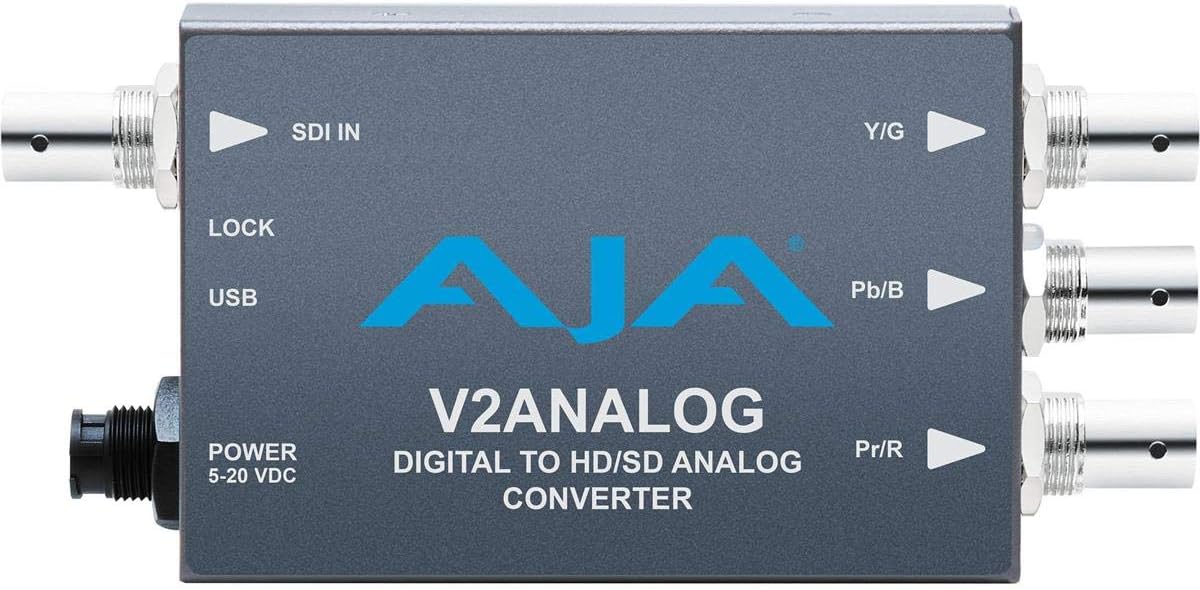
Figura 2: Sus view of the AJA V2Analog Mini-Converter, illustrating port labels for connection.
4. Instrucțiuni de utilizare
Once all connections are made, power on the device. The V2Analog will automatically detect the incoming SDI signal format and convert it to the appropriate analog output. The "LOCK" LED indicator will illuminate when a stable SDI signal is detected and locked.
4.1. Signal Compatibility
The V2Analog supports various HD and SD SDI formats. It is designed to convert these digital signals to standard analog component (YPbPr) or composite (CVBS) outputs.
4.2. Configuration (Advanced)
Advanced configuration options, such as output format selection or color space adjustments, may be available via AJA's Mini-Config software, accessible through the USB port. Refer to the AJA website for the latest software and detailed configuration guides.
5. Întreținere
The AJA V2Analog is designed for reliable operation with minimal maintenance. Follow these guidelines:
- curatenie: Folosiți o lavetă moale și uscată pentru a curăța exteriorul unității. Nu utilizați agenți de curățare lichizi sau cu aerosoli.
- Actualizări firmware: Periodically check the AJA website for firmware updates. Keeping the firmware current ensures optimal performance and compatibility.
- Depozitare: Când nu este utilizată pentru perioade lungi de timp, depozitați unitatea într-un loc răcoros și uscat, ferit de lumina directă a soarelui și de temperaturi extreme.
6. Depanare
If you encounter issues with your V2Analog, refer to the following common problems and solutions:
| Problemă | Cauza posibila | Soluţie |
|---|---|---|
| Fără ieșire video | No power; Incorrect SDI input; Incorrect analog output connection; No signal lock. | Check power supply; Verify SDI source is active and connected to "SDI IN"; Ensure Y/G, Pb/B, Pr/R are connected correctly to display; Check "LOCK" LED. |
| Distorted or colored video | Incorrect analog output format; Loose connections. | Ensure display is set to correct input type (component/composite); Tighten all BNC connections. |
| "LOCK" LED not illuminated | No valid SDI input signal. | Verify SDI source is active and sending a compatible signal. Check SDI cable integrity. |
If the problem persists, contact AJA Technical Support for further assistance.
7. Specificații
| Caracteristică | Detaliu |
|---|---|
| Model | V2ANALOG |
| Marca | AJA |
| Intrare | HD/SD-SDI (BNC) |
| Ieșire | Component (Y/G, Pb/B, Pr/R BNC), Composite (selectable) |
| Tip de interfață | USB, SDI, Component |
| Putere | 5-20 VDC |
| Dimensiuni (L x l x H) | 7.2 x 5.7 x 4.2 inci |
| Greutate | 1.35 lire sterline |
| UPC | 091131246023 |
8. Asistență și garanție
For technical support, product registration, or warranty information, please visit the official AJA website or contact their customer service department. Specific warranty terms and conditions may vary by region and purchase date.
AJA Website: www.aja.com


