Introducere
This manual provides comprehensive instructions for the operation and maintenance of your ONN X5 HiFi Music Player. Please read this manual thoroughly before using the device to ensure proper functionality and to maximize your listening experience. The ONN X5 is designed to deliver high-fidelity audio playback in a compact and user-friendly format.
Produs terminatview
The ONN X5 is a portable HiFi music player featuring a 2.0-inch TFT screen and an aluminum alloy shell. It supports a wide range of audio formats, including lossless files, and offers expandable storage via a MicroSD card.
Caracteristici cheie:
- De înaltă fidelitate audio: Supports WAV, FLAC, ALAC, APE, OGG lossless formats, and high-definition music up to 24Bit/192 KHz.
- Afişa: 2.0-inch TFT screen (176x220 pixels) for clear navigation and information display.
- Depozitare: 8GB internal memory, expandable up to 32GB with a MicroSD/TF card.
- Design durabil: Lightweight aluminum alloy body (60g) for enhanced durability and reduced external interference noise.
- Interfata utilizator: Intuitive key-based operation.
- Caracteristici suplimentare: FM Radio support.
- Baterie: High-capacity rechargeable lithium polymer battery.
- Asistență în mai multe limbi: English, Russian, Korean, German, Japanese, Polish, Indonesian, Chinese.
Aspect dispozitiv:

Imagine: față view of the ONN X5 HiFi Music Player, showing its display and control buttons. The screen displays track information, audio quality (e.g., 24BIT, 88HHZ), and playback status.

Imagine: Laterală view of the ONN X5 HiFi Music Player, illustrating the location of the MicroSD card slot on the right side of the device.

Imagine: Față și verso view of the ONN X5 HiFi Music Player. The back panel shows the model number "X5" and branding information.
Înființat
1. Încărcarea dispozitivului:
- Connect the ONN X5 to a power source using the provided USB cable.
- Indicatorul bateriei de pe ecran va afișa starea de încărcare.
- A full charge is recommended before first use. The device uses a high-capacity rechargeable lithium polymer battery.
2. Inserting a MicroSD/TF Card:
- Locate the MicroSD/TF card slot on the side of the player.
- Gently insert a compatible MicroSD/TF card (up to 32GB) into the slot until it clicks into place.
- Asigurați-vă că cardul este introdus corect pentru a evita deteriorarea.

Image: Contents of the ONN X5 package, showing the player, USB charging cable, and other accessories. This illustrates the components available for setup.
3. Transferul muzicii Files:
- Connect the ONN X5 to your computer using the USB cable.
- Dispozitivul va apărea ca o unitate de stocare amovibilă.
- Trageți și plasați sunetul dorit files (MP3, WMA, APE, FLAC, WAV, ALAC, OGG) into the player's internal storage or the MicroSD card.
- Scoateți dispozitivul în siguranță din computer înainte de a deconecta cablul USB.
Instrucțiuni de operare
Pornire/Oprire:
- To power on, press and hold the power button (usually marked with a universal power symbol) until the screen illuminates.
- Pentru a opri, apăsați și mențineți apăsat butonul de pornire până când dispozitivul se oprește.
Navigare:
The ONN X5 uses physical buttons for navigation. Refer to the device layout for button identification.
- VOL: Reglează volumul.
- M (Meniu): Accesses menus and confirms selections.
- Arrow Buttons (< / >): Navigate through menus, select tracks, or fast forward/rewind during playback.
- Buton de alimentare: Also functions as a play/pause button during music playback.
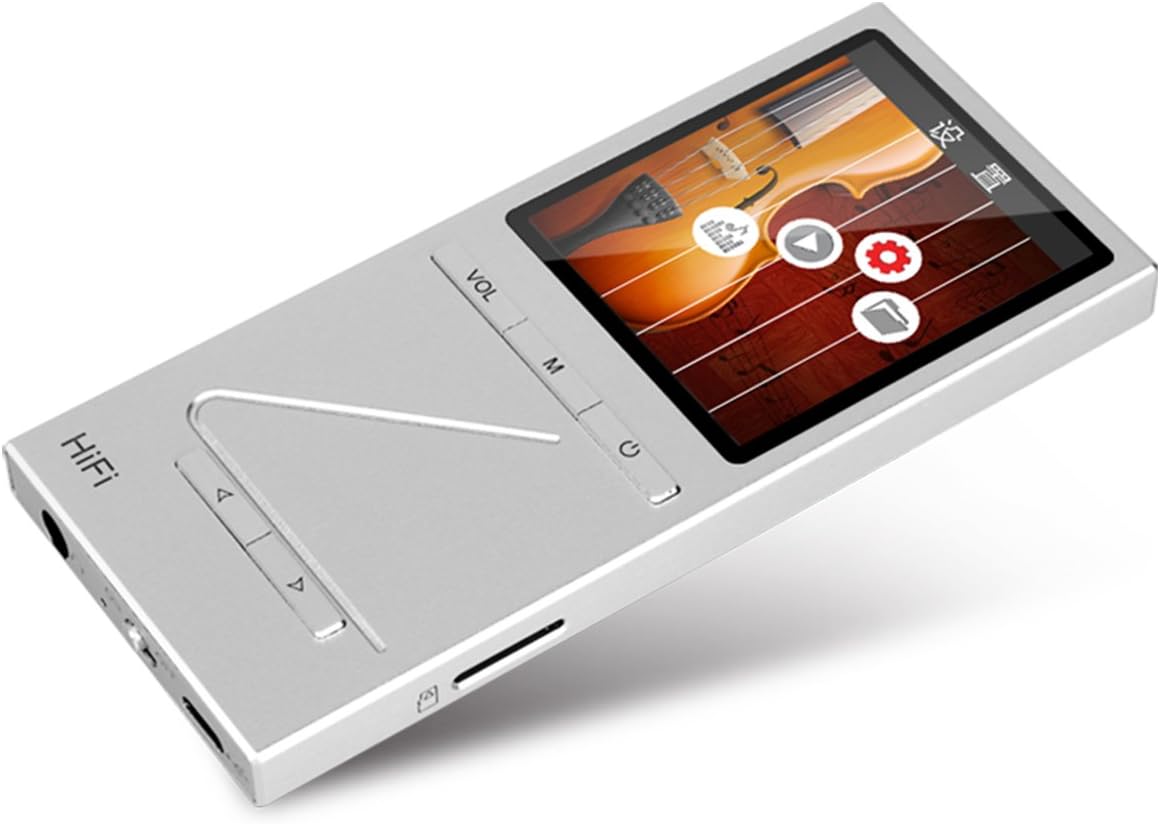
Imagine: Înclinată view of the ONN X5 HiFi Music Player, showing the screen with various menu icons, indicating the user interface for navigation.
Redare muzică:
- From the main menu, navigate to "Music" or "Files ".
- Browse through your folders and select a track to play.
- Press the Power/Play button to start or pause playback.
- Use the arrow buttons to skip tracks or fast forward/rewind.
- Adjust volume using the VOL button.
Radio FM:
- Navigate to the "FM Radio" option from the main menu.
- Folosiți butoanele de navigare pentru a scana posturile sau pentru a regla manual o frecvență.
- Ensure headphones are connected as they often act as the antenna for FM radio.
Setări de limbă:
Dispozitivul acceptă mai multe limbi. Pentru a schimba limba:
- Accesați „Setări” din meniul principal.
- Select "Language" and choose your preferred language from the list (English, Russian, Korean, German, Japanese, Polish, Indonesian, Chinese).
Întreţinere
- curatenie: Folosiți o lavetă moale și uscată pentru curățarea dispozitivului. Evitați substanțele de curățare lichide sau materialele abrazive.
- Depozitare: Depozitați playerul într-un loc răcoros și uscat, ferit de lumina directă a soarelui și de temperaturi extreme.
- Îngrijirea bateriei: Pentru a prelungi durata de viață a bateriei, evitați descărcarea completă frecventă a bateriei. Încărcați dispozitivul în mod regulat, chiar dacă nu îl utilizați pentru perioade lungi de timp.
- Evitați impactul: The aluminum alloy shell provides durability, but avoid dropping the device or subjecting it to strong impacts.
- Expunerea la apă: Acest dispozitiv nu este impermeabil. Evitați expunerea la apă sau umiditate ridicată.
Depanare
Dispozitivul nu pornește:
- Asigurați-vă că bateria este încărcată. Conectați dispozitivul la o sursă de alimentare și lăsați-l să se încarce timp de cel puțin 30 de minute înainte de a încerca să îl porniți din nou.
- Try performing a hard reset (if applicable, refer to manufacturer's specific instructions for hard reset, usually involves holding power button for an extended period).
Fără sunet:
- Check the volume level and ensure it is not muted.
- Verify that headphones or external speakers are properly connected.
- Test with different headphones or audio output devices.
- Asigurați-vă audio file is not corrupted or in an unsupported format.
Nu se poate transfera Files:
- Asigurați-vă că cablul USB este conectat corect atât la player, cât și la computer.
- Încercați un alt port USB pe computer sau un alt cablu USB.
- Verify that the device is recognized by your computer as a removable drive.
- Check if the MicroSD card is properly inserted and not full.
Screen Not Responding / Frozen:
- Apăsați și țineți apăsat butonul de pornire timp de aproximativ 10-15 secunde pentru a forța o repornire.
- If the issue persists, ensure the battery is charged.
Specificații
| Caracteristică | Detaliu |
|---|---|
| Numărul de model | X5 |
| Marca | ONN |
| Dimensiunea ecranului | 2.0 Inches TFT (176x220 PIXEL) |
| Memoria internă | 8 GB |
| Stocare extensibilă | MicroSD/TF card up to 32 GB |
| Formate audio acceptate | APE, FLAC, ALAC, WAV, WMA, OGG, MP3 (up to 24Bit/192 KHz) |
| Tehnologia de conectivitate | Auxiliar, USB |
| Caracteristica specială | Radio FM |
| Baterie | 1 Lithium Ion battery required (High-capacity rechargeable lithium polymer) |
| Greutatea articolului | 7 uncii (aprox. 0.2 kilograme) |
| Dimensiuni pachet | 6.21 x 4.7 x 1.2 inci |
| Producător | SZTZWY |
Garanție și suport
For detailed warranty information, please refer to the warranty card included with your purchase or visit the official ONN product support website. For technical assistance or further inquiries, please contact ONN customer support through their official channels.


