1. Introducere
The Noyafa NF-909C is a compact and easy-to-use 2-in-1 testing instrument designed for optical fiber networks. It integrates both an optical power meter and an optical light source, making it suitable for absolute optical power measurements and insertion loss tests. This device offers a wide range of power measurement, high accuracy, and stable output, providing a cost-effective solution for fiber optic testing.
2. Informații de siguranță
- Citiți manualul: Before operating the device, thoroughly read and understand this user manual.
- Siguranța bateriei: Use only specified 1.5V batteries (3x AAA). Do not mix old and new batteries or different types of batteries. Remove batteries if the device will not be used for an extended period.
- Siguranța laserului: The optical light source emits laser radiation. NU look directly into the optical output port or into a fiber connected to the light source. Direct exposure to laser light can cause severe eye damage.
- Conditii de mediu: Operate the device within the specified operating temperature range (-10°C to +60°C). Avoid exposure to extreme temperatures, humidity, or dust.
- curatenie: Keep optical connectors clean. Use only approved cleaning methods and materials to avoid damaging the fiber end-faces.
- Întreţinere: Nu încercați să deschideți sau să reparați dispozitivul. Apelați la personal calificat pentru toate lucrările de service.
3. Conținutul pachetului
Verificați dacă toate articolele sunt prezente și în stare bună la despachetare:
- Noyafa NF-909C Fiber Optic Tester Unit
- Manual de utilizare
- Protective Cap for Optical Ports
- (Batteries may or may not be included depending on the retailer)
4. Produs terminatview
The NF-909C features a clear LCD display, intuitive control buttons, and standard optical connectors for versatile use.
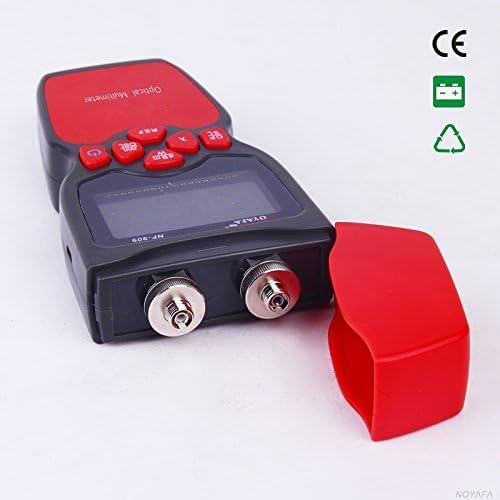
Figura 1: Faţă view of the Noyafa NF-909C Fiber Optic Tester. This image shows the device's display screen, the red control buttons (Power, REF, dBm/W, λ, Hz), and the two optical input/output ports on the front, protected by a red cap. The device is black and red.
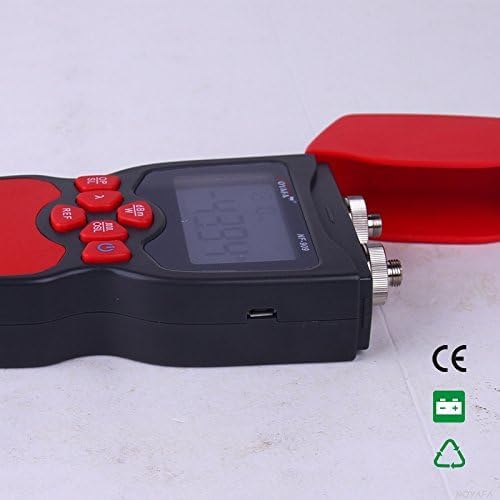
Figura 2: Latura view of the Noyafa NF-909C Fiber Optic Tester. This image highlights the micro USB port located on the side of the device, which may be used for power or data transfer, though its primary function is typically for charging or external power supply. The red protective cap is shown detached.
Componente cheie:
- Display LCD: Shows measurement readings, selected wavelength, unit, and battery status.
- Butoane de control: Power On/Off, Reference (REF), Unit (dBm/W), Wavelength (λ), Frequency (Hz).
- Optical Power Meter Input: Typically supports SC, ST, LC connectors (optional).
- Optical Light Source Output: Typically FC connector (SC, ST, LC optional).
- Compartiment baterie: Located on the rear, for 3x 1.5V batteries.
- Port micro USB: For power supply or charging (refer to Figure 2).
5. Configurare
5.1 Instalarea bateriei
- Localizați capacul compartimentului bateriei pe spatele dispozitivului.
- Glisați sau desfaceți capacul pentru a-l deschide.
- Insert three (3) 1.5V AAA batteries, ensuring correct polarity (+/-) as indicated inside the compartment.
- Puneți bine capacul compartimentului bateriei.
5.2 Pornirea inițială
Țineți apăsat butonul Putere button to turn on the device. The LCD display will illuminate, showing the current mode and settings.
6. Instrucțiuni de utilizare
6.1 Optical Power Meter Mode
This mode measures the absolute optical power or relative loss in optical fiber networks.
- Connect Fiber: Connect the optical fiber to be tested to the Power Meter input port. Ensure the connector is clean.
- Selectați lungimea de undă: Apăsați tasta λ button to cycle through the available calibrated wavelengths: 850nm, 1300nm, 1310nm, 1490nm, 1550nm, 1625nm. Select the wavelength matching your light source.
- View Măsurare: The display will show the optical power in dBm.
- Change Unit: Apăsați tasta dBm/W button to switch between dBm and W (Watts) units.
- Set Reference (REF): For relative measurements (loss), connect a known good fiber to a stable light source and the power meter. Press the REF button to set the current power reading as the reference (0dB). Subsequent measurements will show the loss relative to this reference.
- Frequency Identification: The power meter can identify modulation frequencies from 10Hz to 60KHz. If the incoming signal is modulated, the frequency will be displayed.
6.2 Optical Light Source Mode
This mode provides a stable optical signal for testing fiber optic cables.
- Connect Fiber: Connect the optical fiber to be tested to the Light Source output port. Ensure the connector is clean.
- Selectați lungimea de undă: Apăsați tasta λ button to cycle through the available wavelengths: 1310nm and 1550nm. Select the desired wavelength.
- Select Modulation Frequency: Apăsați tasta Hz button to cycle through modulation frequencies: 270Hz, 1KHz, 2KHz, or continuous wave (CW).
- Semnal de ieșire: The device will emit a stable optical signal at the selected wavelength and modulation.
6.3 Funcția de oprire automată
The device features an auto-off function to conserve battery life. If no operation is performed for approximately 15 minutes, the device will automatically power off. Press the Putere butonul pentru a-l reporni.
7. Întreținere
- Cleaning Optical Connectors: Always ensure optical connectors are clean before use. Use lint-free wipes and appropriate optical cleaning solutions. Dirty connectors can lead to inaccurate measurements and damage to the device or fiber.
- Înlocuire baterie: When the battery indicator on the display shows low power, replace all three 1.5V AAA batteries promptly.
- Depozitare: When not in use, store the device in a dry, cool place, away from direct sunlight and extreme temperatures. Always replace the protective caps on the optical ports to prevent dust and damage.
- Curățare externă: Curățați exteriorul dispozitivului cu un material moale, damp pânză. Nu utilizați agenți de curățare abrazivi sau solvenți.
8. Depanare
- Dispozitivul nu pornește:
- Verificați dacă bateriile sunt instalate corect, respectând polaritatea.
- Înlocuiți cu baterii noi.
- Inaccurate power meter readings:
- Ensure optical connectors are clean.
- Verify the selected wavelength on the power meter matches the light source wavelength.
- Check if the fiber under test is properly connected and not damaged.
- No light output from light source:
- Ensure the device is powered on and in light source mode.
- Verificați nivelul bateriei.
- Verify the fiber is properly connected to the output port.
- Auto-off activates too quickly:
- The auto-off is fixed at 15 minutes of inactivity. This is normal operation.
9. Specificații
| Caracteristică | Caietul de sarcini |
|---|---|
| Optical Power Meter Module | |
| Detector Measurement Range | -50 ~ +26 dBm |
| Calibrated Wavelengths | 850, 1300, 1310, 1490, 1550, 1625 nm |
| Rezoluţie | 0.01 dBm |
| Identification Frequency Range | 10Hz ~ 60KHz |
| Conector optic | SC, ST, LC (optional) |
| Optical Light Source Module | |
| Emitter Wavelengths | 1310 / 1550 nm (other wavelengths customizable) |
| Putere de ieșire | -7 dBm |
| Stabilitatea ieșirii | 0.05 dB / 15 mins; 0.1 dB / 8 hours |
| Modulation Frequencies | 270 Hz, 1 KHz, 2 KHz |
| Conector optic | FC (SC, ST, LC optional) |
| Specificații generale | |
| Alimentare electrică | 3 baterii AAA de 1.5 V |
| Timp de oprire automată | 15 minute (aprox.) |
| Temperatura de operare | -10°C ~ +60°C |
| Dimensiuni (L x l x H) | 160 x 75 x 32 mm |
| Greutate | 400 g (unit only) / 150 g (item weight from specs) |
| Vol. Minim de funcționaretage | 1.5 volți |
| Vol. maxim de operaretage | 5 volți |
| Specificație Met | UL 61010-1, IEC 61010-2-030 |
| Producător | Shenzhen Noyafa Electronic |
10. Garanție și asistență
For warranty information, technical support, or service inquiries, please refer to the warranty card included with your product or contact your authorized Noyafa dealer or the manufacturer directly. Keep your purchase receipt as proof of purchase.


