1. Introducere
The Midas M32C is a 40-input channel, 25-bus, 1U rackmountable digital mixing core designed for professional live and installed sound applications. It integrates advanced digital signal processing with Midas's renowned audio quality, offering extensive connectivity and control options for complex audio environments.
This manual provides essential information for the proper setup, operation, and maintenance of your M32C Digital Rack Mixer. Please read it thoroughly before using the device.
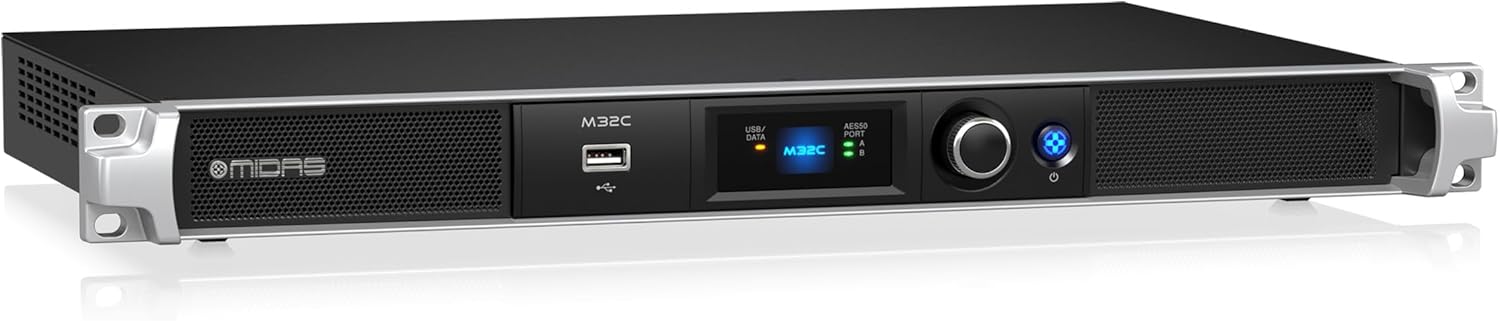
Figura 1.1: Midas M32C Digital Rack Mixer. This image shows the front perspective of the M32C unit, highlighting its compact 1U rackmount design, front panel display, USB port, and control knob.
2. Instrucțiuni importante de siguranță
To reduce the risk of electric shock, fire, or damage to the unit, observe the following safety precautions:
- Sursa de alimentare: Connect the unit only to an AC power supply of the specified voltage. Ensure the power cord is securely plugged into both the unit and the wall outlet.
- Împământare: Unitatea trebuie să fie împământată corespunzător. Nu anulați scopul de siguranță al ștecherului polarizat sau al celui cu împământare.
- Ventilare: Asigurați o ventilație adecvată. Nu blocați nicio deschidere de ventilație. Instalați conform instrucțiunilor producătorului.
- Apă și umiditate: Nu expuneți acest aparat la ploaie sau umezeală. Nu utilizați acest aparat în apropierea apei.
- Căldură: Nu instalați lângă nicio sursă de căldură, cum ar fi calorifere, registre de căldură, sobe sau alte aparate (inclusiv ampliificatori) care produc căldură.
- Service: Toate lucrările de întreținere se adresează personalului de service calificat. Întreținerea este necesară atunci când aparatul a fost deteriorat în vreun fel, cum ar fi cablul de alimentare sau ștecherul este deteriorat, s-a vărsat lichid sau au căzut obiecte în aparat, aparatul a fost expus la ploaie sau umezeală, nu funcționează normal , sau a fost abandonat.
3. Configurare
3.1 Despachetarea și inspecția
Carefully unpack the M32C and inspect it for any signs of damage that may have occurred during transit. Retain the original packaging for future shipping or storage.
3.2 Instalare fizică
The M32C is designed for standard 19-inch rack mounting and occupies 1U of rack space. Secure the unit using appropriate rack screws. Ensure sufficient airflow around the unit for proper cooling.
3.3 Conexiuni
Consultați schema panoului din spate de mai jos pentru punctele de conectare.

Figura 3.1: Midas M32C Rear Panel. This image displays the rear panel of the M32C, showing all input and output ports including AC input, expansion slot, USB, Ethernet, MIDI, ULTRANET, AES50, and monitor/talkback connections.
- INTRARE CA: Conectați cablul de alimentare CA furnizat aici.
- Slot de expansiune: For optional expansion cards (e.g., DN32-USB for USB audio interface).
- USB 2.0: Pentru actualizări de firmware și transfer de date.
- REMOTE ETHERNET: Connect to a network router or computer for remote control via M32-EDIT software or M32-MIX app.
- INTRARE/IEȘIRE MIDI: Pentru conectarea dispozitivelor MIDI externe.
- ULTRANET PERSONAL MONITORING: Connect to Behringer P16-M personal mixers for distributed monitoring.
- AES50 PORT A/B: Connect to Midas digital stage boxes (e.g., DL16, DL32) for expanded input/output capabilities. These ports support up to 96 inputs and 96 outputs.
- MONITOR OUTPUT (BAL/UNBAL): Analog outputs for local monitoring.
- TALKBACK INPUT (MIC/TRIM): Analog input for a talkback microphone.
3.4 Pornirea inițială
After all connections are made, press the power button on the front panel. The unit will initiate its startup sequence. Observe the front panel display for status indicators.
4. Operating the M32C
4.1 Controale panoului frontal

Figura 4.1: Midas M32C Front Panel. This image shows a direct front view of the M32C, detailing the USB/DATA port, the central display, AES50 port indicators, the main rotary encoder, and the power button.
- USB/DATA Port: Used for connecting USB storage devices for firmware updates or scene/preset management.
- Afişa: Provides essential status information, including AES50 connection status and basic system parameters.
- AES50 PORT A/B Indicators: LEDs indicate active AES50 connections.
- Rotativ: Used for navigating menus and adjusting parameters displayed on the front panel.
- Buton de alimentare: Pornește sau oprește unitatea.
4.2 Telecomandă
The M32C is primarily controlled via external software. Connect the unit to a network using the REMOTE ETHERNET port. You can then use:
- M32-EDIT Software: A comprehensive application for Windows, macOS, and Linux, offering full control over all mixer functions.
- M32-MIX App: Mobile applications for iOS and Android devices, providing remote control capabilities for mixing on the go.
4.3 AES50 Networking
The AES50 ports are crucial for expanding the M32C's capabilities. They allow connection to digital stage boxes, providing remote microphone preamplifiers and analog outputs, effectively extending the mixer's I/O count to up to 96 inputs and 96 outputs.
4.4 Mix Buses and DSP
The M32C features 25 time-aligned and phase-coherent mix buses, providing flexible routing and processing options for monitors, effects sends, and matrix mixes. The 40-bit floating point digital signal processing ensures high-fidelity audio and extensive dynamic range.
5. Întreținere
5.1 Curățare
To maintain the appearance and functionality of your M32C, regularly clean the exterior with a soft, dry cloth. Avoid using abrasive cleaners or solvents. Ensure ventilation openings are free from dust and debris.
5.2 de actualizări de firmware
Verificați periodic Midas-ul website for firmware updates. Keeping your M32C's firmware current ensures optimal performance, access to new features, and bug fixes. Firmware updates are typically performed via the front panel USB port using a USB flash drive.
6. Depanare
If you encounter issues with your M32C, consult the following common troubleshooting steps:
- Fără putere:
- Verify the AC power cable is securely connected to both the unit and a working power outlet.
- Verificați poziția comutatorului de alimentare.
- Fără intrare/ieșire audio:
- Ensure AES50 connections to stage boxes are secure and active (check AES50 indicators).
- Verify input and output routing within the M32-EDIT software or M32-MIX app.
- Verificați câștigultaging for all channels and buses.
- Remote Control Connection Issues:
- Confirm the Ethernet cable is properly connected to the REMOTE ETHERNET port and your network.
- Check network settings (IP address, subnet mask) on both the M32C and your control device.
- Ensure firewall settings on your computer or mobile device are not blocking the M32-EDIT/M32-MIX application.
- Unit Freezes or Behaves Erratically:
- Efectuați un ciclu de pornire/oprire (opriți, așteptați 10 secunde, apoi porniți).
- Consider performing a factory reset (refer to the Midas website or full software manual for instructions).
- Asigurați-vă că firmware-ul este actualizat.
7. Specificații
| Caracteristică | Detaliu |
|---|---|
| canale de intrare | 40 |
| Mix Autobuze | 25 (time-aligned, phase-coherent) |
| Procesarea semnalului digital | 40-bit virgulă mobilă |
| Rețele | AES50 (up to 96 inputs / 96 outputs) |
| Material de construcție | High-performance aluminium and high-impact steel structure |
| Dimensiune rack | 1U |
| Dimensiuni (Îl x l x A) | 7.49 x 4.65 x 0.78 inches (approximate, unit specific) |
| Greutatea articolului | 7.7 lire (3.5 kg) |
| Sursa de alimentare | Wired AC |
| Tehnologia de conectivitate | Wired (Ethernet, USB, MIDI, AES50) |
8. Informații despre garanție
Midas products are covered by a limited warranty. For detailed information regarding the terms and conditions of your warranty, including registration and claims procedures, please refer to the official Midas website or the warranty card included with your product. Keep your proof of purchase for warranty validation.
9. Asistență și contact
For technical support, service, or further information regarding your Midas M32C Digital Rack Mixer, please visit the official Midas website:
You may also find additional resources, FAQs, and software downloads on the support section of the website-ul.


