Introducere
This manual provides instructions for the HAVIT HV-KB366L RGB Backlit Mechanical Gaming Keyboard. This keyboard features blue mechanical switches, full anti-ghosting, and customizable RGB backlighting, designed for reliable performance.
Instrucțiuni de configurare
Conectarea tastaturii
- Găsiți un port USB disponibil pe computer.
- Connect the USB cable from the HAVIT HV-KB366L keyboard to the USB port on your computer.
- Tastatura este plug-and-play și ar trebui să fie recunoscută automat de sistemul de operare.
Compatibilitatea sistemului
- Compatible with Windows 10 and other Windows operating systems.
- Mac OS supports 6-key rollover only.
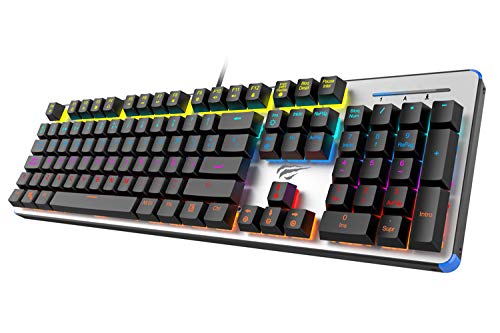
Figure 1: HAVIT HV-KB366L RGB Backlit Mechanical Gaming Keyboard. An overhead view a tastaturii, aratăasing its full layout with RGB lighting on the keys and a white frame.
Instrucțiuni de operare
Comutatoare mecanice cu cheie
The keyboard is equipped with blue mechanical switches, providing tactile feedback and an audible click with each keystroke. This design is intended for precise input during typing and gaming.
Anti-Ghosting Feature
The full key anti-ghosting mechanism ensures that all key presses are registered accurately, even when multiple keys are pressed simultaneously. This feature is beneficial for fast-paced gaming.
Reglarea luminii de fundal
- To change the backlight color or mode, press the Fn simultan cu tasta Iluminat din spate key. Repeated presses will cycle through available modes and colors.
- Marquee Mode: In 7-color backlit mode (non-breathing), press the Iluminat din spate key once to activate marquee mode. Press the Iluminat din spate key again to deactivate marquee mode and return to 7-color backlit mode.
- Niveluri de luminozitate: The backlight offers 4 levels of brightness adjustment.
- Ritm respirator: The breathing effect has 10 adjustable levels.
Întreţinere
Curățarea tastaturii
- Deconectați tastatura de la computer înainte de curățare.
- Folosiți o lavetă moale și uscată pentru a șterge suprafața tastaturii.
- Pentru praf și resturi între taste, folosiți aer comprimat.
- Avoid using harsh chemicals or abrasive materials, as these can damage the finish or keycaps.
Durabilitate
The keyboard features an aluminum top housing with a sanded finish and a metal base, contributing to its overall durability and stable performance.
Depanare
Tastatura nu răspunde
- Asigurați-vă că ați conectat cablul USB în siguranță atât la tastatură, cât și la computer.
- Încercați să conectați tastatura la un alt port USB al computerului.
- Testați tastatura pe un alt computer pentru a determina dacă problema este cu tastatura sau cu portul USB al computerului.
Iluminarea de fundal nu funcționează sau este incorectă
- Verificați dacă tastatura este conectată corect și primește alimentare.
- Presa Fn + Backlit key to cycle through backlight modes and ensure it is not turned off or set to a very low brightness.
- Refer to the "Backlight Adjustment" section for detailed instructions on changing modes and brightness.
Specificații
| Marca | HAVIT |
| Numărul de model | HV-KB366L |
| Producător | HAVIT |
| Dimensiunile produsului | 50.5 x 17.6 x 6 centimetri |
| Greutatea articolului | 1.33 kg |
| Tehnologia de conectivitate | Cu fir (USB) |
| Descrierea tastaturii | Tastatură mecanică pentru jocuri |
| Caracteristica specială | RGB Backlit, Anti-Ghosting |
| Platformă hardware | Laptop, PC |
| Sistem de operare | Windows 10 (and compatible), Mac OS (6-key rollover) |
| Voltage | 5 volți |
| Componente incluse | Cablu USB |
Garanție și asistență
Informații despre garanție
Specific warranty details for the HAVIT HV-KB366L keyboard are not provided in the product data. Please refer to the product packaging or contact HAVIT directly for warranty terms and conditions.
Asistență pentru clienți
For technical assistance, troubleshooting, or further inquiries, please contact HAVIT customer support through their official website-ul sau informațiile de contact furnizate odată cu achiziția dvs.


