Introducere
The ASTRO Gaming A40 TR Headset and MixAmp Pro TR are designed to provide a high-fidelity audio experience for gaming on PlayStation 4 and PC. The A40 TR headset offers user customization, allowing transformation from an open-back to a closed-back noise-canceling headset with optional Mod Kits. The MixAmp Pro TR features all-digital components for clear, interference-free audio and voice communication, with customizable settings via the ASTRO Command Center software.

Image: The ASTRO Gaming A40 TR Headset and MixAmp Pro TR, showcasing both components together. The headset is black with gold accents, and the MixAmp is a compact black unit with control dials.
Conținutul pachetului
Verificați dacă toate articolele enumerate mai jos sunt incluse în ambalajul produsului:
- ASTRO A40 TR Headset
- ASTRO MixAmp Pro TR
- A40 TR Inline Mute Cable (2.0m)
- TOSlink Optical Cable (3.0m)
- Micro-USB Cable (3.0m)
- Digital Daisy Chain Cable (0.5m)
- Swappable Microphone
Înființat
Conectarea la PlayStation 4 (PS4)
- Conectați TOSlink Optical Cable from the MixAmp Pro TR's OPTICAL port to the PS4's Optical Out port.
- Conectați Cablu micro-USB from the MixAmp Pro TR's USB port to an available USB port on the PS4.
- Conectați A40 TR Inline Mute Cable from your A40 TR Headset to the headset port on the front of the MixAmp Pro TR.
- Pe PS4, navigați la Settings > Sound and Screen > Audio Output Settings.
- Set Port de ieșire primar la Ieșire digitală (optică).
- Selecta Dolby Digital (Bitstream) for the audio format.
- Du-te la Setări> Dispozitive> Dispozitive audio.
- Set Dispozitiv de intrare la USB Headset (ASTRO MixAmp Pro TR).
- Set Dispozitiv de ieșire la USB Headset (ASTRO MixAmp Pro TR).
- Regla Controlul volumului (căști) la maxim.
- Set Ieșire la căști la chat audio or Toate audio as preferred.
Conectarea la PC
- Conectați Cablu micro-USB from the MixAmp Pro TR's USB port to an available USB port on your PC.
- Conectați A40 TR Inline Mute Cable from your A40 TR Headset to the headset port on the front of the MixAmp Pro TR.
- On your PC, ensure the MixAmp Pro TR is selected as the default playback and recording device in your sound settings.
- Descărcați și instalați ASTRO Command Center software from the official ASTRO Gaming website to customize settings, update firmware, and manage EQ presets.
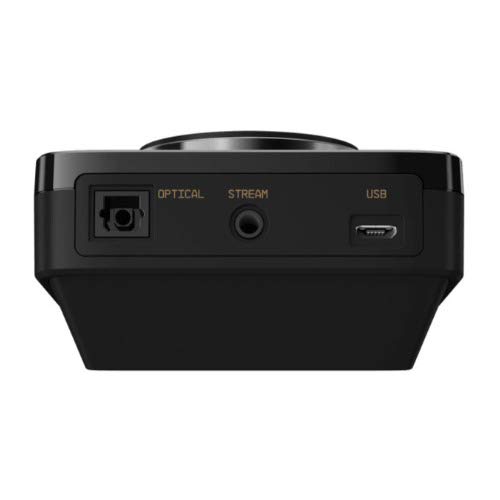
Imagine: Spate view of the ASTRO MixAmp Pro TR, highlighting the Optical, USB, AUX, and Stream ports for various connections.
Operating the MixAmp Pro TR
MixulAmp Pro TR provides intuitive controls for managing your audio experience:
- Master Volume Dial: The large dial on the left controls the overall volume of your headset. Rotate clockwise to increase volume, counter-clockwise to decrease.
- Game/Voice Balance Dial: The smaller dial on the right allows you to adjust the balance between game audio and voice chat.
- Rotate towards "GAME" to prioritize game audio.
- Rotate towards "VOICE" to prioritize voice chat.
- EQ Presets Button: Located in the center, this button cycles through four customizable equalizer presets. The active preset is indicated by the illuminated icon (star, headphone, etc.). These presets can be configured using the ASTRO Command Center software.
- Dolby Button: Activates or deactivates Dolby Surround Sound. When active, the Dolby logo will illuminate.
- Buton de dezactivare a microfonului: Located on the A40 TR Inline Mute Cable, this switch mutes or unmutes your microphone. When muted, the MixAmp's volume dials will typically glow red.
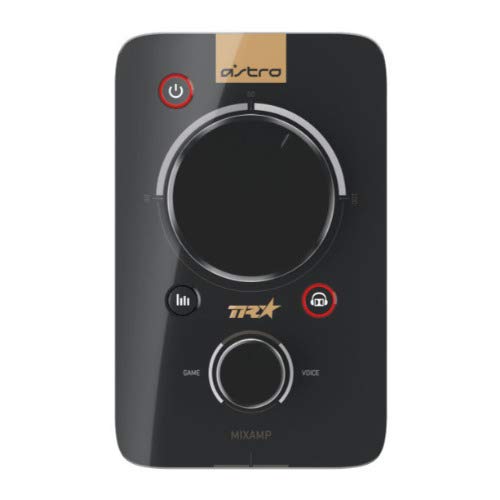
Imagine: Sus view of the ASTRO MixAmp Pro TR, showing the large master volume dial, the smaller game/voice balance dial, and the EQ preset buttons.
Întreţinere
- curatenie: Use a soft, dry cloth to clean the headset and MixAmp. Avoid abrasive cleaners or solvents.
- Depozitare: Store the headset and MixAmp într-un loc răcoros și uscat ferit de lumina directă a soarelui și de temperaturi extreme.
- Îngrijirea cablului: Manevrați cablurile cu grijă pentru a preveni deteriorarea. Evitați îndoirile bruște sau tragerea excesivă.
- Perne de urechi: Periodically check ear cushions for wear and tear. Replacement cushions are available from ASTRO Gaming.
Depanare
If you encounter issues with your ASTRO Gaming A40 TR Headset or MixAmp Pro TR, try the following solutions:
| Problemă | Soluţie |
|---|---|
| Nu se aude sunet din căști. |
|
| Microfonul nu funcționează. |
|
| Distorted or poor audio quality. |
|
For more detailed troubleshooting, please refer to the official ASTRO Gaming support resources.
Specificații
- Număr de model: 939-001511
- Raspuns in frecventa: 20 - 20,000 Hz
- Impedanta nominala: 48 ohmi
- Presiune bentiță: 2.6N
- Dimensiuni produs: 9.06 x 13.87 x 4.33 inci
- Greutatea articolului: 1.06 lire sterline
- Conectivitate: Optic, USB
- Compatibilitate: PlayStation 4, PC
Garanție și suport
For detailed warranty information and product support, please visit the official ASTRO Gaming website-ul sau consultați documentația furnizată:
Ensure you register your product on the ASTRO Gaming website for the latest updates and support.


