1. Introducere
This manual provides essential instructions for the safe and efficient operation of your Brother DCP-T700W Color Ink Tank Wi-Fi Multifunction Printer. This device is designed for printing, scanning, and copying, featuring an integrated refillable ink tank system and wireless connectivity. Please read this manual thoroughly before using the printer and keep it for future reference.
2. Informații de siguranță
Respectați următoarele măsuri de siguranță pentru a preveni vătămările corporale sau deteriorarea imprimantei:
- Conectați întotdeauna imprimanta la o priză de alimentare cu împământare.
- Do not place the printer in areas with excessive dust, humidity, or direct sunlight.
- Țineți imprimanta departe de apă sau alte lichide.
- Nu încercați să reparați imprimanta singur. Apelați la personal calificat pentru toate lucrările de service.
- Use only Brother-recommended ink and paper to ensure optimal performance and prevent damage.
3. Produs terminatview
Familiarize yourself with the main components of your Brother DCP-T700W printer.
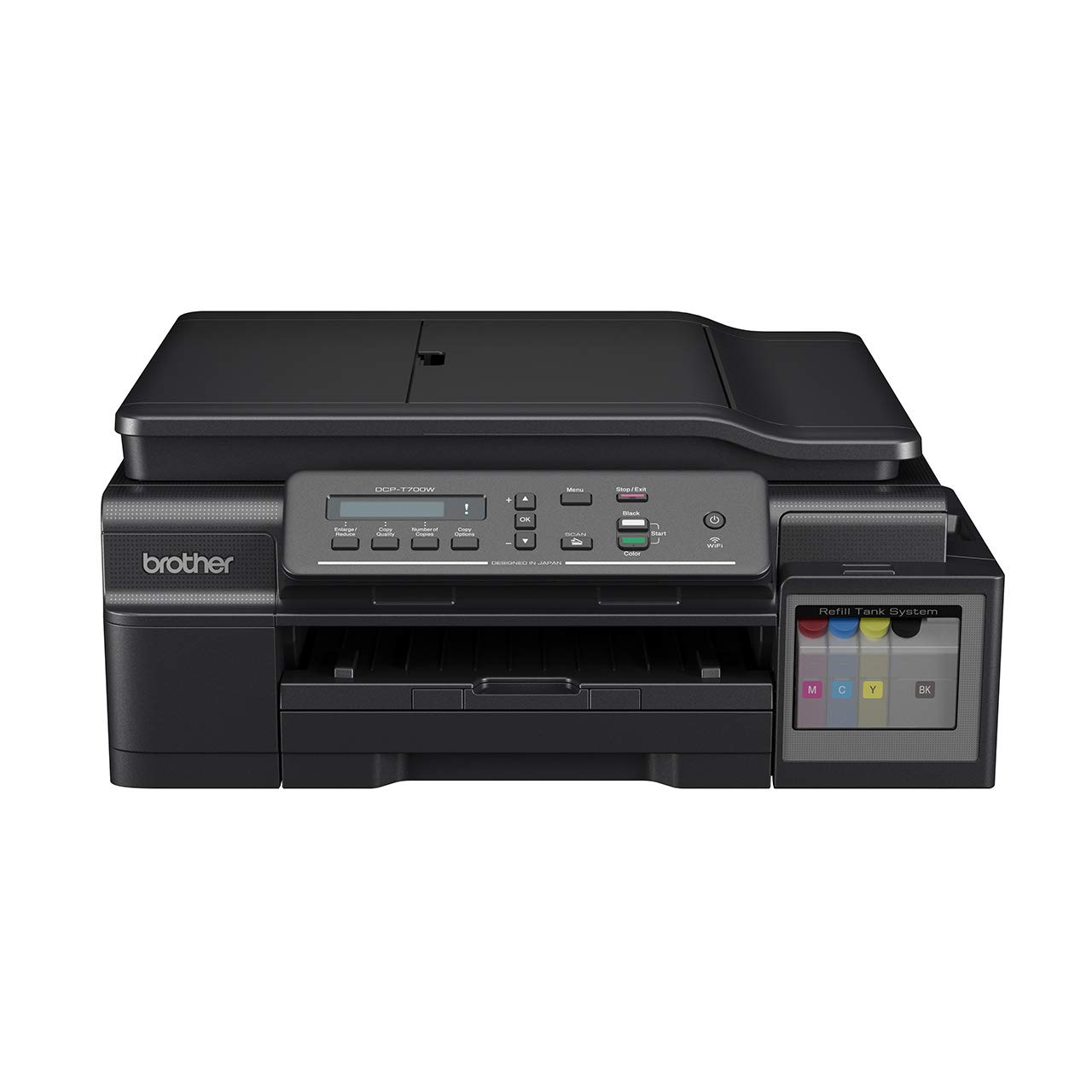
Figura 3.1: Faţă view of the Brother DCP-T700W printer, showing the control panel, paper output tray, and integrated ink tank system on the right side.

Figura 3.2: Înclinat view of the Brother DCP-T700W, highlighting the Automatic Document Feeder (ADF) tray in an open position, ready for scanning or copying multiple documents.
Panoul de control
The control panel allows you to operate the printer's functions. It typically includes:
- Display LCD: Shows status messages and menu options.
- Butoanele de meniu: Navigați prin setări.
- Start Buttons: Initiate print, copy, or scan jobs (Color/Mono).
- Stop/Exit Button: Cancel operations or exit menus.
- Buton Wi-Fi: Manage wireless network connection.
4. Configurare
4.1 Despachetarea și plasarea
- Scoateți imprimanta din ambalaj și îndepărtați toate benzile și materialele de protecție.
- Așezați imprimanta pe o suprafață stabilă, plană, cu ventilație adecvată.
- Ensure there is enough space around the printer for paper loading and output.
4.2 Umplerea rezervoarelor de cerneală
The DCP-T700W features an integrated ink tank system. Follow these steps to fill the tanks:
- Open the ink tank cover located on the right side of the printer.
- Desfaceți capacul sticlei de cerneală pentru culoarea corespunzătoare (Negru, Cyan, Magenta, Galben).
- Carefully pour the ink into the correct tank, ensuring not to overfill.
- Închideți bine capacul rezervorului de cerneală.
- Perform an initial ink charge as instructed by the printer's display or setup guide.
Nota: Use genuine Brother ink bottles to prevent damage and ensure print quality.
4.3 Instalarea software-ului și a driverelor
- Insert the installation CD-ROM into your computer's drive, or download the latest drivers and software from the official Brother support website-ul.
- Urmați instrucțiunile de pe ecran pentru a finaliza instalarea.
- During installation, you will be prompted to choose your connection type (USB or Wireless).
4.4 Connecting to a Network (Wi-Fi)
Pentru a conecta imprimanta la o rețea wireless:
- Apăsați tasta Wifi butonul de pe panoul de control.
- Navigați la Reţea settings using the menu buttons.
- Selecta WLAN si apoi Expert de configurare.
- The printer will search for available networks. Select your network (SSID) from the list.
- Enter your network password (network key) using the control panel buttons.
- Confirm the connection. The Wi-Fi indicator light will illuminate when connected.
Alternatively, you can use the WPS (Wi-Fi Protected Setup) method if your router supports it.
5. Instrucțiuni de utilizare
5.1 Încărcarea hârtiei
- Open the paper tray and extend it if necessary.
- Load paper print-side down. Adjust the paper guides to fit the paper size.
- Închideți tava pentru hârtie.
The printer supports various paper types and sizes, including A4. Refer to specifications for details.
5.2 Imprimarea documentelor
- De pe computer, deschideți documentul pe care doriți să îl imprimați.
- Selecta Imprimare din meniul aplicației.
- Choose your Brother DCP-T700W printer.
- Adjust print settings such as paper size, orientation, color/monochrome, and duplex printing (if desired).
- Clic Imprimare.
For mobile printing, use the Brother iPrint&Scan app or other compatible mobile printing services.
5.3 Scanarea documentelor
Puteți scana documente utilizând scanerul cu suport plat sau alimentatorul automat de documente (ADF).
Utilizarea scanerului cu suprafață plană:
- Ridicați capacul scanerului.
- Așezați documentul cu fața în jos pe geamul scanerului, aliniindu-l cu marcajele de ghidare.
- Închideți capacul scanerului.
- Initiate the scan from your computer using the Brother ControlCenter software or directly from the printer's control panel.
Utilizarea alimentatorului automat de documente (ADF):
- Load documents face-up into the ADF tray. Adjust the paper guides.
- Ensure documents are free of staples or clips.
- Initiate the scan from your computer or the printer's control panel.
5.4 Copierea documentelor
- Așezați documentul pe scanerul cu suport plat sau în ADF.
- Pe panoul de control al imprimantei, apăsați butonul Copie buton.
- Use the arrow keys to select the number of copies and adjust settings like quality or zoom.
- Apăsați tasta Început (Color or Mono) button to begin copying.
6. Întreținere
6.1 Checking and Refilling Ink Levels
Regularly check the ink levels in the transparent ink tanks. When a tank is low, refill it promptly to avoid print quality issues or damage to the print head. Refer to Section 4.2 for ink refilling instructions.
6.2 Curăţarea imprimantei
- Exterior: Ștergeți exteriorul imprimantei cu o lavetă moale, fără scame. Nu utilizați substanțe de curățare abrazive sau solvenți.
- Sticla scanerului: Clean the scanner glass with a soft, dry cloth. For stubborn marks, use a small amount of glass cleaner applied to the cloth (not directly to the glass).
- Cap de imprimare: If print quality deteriorates (e.g., streaks, missing colors), perform a print head cleaning cycle from the printer's maintenance menu or through the printer driver on your computer.
7. Depanare
This section addresses common issues you might encounter. For more detailed troubleshooting, refer to the Brother support website-ul.
7.1 Probleme de calitate a imprimării
- Dungi sau imprimeuri decolorate: Check ink levels and perform a print head cleaning. Ensure you are using appropriate paper settings.
- Culori incorecte: Verificați dacă există culorile corecte de cerneală în rezervoarele respective. Efectuați o aliniere a capului de imprimare.
- Pagini goale: Check ink levels. Ensure the print head is not clogged.
7.2 Blocaje de hârtie
- Opriți imprimanta și deconectați-o.
- Carefully open all covers and remove any jammed paper, pulling gently in the direction of the paper path.
- Asigurați-vă că nu rămân bucăți mici de hârtie înăuntru.
- Închideți toate capacele, conectați imprimanta la priză și porniți-o.
7.3 Probleme de conectivitate
- Deconectare Wi-Fi: Check your router and printer's Wi-Fi status. Re-establish the connection using the setup wizard. Ensure the printer is within range of your wireless router.
- Conexiune USB nedetectată: Asigurați-vă că este conectat corect cablul USB atât la imprimantă, cât și la computer. Încercați un alt port USB sau un alt cablu.
7.4 Automatic Document Feeder (ADF) Issues
- Paper Misfeeds/Jams: Ensure documents are loaded correctly, face-up, and within the paper guides. Remove any staples or clips.
- Skewed Scans: Clean the ADF rollers. Ensure documents are not wrinkled or damaged.
8. Specificații
| Caracteristică | Detaliu |
|---|---|
| Model | DCP-T700W |
| Funcții | Imprimare, scanare, copiere |
| Tehnologia de imprimare | Inkjet |
| Conectivitate | USB 2.0, Wi-Fi (802.11a) |
| Rezoluție maximă de imprimare (color) | 1200 dpi |
| Maximum Print Resolution (Black & White) | 1200 dpi |
| Viteză maximă de imprimare (monocrom) | 27 ppm |
| Viteză maximă de imprimare (color) | 10 ppm |
| Imprimare duplex | Automat |
| Tip scaner | Sheetfed (ADF) |
| Dimensiune maximă a suportului media | A4 |
| Culori de cerneală | Negru, Cyan, Magenta, Galben |
| Dimensiuni articol (Lxlxh) | 38 x 43.5 x 19.5 cm |
| Greutatea articolului | 9.84 kg |
| Consumul de energie | 700 wați (maximum) |
| Caracteristica specială | Certificat Energy Star |
9. Garanție și asistență
9.1 Informații despre garanție
The Brother DCP-T700W printer comes with a Garanție de 1 an de la producător. This warranty covers defects in materials and workmanship under normal use. Please retain your proof of purchase for warranty claims. The warranty is applicable as per the manufacturer's terms and conditions.
9.2 Asistență pentru clienți
For technical assistance, driver downloads, FAQs, or to locate a service center, please visit the official Brother support website. You can also find contact information for customer service in your region on their website-ul.
Asistență Brother Website: www.brother.com/support


