Introducere
This manual provides detailed instructions for the setup, operation, maintenance, and troubleshooting of your Sharp HT-SB60 High-Powered Soundbar System. Please read this manual thoroughly before using the product to ensure proper and safe operation.
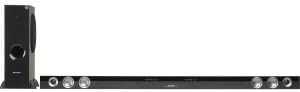
This image displays the Sharp HT-SB60 soundbar and its accompanying wireless subwoofer. The soundbar is a long, slender black unit designed to sit horizontally, featuring speaker grilles and controls on its front. To the left, the tall, black wireless subwoofer stands vertically, indicating its role in providing deep bass.
Înființat
Despachetarea
Scoateți cu grijă toate componentele din ambalaj. Asigurați-vă că sunt prezente toate articolele enumerate mai jos:
- Sharp HT-SB60 Soundbar
- Subwoofer fără fir
- Power Cords (for soundbar and subwoofer)
- Telecomanda (cu baterii)
- Audio Cables (e.g., Optical, RCA - specific types may vary)
Plasarea
- Soundbar: Place the soundbar horizontally on a stable surface directly in front of your television, ensuring it does not obstruct the TV's remote sensor.
- Subwoofer fără fir: Position the wireless subwoofer on the floor, preferably in a corner or near a wall, to enhance bass response. Ensure it is within wireless range of the soundbar.
Conexiuni
- Putere: Conectați cablurile de alimentare la soundbar și la subwoofer, apoi introduceți-le într-o priză de perete.
- Intrare audio: Connect your TV or other audio source to the soundbar using the appropriate audio cable (e.g., Optical, HDMI ARC, RCA). Refer to your TV's manual for compatible audio output ports.
- Asociere subwoofer: The wireless subwoofer should automatically pair with the soundbar upon power-up. If pairing fails, refer to the troubleshooting section.
Instrucțiuni de operare
Operare de bază
- Pornire/Oprire: Apăsați butonul de pornire/oprire de pe soundbar sau de pe telecomandă.
- Controlul volumului: Folosește butoanele de creștere/reducere a volumului de pe telecomandă sau de pe soundbar.
- Selectare intrare: Press the Input button on the remote or soundbar to cycle through available audio sources (e.g., Optical, Bluetooth, AUX).
Asociere Bluetooth
- Press the Bluetooth button on the remote or soundbar to enter Bluetooth pairing mode. The indicator light will flash.
- Pe dispozitivul mobil, activați Bluetooth și căutați dispozitivele disponibile.
- Select "Sharp HT-SB60" from the list of devices.
- Once connected, the indicator light will become solid. You can now play audio from your device through the soundbar.
Moduri de sunet
The HT-SB60 may offer various sound modes to optimize audio for different content types. Refer to your remote control for specific buttons (e.g., Movie, Music, News) to switch between modes.
Întreţinere
Pentru a asigura longevitatea și performanța optimă a sistemului soundbar, urmați aceste instrucțiuni de întreținere:
- curatenie: Use a soft, dry cloth to wipe the surfaces of the soundbar and subwoofer. Do not use liquid cleaners or abrasive materials.
- Ventilare: Ensure adequate ventilation around both units to prevent overheating. Do not block any vents.
- Depozitare: Dacă depozitați unitatea pentru o perioadă lungă de timp, deconectați-o de la priză și depozitați-o într-un loc răcoros și uscat.
Depanare
If you encounter issues with your Sharp HT-SB60 system, refer to the table below for common problems and solutions.
| Problemă | Cauza posibila | Soluţie |
|---|---|---|
| Fără putere | Cablul de alimentare nu este conectat; priza nu este activă | Asigurați-vă că cablurile de alimentare sunt conectate corect la soundbar/subwoofer și la o priză de perete funcțională. |
| Nici un sunet | Incorrect input selected; volume too low; audio cable loose/damaged | Selectați sursa de intrare corectă. Măriți volumul. Verificați conexiunile cablului audio. |
| Subwooferul nu se conectează | Out of range; interference; pairing issue | Ensure subwoofer is within 10 meters of the soundbar. Power cycle both units. Refer to manual for manual pairing steps if available. |
| Conexiune Bluetooth instabilă | Device too far; interference | Move Bluetooth device closer to the soundbar. Avoid obstacles between devices. |
Specificații
- Marca: Ascuțit
- Model: HT-SB60
- Tip difuzor: Bară de sunet, Subwoofer
- Configurația canalului de sunet surround: 2.1
- Tehnologie de conectivitate: Wireless (Bluetooth)
- Sursa de alimentare: Electric cu fir
- Dimensiuni produs: 8.34 x 18.37 x 57.2 inci
- Greutatea articolului: 29.8 lire sterline
- Speaker Size (Soundbar): Designed for 60-Inch & Larger TVs
Garanție și suport
Informații despre garanție
This Sharp HT-SB60 product is Certified Refurbished, tested, and certified by Sharp to look and function like new. It includes all original accessories and is backed by a 90-day warranty from the date of purchase.
Asistență pentru clienți
For further assistance, technical support, or warranty claims, please contact Sharp customer service. Refer to the official Sharp website-ul sau ambalajul produsului pentru cele mai recente informații de contact.


