Introducere
The Logitech UE Boom is a 360-degree wireless Bluetooth speaker designed for portable audio. It features a durable, go-anywhere shape and is equipped with a water and stain resistant acoustic skin. This speaker allows for wireless music playback, phone calls, and can be paired with another UE Boom for stereo sound.

Imagine: față view of the Logitech UE Boom Wireless Bluetooth Speaker in Northern Light color.
Caracteristici cheie
- Sunet la 360 de grade: Delivers immersive audio in all directions.
- Design portabil: Versatile, cylindrical shape for easy transport.
- Water and Stain Resistant: Features a colorful acoustic skin with plasma coating for durability against water and stains.
- Conectivitate wireless: Connects via Bluetooth from up to 50 feet away. Easy pairing via NFC for compatible devices.
- Double Up Feature: Wirelessly connect two UE BOOM speakers in stereo using the UE BOOM app for enhanced sound.
- Durată lungă de viață a bateriei: Rechargeable battery provides up to 15 hours of playback.
- Difuzor: Integrated crystal-clear speakerphone for calls.
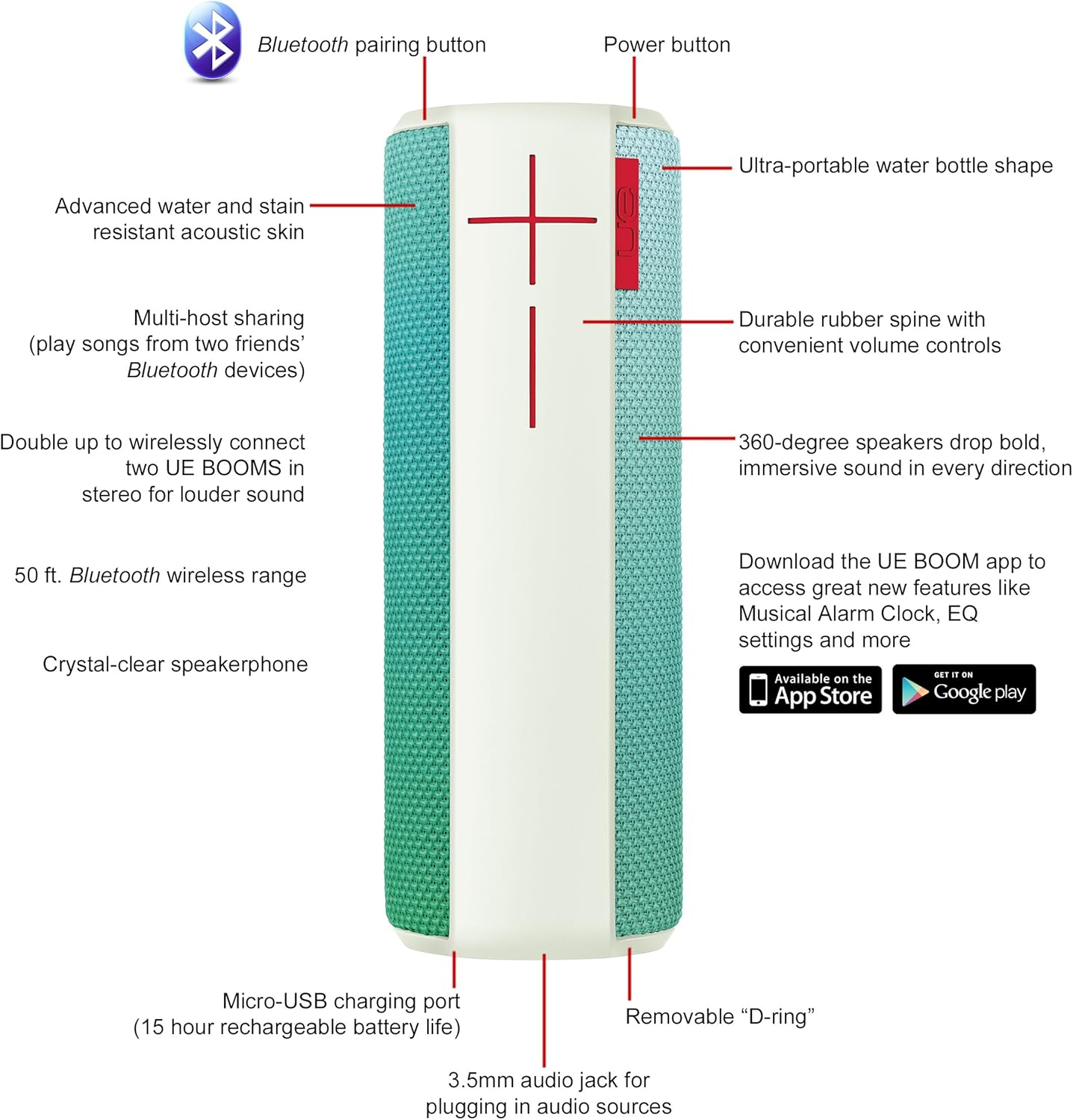
Image: Diagram highlighting key features and controls of the UE Boom speaker, including Bluetooth pairing button, power button, volume controls, micro-USB charging port, and 3.5mm audio jack.
Înființat
Încărcarea difuzorului
Before initial use, fully charge your UE Boom speaker. Connect the provided micro-USB cable to the charging port located at the bottom of the speaker and plug the other end into a USB power source. The speaker's battery provides approximately 15 hours of playback on a full charge.
Asociere Bluetooth
- Power on your UE Boom speaker by pressing the power button.
- Press and hold the Bluetooth pairing button (usually indicated by a Bluetooth icon) until you hear an audible tone and the LED indicator flashes rapidly.
- On your mobile device (smartphone or tablet), navigate to the Bluetooth settings.
- Select "UE Boom" from the list of available devices to pair.
- Once paired, you will hear a confirmation tone from the speaker.
For NFC-enabled devices, simply tap your device to the NFC area on the speaker for quick pairing.
Instrucțiuni de operare
Controale de bază
- Buton de alimentare: Located on the top of the speaker to turn it on or off.
- Controale de volum: Large '+' and '-' buttons on the side of the speaker adjust the volume.
- Buton Bluetooth: Inițiază modul de asociere Bluetooth.
Using the UE BOOM App
Download the official UE BOOM app from your device's app store (available on App Store and Google Play) to unlock additional features:
- Musical Alarm Clock: Wake up to your favorite music.
- Activare de la distanță: Turn your speaker on/off from your device.
- Setări EQ: Personalizați sunetul profesionalfile după preferința dvs.
- Dublare: Connect two UE BOOM speakers for a stereo sound experience.
Funcționalitate difuzor
When connected to a smartphone, the UE Boom can be used as a speakerphone. Incoming calls will be routed through the speaker, allowing for hands-free communication.
Întreţinere
The UE Boom speaker features a water and stain resistant acoustic skin. To clean, gently wipe the speaker with a damp cloth. Avoid using harsh chemicals or abrasive cleaners. Ensure all ports are dry before charging or connecting other devices.
Depanare
- Fără putere: Ensure the speaker is charged. Connect it to a power source using the micro-USB cable.
- Nu se poate conecta prin Bluetooth:
- Asigurați-vă că difuzorul este în modul de asociere (LED-ul clipește).
- Verificați dacă Bluetooth este activat pe dispozitivul dvs.
- Move your device closer to the speaker (within 50 feet).
- Încercați să anulați asocierea și să reasociați dispozitivul.
- Volum scăzut sau sunet distorsionat:
- Reglați volumul atât pe difuzor, cât și pe dispozitivul conectat.
- Asigurați-vă că difuzorul este complet încărcat.
- Check for any obstructions around the speaker.
- Aplicația nu se conectează: Ensure the speaker is powered on and connected via Bluetooth to your device. Update the app to the latest version.
Specificațiile produsului
| Numele modelului | Logitech UE Boom Wireless Bluetooth Speaker |
| Numărul de model | 980-001023 |
| Marca | Logitech |
| Culoare | Northern Light |
| Tip difuzor | În aer liber |
| Tehnologia de conectivitate | Bluetooth, fără fir |
| wireless Range | Până la 50 de picioare (15.24 metri) |
| Sursa de alimentare | Alimentat cu baterie (1 baterie litiu-ion inclusă) |
| Durata medie a bateriei | 15 de ore |
| Nivel de rezistență la apă | Impermeabil |
| Greutatea articolului | 2.2 lire sterline |
| Dimensiunile produsului (Lxlxh) | 2.6 x 2.6 x 7.1 inci |
| Material | Plastic |
| UPC | 097855112125 |
Videoclip oficial al produsului
Video: Un pesteview of the Logitech UE Boom speaker's features, including 360-degree sound, water resistance, wireless connectivity, and the ability to pair two speakers for louder sound. This video demonstrates the speaker's durability and portability in various environments.
Garanție și suport
The Logitech UE Boom Wireless Bluetooth Speaker comes with a Limited Warranty. For specific warranty details, please refer to the documentation included with your product or visit the official Logitech website-ul.
For technical support or customer service, you may contact Logitech at: 646-454-3200.


