Introducere
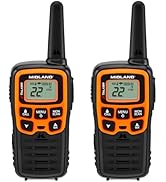
This manual provides comprehensive instructions for the setup, operation, maintenance, and troubleshooting of your Midland T10 X-TALKER Two-Way Radios. These radios offer reliable communication with 22 FRS channels and 38 privacy codes, along with NOAA Weather Alert capabilities, making them suitable for various outdoor activities and general use.
Ce este în cutie
Your Midland T10 X-TALKER package includes the following items:
- Two (2) Midland T10 X-TALKER Two-Way Radios
- Two (2) Belt Clips
- One (1) Owner's Manual

Descrierea imaginii: Un de sus în jos view of the package contents, showing two black Midland X-TALKER radios, two black belt clips, and an owner's manual, all neatly arranged.
Caracteristici terminateview
The Midland T10 X-TALKER radios are designed for clear and efficient communication with several key features:
- 22 de canale FRS: Provides a wide range of communication options.
- 38 CTCSS Privacy Codes: Enhances communication privacy by filtering out unwanted transmissions.
- NOAA Weather Scan + Alert: Automatically scans 10 weather band channels and alerts you to severe weather.
- eVOX (Easy Voice and Sound Activated Transmission): Allows for hands-free operation.
- Comunicare pe distanță lungă: Optimized for extended range in open areas.
- Design compact și ușor: Easy to carry and handle.
- Ecran LCD retroiluminat: Oferă vizibilitate în condiții de lumină slabă.

Descrierea imaginii: Un prim plan view of the Midland T10 X-TALKER radio, with key features labeled: Push to Talk Button, Channel Display, VOX - Hands-Free Communication, Battery Meter, Menu, Scan, Silent Operation, and WX (Weather) button.
Înființat
Instalarea bateriei
The Midland T10 radios are designed to operate with a rechargeable Li-ion battery (Model: BL-10C, 3.7V/1200mAh). To install the battery:
- Remove the belt clip by pinching the release tab and sliding the clip upwards.
- Deschideți capacul compartimentului bateriilor situat pe spatele radioului.
- Insert the BL-10C Li-ion battery into the compartment, ensuring correct polarity.
- Replace the battery compartment cover and reattach the belt clip.
Încărcarea bateriei
To charge your Midland T10 radio:
- Locate the USB-C charging port on the side of the radio, protected by a rubber flap.
- Connect the provided USB-C charging cable to the radio's charging port.
- Conectați celălalt capăt al cablului USB la o sursă de alimentare USB compatibilă (de exemplu, adaptor de perete, port USB al computerului).
- Indicatorul bateriei de pe ecranul LCD va afișa starea de încărcare.
Descrierea videoclipului: A user demonstrates how to remove the belt clip, open the battery compartment, insert the rechargeable Li-ion battery, and then connect the USB-C charging cable to the radio. The video also shows the battery specifications on the battery itself.
Operare de bază
Pornire/Oprire
Pentru a porni sau opri radioul, apăsați și mențineți apăsat butonul MENU/PUTERE button located below the display.
Controlul volumului
Reglați volumul folosind UP şi JOS arrow buttons. The current volume level will be displayed on the screen.
Selectarea canalului
Pentru a selecta un canal:
- Apăsați tasta MENIU Apăsați butonul o dată. Numărul canalului va clipi.
- Utilizați UP or JOS butoanele săgeată pentru a selecta canalul dorit (1-22).
- Apăsați tasta MENIU button again to confirm your selection, or wait a few seconds for the radio to automatically confirm.
Apăsați pentru a vorbi (PTT)
Pentru a transmite, apăsați și mențineți apăsat butonul PTT button located on the left side of the radio. Speak clearly into the microphone. Release the PTT button to receive transmissions.
Caracteristici avansate
Privacy Codes (CTCSS)
The T10 radios feature 38 CTCSS (Continuous Tone Coded Squelch System) Privacy Codes to minimize interference from other users on the same channel. To set a privacy code:
- Apăsați tasta MENIU Apăsați butonul de două ori. Numărul codului de confidențialitate va clipi.
- Utilizați UP or JOS arrow buttons to select your desired privacy code (1-38).
- Apăsați tasta MENIU button again to confirm, or wait for automatic confirmation.
Notă: Ambele radiouri trebuie să fie pe același canal și cu același cod de confidențialitate pentru a comunica.
Scanare meteo NOAA + alertă
Stay informed about weather conditions with the NOAA Weather Scan and Alert feature:
- Weather Scan: Țineți apăsat butonul WX button to activate NOAA Weather Scan. The radio will automatically scan through 10 available weather (WX) band channels and lock onto the strongest weather channel.
- Alertă meteo: When activated, the NOAA Weather Alert will sound an alarm indicating a risk of severe weather in your area. NOAA Weather Radio also broadcasts AMBER alerts.
eVOX (Hands-Free Operation)
The eVOX feature allows you to transmit without pressing the PTT button. The radio detects your voice and automatically transmits. Refer to the owner's manual for detailed eVOX sensitivity settings.
Autonomie și performanță
The Midland T10 X-TALKER radios offer varying ranges depending on terrain and obstructions:
- No Obstruction: Up to 20 miles in open areas with clear line of sight.
- Partial Obstruction: 2-5 miles in areas with some trees or light buildings.
- Obstrucționat: Less than 1 mile in urban areas with heavy buildings or dense foliage.
Descrierea imaginii: A diagram showing three scenarios for radio range: 'No Obstruction' (up to 20 miles), 'Partial Obstruction' (2-5 miles with trees), and 'Obstructed' (less than 1 mile with city buildings). Actual distance may vary.
Descrierea videoclipului: O prezentare video oficială a produsuluiasing the Midland X-TALKER T10 walkie-talkie, highlighting its features and ease of use for various communication needs.
Întreţinere
To ensure optimal performance and longevity of your Midland T10 radios:
- curatenie: Folosiți un moale, damp o lavetă pentru curățarea exteriorului radioului. Nu utilizați substanțe chimice dure sau produse de curățare abrazive.
- Îngrijirea bateriei: Fully charge batteries before extended storage. If storing for long periods, remove batteries.
- Depozitare: Store radios in a cool, dry place away from extreme temperatures and direct sunlight.
- Rezistenta la apa: The radios are water resistant. Avoid submerging them in water. Ensure the USB-C port cover is securely closed when not charging.
Depanare
If you experience issues with your Midland T10 radios, try the following:
- Fără putere: Check battery charge level. Ensure batteries are correctly installed.
- Nu se poate transmite/recepționa: Verify both radios are on the same channel and privacy code. Ensure the PTT button is fully pressed when transmitting. Check for obstructions if range is limited.
- Static/Poor Audio: Move to an area with fewer obstructions. Adjust volume. Try a different channel.
- Tastatura blocată: If the keypad is locked, press and hold the lock button (usually the MENU button) until the lock icon disappears from the display.
Specificații
| Greutatea articolului | 2.7 uncii |
| Dimensiunile produsului | 2 x 1.2 x 5.5 inci |
| Numărul de model al articolului | T10 |
| Tip baterie | Rechargeable Li-ion (BL-10C, 3.7V/1200mAh) |
| Numărul de canale | 22 |
| Gama de frecvente | 400-512 MHz |
| Raza de vorbire maximă | 20 Miles (in optimal conditions) |
| Nivel de rezistență la apă | Rezistent la apă |
| Producător | Midland |
Garanție și suport
The Midland T10 X-TALKER Two-Way Radios come with a Three Year Warranty. For warranty claims, technical support, or additional information, please refer to the contact details provided in your owner's manual or visit the official Midland website-ul.


