1. Introducere
This manual provides detailed instructions for the proper use, setup, and maintenance of your Genius HS-920BT Bluetooth Headset. Please read this manual thoroughly before using the device to ensure optimal performance and longevity.
The Genius HS-920BT is a versatile Bluetooth headset designed for wireless audio streaming and hands-free communication with compatible devices such as smartphones, tablets, and PCs.
2. Conținutul pachetului
Verificați dacă toate articolele sunt prezente în colet:
- Genius HS-920BT Bluetooth Headset
- Cablu de încărcare USB
- Multi-language User Manual (this document)
3. Produs terminatview
The HS-920BT headset features an adjustable headband and comfortable earcups, integrating controls for audio playback and call management.
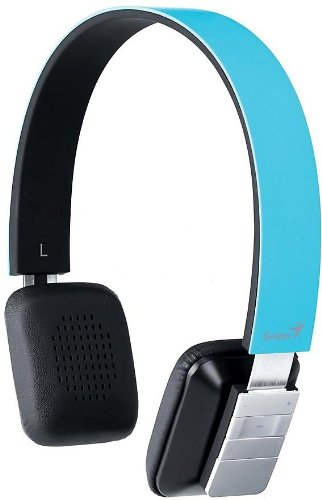
Figure 1: Genius HS-920BT Bluetooth Headset (Blue)
This image displays the Genius HS-920BT Bluetooth Headset in blue, viewed from an angle, highlighting its adjustable headband and earcup design.
Caracteristici cheie:
- Wireless Bluetooth connectivity for audio and calls (A2DP support)
- Integrated rechargeable Lithium-Ion battery
- Microfon încorporat pentru comunicare fără mâini
- On-ear controls for volume adjustment, track skipping (AVRCP support)
- Bandă reglabilă pentru o potrivire confortabilă
- 40 mm driver units for clear sound
4. Configurare
4.1 Încărcarea căștilor
Before initial use, fully charge the headset. Use the provided USB charging cable.
- Conectați capătul mic al cablului de încărcare USB la portul de încărcare de pe căști.
- Connect the larger end of the USB cable to a powered USB port (e.g., computer, USB wall adapter).
- The LED indicator on the headset will illuminate during charging and change color or turn off when fully charged. Refer to the headset's LED behavior for specific indications.
O încărcare completă durează de obicei aproximativ 2-3 ore.
4.2 Împerecherea cu un dispozitiv Bluetooth
To use the HS-920BT wirelessly, you must pair it with your Bluetooth-enabled device.
- Pornire: Press and hold the Power button on the headset until the LED indicator flashes, usually alternating blue and red, indicating pairing mode.
- Activați Bluetooth: On your smartphone, tablet, or PC, enable Bluetooth functionality.
- Caută Dispozitive: In your device's Bluetooth settings, search for available devices. The headset should appear as "HS-920BT".
- Selectați și asociați: Select "HS-920BT" from the list. If prompted for a passcode, enter "0000" (four zeros).
- Confirmare: Once paired, the headset's LED indicator will typically flash blue slowly, and your device will confirm the connection.
The headset will automatically attempt to reconnect to the last paired device when powered on, if that device's Bluetooth is active and within range.
5. Instrucțiuni de utilizare
The HS-920BT features intuitive controls located on the earcup.

Figure 2: Earcup Controls of HS-920BT
This image shows a close-up of the right earcup of the Genius HS-920BT Bluetooth Headset, detailing the control buttons for power, volume, and track navigation.
5.1 Pornire/Oprire
- Pornire: Apăsați și țineți apăsat butonul de pornire timp de aproximativ 3 secunde, până când indicatorul LED clipește în albastru.
- Oprire: Apăsați și mențineți apăsat butonul de pornire timp de aproximativ 3 secunde, până când indicatorul LED se stinge.
5.2 Redarea muzicii
- Redare/Pauză: Apăsați butonul Redare/Pauză o dată.
- Următoarea piesă: Press the "Next Track" button (usually marked with a forward arrow).
- Pista anterioară: Press the "Previous Track" button (usually marked with a backward arrow).
5.3 Gestionarea apelurilor
- Răspundeți/Terminați apelul: Press the Multi-function button (often the same as Play/Pause) once during an incoming call to answer, or once during a call to end it.
- Respinge apelul: Apăsați și mențineți apăsat butonul multifuncțional timp de aproximativ 2 secunde în timpul unui apel primit.
- Reapelează ultimul număr: Apăsați de două ori butonul multifuncțional atunci când nu sunteți în timpul unui apel.
5.4 Controlul volumului
- Creșteți volumul: Apăsați butonul de creștere a volumului (+).
- Reduceți volumul: Apăsați butonul de reducere a volumului (-).
6. Întreținere
Proper care ensures the longevity of your headset.
- curatenie: Folosiți o lavetă moale și uscată pentru a curăța setul cu cască. Nu utilizați substanțe de curățare abrazive sau solvenți.
- Depozitare: Depozitați setul cu cască într-un loc răcoros și uscat, ferit de lumina directă a soarelui și de temperaturi extreme.
- Îngrijirea bateriei: Pentru a prelungi durata de viață a bateriei, evitați descărcarea completă frecventă a acesteia. Încărcați setul cu cască în mod regulat, chiar dacă nu este utilizat pentru perioade lungi de timp.
- Expunerea la apă: Căștile nu sunt impermeabile. Evitați expunerea la apă sau umiditate excesivă.
7. Depanare
If you encounter issues with your HS-920BT headset, refer to the following common solutions:
| Problemă | Soluție posibilă |
|---|---|
| Căștile nu pornesc. | Ensure the battery is charged. Connect the headset to a power source using the USB cable. |
| Nu se poate asocia căștile cu un dispozitiv. |
|
| Niciun sunet sau volum redus. |
|
| Calitatea apelurilor este slabă. |
|
8. Specificații
| Nume model: | HS-920BT |
| Tehnologie fără fir: | Bluetooth |
| Unități de șofer: | 40 mm |
| Baterie: | Litiu-ion reîncărcabil încorporat |
| Tip control: | Volume Control, Track Navigation, Call Management |
| Microfon: | Încorporat |
| Pro acceptatfiles: | A2DP, AVRCP |
| Platforma hardware: | PC, Smartphone, Tabletă |
| Greutatea articolului: | 110 grame |
| Dimensiuni (Lxlxh): | 13.6 x 17.3 x 2.9 cm |
9. Garanție și asistență
For warranty information and technical support, please refer to the warranty card included with your product or visit the official Genius webPăstrați bonul fiscal ca dovadă a achiziției.
For further assistance, you may contact Genius customer service through their official channels.


