1. Introducere
This manual provides comprehensive instructions for the setup, operation, maintenance, and troubleshooting of your Genius Traveler 9005BT 4-D Bluetooth Mouse. Please read this manual thoroughly before using the device to ensure proper functionality and longevity.
Caracteristici cheie:
- Precision 1200 dpi BlueEye engine for versatile surface tracking.
- Bluetooth 4-button wireless optical mouse.
- Ergonomic design suitable for both left and right-handed users.
- Turbo Scroll function for rapid document and web navigare pe pagină.
- BlueEye technology allows operation on various surfaces including dusted glass, marble, carpet, and sofa upholstery.
- Compatible with multiple operating systems: Android 3.0+, Windows 7/XP/Vista, and Mac OS X 10.4 or later.
2. Conținutul pachetului
Verificați dacă toate articolele enumerate mai jos sunt prezente în ambalajul produsului:
- Genius Traveler 9005BT Mouse
- CD driver for mouse 4-D Scroll function
- Two AA Alkaline batteries
- Manual de utilizare în mai multe limbi
3. Configurare
3.1. Instalarea bateriei
- Localizați capacul compartimentului bateriei pe partea inferioară a mouse-ului.
- Glisați sau ridicați ușor capacul pentru a deschide compartimentul.
- Insert the two AA Alkaline batteries, ensuring correct polarity (+ and -) as indicated inside the compartment.
- Puneți la loc capacul compartimentului bateriei până când se fixează în siguranță cu un clic.
3.2. Asociere Bluetooth
To connect your Traveler 9005BT mouse to your device:
- Ensure the mouse is powered on. There is typically a power switch on the underside of the mouse.
- Activate Bluetooth on your computer, laptop, or Android device.
- On your device, navigate to the Bluetooth settings and initiate a search for new devices.
- The Genius Traveler 9005BT should appear in the list of available devices. Select it to begin the pairing process.
- Follow any on-screen prompts to complete the pairing. A successful connection will be indicated by a confirmation message on your device.
The mouse supports Bluetooth EDR 2.0 technology, providing a reliable working distance of up to 10 meters. It is compatible with Android 3.0+, Windows 7/XP/Vista, and Mac OS X 10.4 or later.
3.3. Driver Installation (for 4-D Scroll Function)
For optimal use of the 4-D Scroll function, install the provided driver:
- Insert the included CD driver into your computer's optical drive.
- Follow the on-screen instructions to install the necessary software.
- Restart your computer if prompted to ensure the driver is fully installed and recognized.
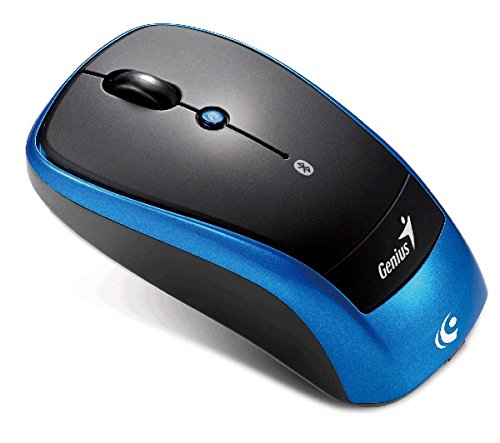
Un deasupra capului view of the Genius Traveler 9005BT 4-D Bluetooth Mouse, showcasing its ergonomic design with a black top surface and blue sides. It features a scroll wheel, left and right click buttons, and a small button for 4-D scroll functionality.
4. Utilizarea mouse-ului
4.1. Funcții de bază
- Click stânga: Press the left button for primary selection and activation.
- Click dreapta: Press the right button to access contextual menus.
- Rotiță de defilare: Roll the wheel up or down to scroll vertically through documents and web pagini.
4.2. 4-D Scroll Function
The Traveler 9005BT features a dedicated 4-D scroll function key. Once the driver is installed, this function allows for more natural and convenient scrolling by simply moving your mouse in the direction you wish to scroll (up, down, left, or right) while holding down the 4-D scroll button.
4.3. Turbo Scroll
Engage the Turbo Scroll feature for hyper-fast navigation through lengthy documents, spreadsheets, and web pages. This function allows you to accelerate scrolling speed, significantly improving efficiency when reviewing extensive content.
4.4. BlueEye Technology
The integrated BlueEye technology enables the mouse to operate on a wide variety of surfaces that traditional optical mice may struggle with. This includes challenging textures such as dusted glass, marble, carpet, and sofa upholstery, providing flexibility in your workspace.
5. Întreținere
5.1. Curatenie
Pentru a menține performanța și aspectul optime:
- Asigurați-vă că mouse-ul este oprit înainte de curățare.
- Folosiți o lavetă moale, uscată și fără scame pentru a șterge suprafețele exterioare.
- Pentru murdăria persistentă, dreaptă ușorampClătiți laveta cu apă sau cu un detergent blând, neabraziv. Evitați umiditatea excesivă.
- Do not use harsh chemicals, solvents, or abrasive materials, as these can damage the mouse's finish or internal components.
- Curățați periodic zona senzorului optic de pe partea inferioară a mouse-ului cu un bețișor de bumbac pentru a preveni problemele de urmărire.
5.2. Înlocuirea bateriei
When the mouse's performance degrades or it stops responding, it may be time to replace the batteries. Follow the battery installation steps outlined in Section 3.1.
6. Depanare
If you encounter issues with your Genius Traveler 9005BT mouse, refer to the following common solutions:
- Mouse-ul nu răspunde:
- Asigurați-vă că mouse-ul este pornit.
- Verificați și înlocuiți bateriile dacă este necesar.
- Verify that Bluetooth is enabled on your device and the mouse is paired correctly. Try re-pairing if needed.
- Mută mouse-ul mai aproape de dispozitiv pentru a elimina problemele de rază de acțiune.
- Mișcare neregulată a cursorului:
- Curățați senzorul optic de pe partea inferioară a mouse-ului.
- Ensure you are using the mouse on a suitable surface. While BlueEye technology is versatile, extreme surfaces or highly reflective ones can still cause issues.
- Check for any obstructions around the optical sensor.
- 4-D Scroll Function Not Working:
- Confirm that the 4-D scroll driver has been installed correctly from the provided CD.
- Reporniți computerul după instalarea driverului.
- Deconectări Bluetooth:
- Asigurați-vă că niciun alt dispozitiv nu cauzează interferențe Bluetooth.
- Actualizați driverele Bluetooth ale dispozitivului.
- Re-pair the mouse with your device.
If these steps do not resolve the issue, consult the multi-language user manual included in your package or contact Genius customer support.
7. Specificații
| Caracteristică | Detaliu |
|---|---|
| Marca | Geniu |
| Numărul de model | Traveler 9005BT |
| Tehnologia de detectare a mișcării | Optical (BlueEye) |
| DPI | 1200 dpi |
| Conectivitate | Bluetooth EDR 2.0 |
| Numărul de butoane | 4 |
| Orientarea mâinii | Ambidextru |
| Sursa de alimentare | 2 baterii alcaline AA (nu sunt incluse) |
| Sisteme de operare compatibile | Windows® 7, Vista, XP / Android 3.0+ / Mac OS X 10.4+ |
| Platformă hardware | Laptop, computer personal |
8. Garanție și asistență
For warranty information, please refer to the documentation provided with your purchase or contact your retailer. Genius products typically come with a limited warranty. For technical support or further assistance, please consult the multi-language user manual included in your package or visit the official Genius website pentru informații de contact.


