Introducere
The Mastech MS6514 is a high-precision, dual-channel digital thermometer designed for accurate temperature measurement and data logging. It supports various thermocouple types (J, K, T, E, R, S, N) and features a USB interface for data transfer to a computer. This manual provides essential information for the safe and effective operation, maintenance, and troubleshooting of your MS6514 thermometer.
Informații de siguranță
Vă rugăm să citiți și să înțelegeți toate instrucțiunile de siguranță înainte de a utiliza dispozitivul. Nerespectarea acestei instrucțiuni poate duce la vătămări corporale sau la deteriorarea instrumentului.
- Do not operate the device if it appears damaged or if the insulation is compromised.
- Ensure correct battery polarity when installing.
- Evitați expunerea dispozitivului la temperaturi extreme, umiditate sau lumina directă a soarelui.
- Nu încercați să reparați sau să modificați dispozitivul. Apelați la personal calificat pentru toate lucrările de service.
- Use only specified thermocouple types and ensure they are properly connected.
- Păstrați aparatul curat și uscat.
Conținutul pachetului
Verificați dacă toate articolele enumerate mai jos sunt prezente în colet:
- Mastech MS6514 Digital Thermometer (1 unit)
- Cablu USB (1 unitate)
- CD Software (1 unit)
- Temperature Probe (2 units)
- Manual de utilizare (acest document)
Produs terminatview
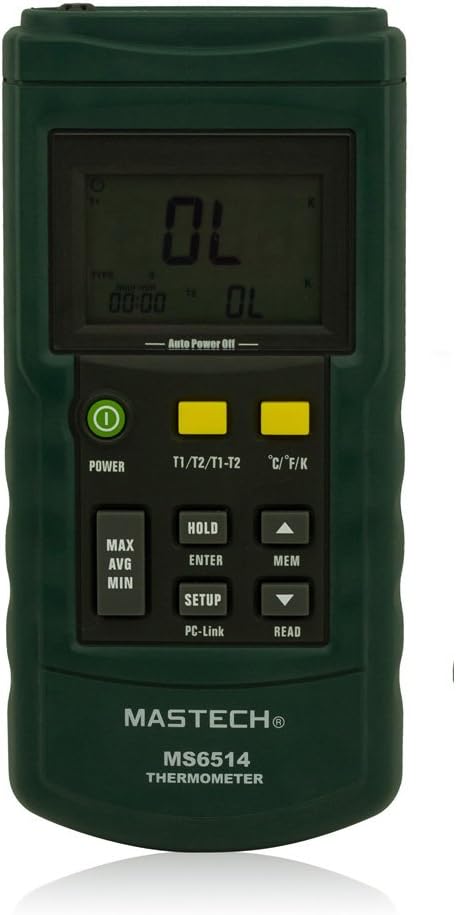
Figura 1: Față view of the MS6514 thermometer, highlighting the LCD display and button layout.

Figura 2: Lateral și spate views illustrating the physical dimensions and battery compartment of the MS6514.

Figure 3: The MS6514 thermometer with its standard accessories, including the USB cable and two temperature probes.
The MS6514 features a clear LCD display, intuitive button controls, and robust construction. Key components include:
- Display LCD: Shows temperature readings, units, time, and various indicators.
- Butonul de pornire: Pornește sau oprește dispozitivul.
- Buton T1/T2/T1-T2: Toggles between displaying temperature from probe 1, probe 2, or the difference between T1 and T2.
- Buton °C/°F/K: Schimbă unitatea de temperatură între Celsius, Fahrenheit și Kelvin.
- Butonul MAX/AVG/MIN: Cycles through maximum, average, and minimum recorded temperature values.
- HOLD/ENTER/SETUP Button: Holds the current reading, confirms selections in setup mode, or enters setup mode.
- MEM/READ Button: Accesses memory functions to store or recall data.
- Săgeți sus/jos: Navigate menus or adjust settings.
- Port USB: For connecting to a computer for data transfer.
- Thermocouple Inputs (T1, T2): Jacks for connecting K-type thermocouples.
Înființat
1. Instalarea bateriei
- Localizați compartimentul bateriei de pe spatele dispozitivului.
- Deschideți capacul bateriei.
- Introduceți o baterie nouă de 9V, respectând polaritatea corectă (+/-).
- Închideți bine capacul bateriei.
2. Conectarea termocuplului
- Identify the T1 and T2 input jacks at the top of the thermometer.
- Connect your desired thermocouple probes into the T1 and/or T2 jacks. Ensure a firm connection.
- Note: The device supports J, K, T, E, R, S, N type thermocouples. Ensure the correct type is selected in the device settings for accurate readings.
3. Software Installation (for Data Logging)
- Insert the provided CD Software into your computer's CD/DVD drive.
- Follow the on-screen instructions to install the necessary drivers and data logging software.
- Connect the MS6514 to your computer using the supplied USB cable.
- Launch the installed software to begin data transfer and logging.
Instrucțiuni de operare
Pornire/Oprire
Apăsați tasta PUTERE button to turn the thermometer on or off. The device features an automatic shutdown function to conserve battery life; the auto-off time can be configured in the setup menu.
Selecting Temperature Units (°C/°F/K)
Apăsați tasta °C/°F/K button to cycle through Celsius, Fahrenheit, and Kelvin temperature units.
Dual Input Display (T1, T2, T1-T2)
Apăsați tasta T1/T2/T1-T2 button to switch the display between:
- T1: Temperature reading from the first thermocouple input.
- T2: Temperature reading from the second thermocouple input.
- T1-T2: The temperature difference between the two inputs.
Maximum, Minimum, and Average Measurement
Apăsați tasta MAX/AVG/MIN butonul pentru a view the maximum, minimum, or average temperature recorded since the last reset or power-on. Press repeatedly to cycle through these values.
Reținere de date
Apăsați tasta ȚINE button (short press) to freeze the current temperature reading on the display. Press again to release the hold function.
Data Logging and Memory
The MS6514 can store up to 1000 data points, either automatically or manually.
- Depozitare manuală: While in normal measurement mode, press the MEM button (short press) to manually save the current reading.
- Automatic Storage: Configure the automatic storage interval in the setup menu. The device will log data at the set interval.
- Reading Stored Data: Țineți apăsat butonul MEM , apoi utilizați butonul Sus/Jos arrows to scroll through stored data points.
USB Interface for Data Transfer
Connect the thermometer to your computer using the USB cable. Use the provided software to transfer logged data, view real-time readings, and configure device settings from your computer.
User Auto-Calibration and Thermocouple Deviation Compensation
The device features a user auto-calibration function and thermocouple deviation compensation to ensure accuracy. Refer to the detailed instructions in the software manual or the device's internal setup menu for proper execution of these functions. It is crucial to understand the procedure before attempting self-calibration.
Întreţinere
Curatenie
Ștergeți dispozitivul cu un material moale, damp lavetă. Nu utilizați substanțe de curățare abrazive sau solvenți. Asigurați-vă că dispozitivul este uscat înainte de depozitare sau de următoarea utilizare.
Înlocuirea bateriei
When the low battery indicator appears on the display, replace the 9V battery as described in the "Battery Installation" section. Remove the battery if the device will not be used for an extended period.
Depozitare
Store the thermometer in a cool, dry place, away from direct sunlight and extreme temperatures. Keep it in its protective case (if provided) to prevent damage.
Depanare
| Problemă | Cauza posibila | Soluţie |
|---|---|---|
| Dispozitivul nu pornește. | Baterie descărcată sau descărcată; instalare incorectă a bateriei. | Înlocuiți bateria de 9V; asigurați-vă că polaritatea este corectă. |
| Citiri inexacte ale temperaturii. | Incorrect thermocouple type selected; damaged thermocouple; need for calibration. | Verify thermocouple type in settings; check thermocouple for damage and replace if necessary; perform user auto-calibration. |
| Cannot connect to PC via USB. | Driver not installed or corrupted; faulty USB cable/port; software issue. | Reinstall drivers from the provided CD; try a different USB cable or port; ensure software is running correctly. |
| "OL" or "---" displayed. | Temperature out of range; open thermocouple circuit. | Ensure temperature is within specified range; check thermocouple connection and integrity. |
Specificații
| Parametru | Valoare |
|---|---|
| Material | Carcasa ABS |
| Supported Thermocouple Types | J, K, T, E, R, S, N |
| Unități de temperatură | °C, °F, K (Kelvin) |
| Measurement Range (K-type) | -200.0°C până la +1372°C / -328.0°F până la +2501°F |
| Measurement Range (J-type) | -210.0°C până la +1200°C / -346.0°F până la +2192°F |
| Measurement Range (T-type) | -250.0°C până la +400°C / -418.0°F până la +752°F |
| Measurement Range (E-type) | -150.0°C până la +1000°C / -238.0°F până la +1832°F |
| Measurement Range (R-type) | 0°C până la +1767°C / 32°F până la +3212°F |
| Measurement Range (S-type) | 0°C până la +1767°C / 32°F până la +3212°F |
| Measurement Range (N-type) | -200.0°C până la +1300°C / -328.0°F până la +2372°F |
| Rezoluția afișajului | 0.1°C / °F / K (for values <1000); 1°C / °F / K (for values ≥1000, R/S types) |
| Accuracy (K, J, T, E) | ±(0.2% + 0.5°C) |
| Accuracy (R, S) | ±(0.2% + 1°C) |
| Accuracy (N) | ±(0.2% + 0.5°C) |
| Scala de temperatură | STI-90 |
| Standarde aplicabile | NIST-175 |
| Capacitate de stocare a datelor | 1000 data points (automatic and manual) |
| Interfață | USB |
| Alimentare electrică | baterie de 9V |
| Dimensiuni (L x l x H) | Aprox. 188 mm x 85 mm x 39 mm (7.5 x 3.3 x 1.5 inci) |
| Greutate | Aproximativ 1.12 livre |
Garanție și suport
Warranty information for the Mastech MS6514 Digital Thermometer is typically provided with your purchase documentation. Please refer to the warranty card or contact your point of purchase for specific details regarding warranty coverage and duration.
For technical support, service, or inquiries not covered in this manual, please contact Mastech customer service or visit the official Mastech website. Contact information can usually be found on the product packaging or the manufacturer's website-ul.


