1. Introducere
This manual provides comprehensive instructions for the installation, operation, and maintenance of the Chief LVSXU Portrait Hardware Mount. The Chief ConnexSys Video Wall Mounting System is designed to simplify video wall installations by addressing common challenges related to speed, alignment, serviceability, and rigidity. It facilitates the leveling of multiple mounts on a single strut channel, accommodating large-scale requirements efficiently.
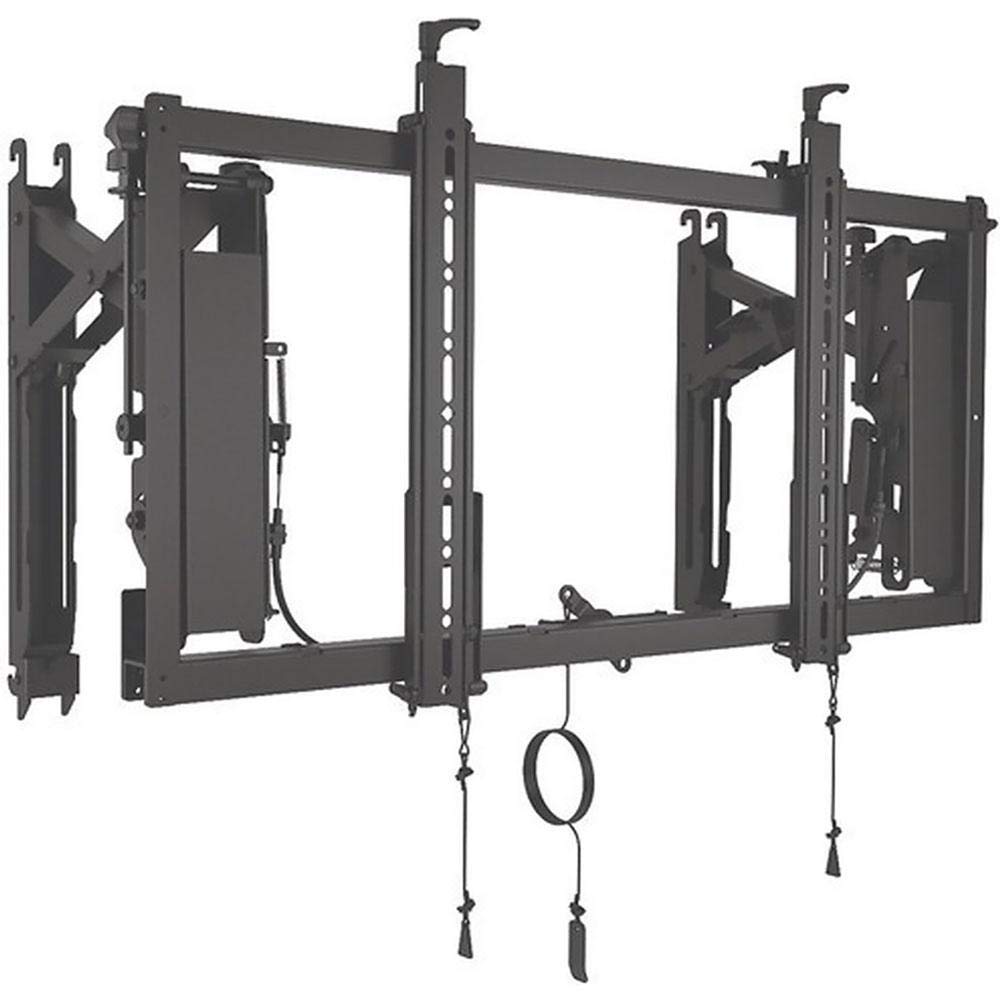
Figura 1: The Chief LVSXU Portrait Hardware Mount, a black metal structure designed for mounting televisions or monitors in a portrait orientation. It features multiple vertical and horizontal bars, adjustment mechanisms, and pull cords for release, indicating its use in video wall configurations.
2. Informații de siguranță
Please read all instructions carefully before installation and use. Failure to follow these instructions may result in property damage, serious injury, or death. Keep this manual for future reference.
- Asigurați-vă că suprafața de montare poate susține în siguranță greutatea combinată a suportului și a afișajului.
- Folosiți unelte și accesorii adecvate pentru instalare. Dacă nu sunteți sigur, consultați un profesionist calificat.
- Nu depășiți capacitatea maximă de greutate a monturii.
- Țineți copiii și animalele de companie departe în timpul instalării.
- Verificați periodic toate elementele de fixare pentru a vă asigura că sunt fixate.
3. Conținutul pachetului
The Chief LVSXU package includes the following components:
- Video Wall Landscape Mounting System (LVSXU)
- (Additional hardware such as screws, washers, and spacers may be included depending on the specific kit configuration.)
4. Configurare și instalare
Follow these steps for proper installation of the Chief LVSXU mount:
- Pregătiți suprafața de montare: Identify the desired location for your video wall. Ensure the wall structure is capable of supporting the total weight of the mount and displays. Walls can be out of alignment by up to 2 inches horizontally, which the system is designed to accommodate.
- Install Strut Channel: Mount a single strut channel horizontally across the desired installation area. This channel will serve as the primary support for multiple LVSXU units, enabling quick row leveling.
- Attach Mount Units: Hang the LVSXU units onto the installed strut channel. The design eliminates the need for horizontal spacers between units, streamlining the installation process.
- Determine Vertical Spacing: The vertical measurement for subsequent rails is simply the height of the display. This simplifies planning and execution for multi-row video walls.
- Secure Displays: Attach your television or monitor to the LVSXU mount. Ensure all connections are secure and tightened according to the display manufacturer's recommendations.
Nota: For detailed diagrams and specific hardware instructions, refer to the supplementary installation guide provided with your product.
5. Funcționare
The Chief LVSXU mount is designed for straightforward operation, primarily focusing on display positioning and adjustment.
5.1 Reglarea înclinării
The mount features a tilt adjustment mechanism at a single pivot point. This design protects displays from twisting during adjustment. To adjust the tilt:
- Locate the tilt adjustment mechanism on the mount.
- Carefully adjust the display to the desired tilt angle. The maximum tilt angle is 4 degrees.
- Ensure the display is stable and securely positioned after adjustment.
5.2 Capacitatea de service
The ConnexSys system is engineered for enhanced serviceability, allowing for easy access to individual displays within a video wall for maintenance or replacement without disturbing adjacent units.
6. Întreținere
Regular maintenance ensures the longevity and safe operation of your Chief LVSXU mount.
- curatenie: Folosește o cârpă moale și uscată pentru a șterge suportul. Evită substanțele de curățare abrazive sau solvenții care ar putea deteriora finisajul.
- Verificarea elementelor de fixare: Periodically (e.g., every 6-12 months) inspect all mounting bolts and screws to ensure they remain tight and secure. Retighten if necessary.
- Inspecția deteriorării: Check for any signs of wear, corrosion, or damage to the mount components. If any damage is observed, contact Chief customer support for assistance. Do not attempt to repair damaged components yourself.
7. Depanare
This section addresses common issues you might encounter with your Chief LVSXU mount.
| Problemă | Cauza posibila | Soluţie |
|---|---|---|
| Display appears uneven or not level. | Improper strut channel installation or display attachment. | Verify the strut channel is perfectly level. Re-check how the LVSXU units are hung and ensure displays are properly seated. The system is designed for quick row leveling. |
| Difficulty adjusting tilt. | Fasteners too tight or obstruction. | Ensure no cables or other obstructions are interfering with the tilt mechanism. Check if any adjustment screws are overtightened. |
| Montura pare instabilă. | Loose fasteners or inadequate wall support. | Immediately remove the display. Re-inspect all wall fasteners and mount connections. Ensure the wall structure meets load requirements. Consult a professional if necessary. |
8. Specificații
| Caracteristică | Detaliu |
|---|---|
| Marca | Şef |
| Numărul de model | LVSXU |
| Dimensiunile produsului | 35.55 x 4.02 x 21.81 inci |
| Greutatea articolului | 37 lire sterline |
| Tip de montare | Înclinare |
| Tipul de mișcare | Înclinare |
| Material | Metal |
| Culoare | Negru |
| Dispozitive compatibile | Television, Monitor |
| Unghi maxim de înclinare | 4 de grade |
| Caracteristici speciale | Portrait orientation support |
| UPC | 841872161174 |
| Producător | Chief Mfg. |
9. Informații despre garanție
Chief products are manufactured to high standards and are backed by a limited warranty. For specific warranty terms and conditions applicable to your LVSXU Portrait Hardware Mount, please refer to the warranty card included with your product or visit the official Chief webPăstrați dovada achiziției pentru reclamații în garanție.
10. Asistență pentru clienți
If you have any questions, require technical assistance, or need to report an issue with your Chief LVSXU Portrait Hardware Mount, please contact Chief customer support.
- Website: Visit the official Chief website pentru întrebări frecvente, documentație despre produs și informații de contact.
- Telefon: Refer to the contact details provided on the Chief webamplasamentul sau ambalajul produsului.
When contacting support, please have your product model number (LVSXU) and proof of purchase readily available.


