1. Introducere
This manual provides detailed instructions for the installation, operation, and maintenance of your Axis P1355 Surveillance/Network Camera. The Axis P13 series offers high-performance fixed cameras designed for both indoor and outdoor surveillance, delivering superb image quality with H.264 compression. These models support HDTV 720p/1080p video and are equipped with features like Wide Dynamic Range and Day/Night functionality for clear imaging in various lighting conditions. Specific models within the P13 series, including HDTV 720p, incorporate Axis Lightfinder technology for enhanced low-light sensitivity, while HDTV 1080p and 5-megapixel cameras feature P-iris control for optimized depth of field and lens resolution.
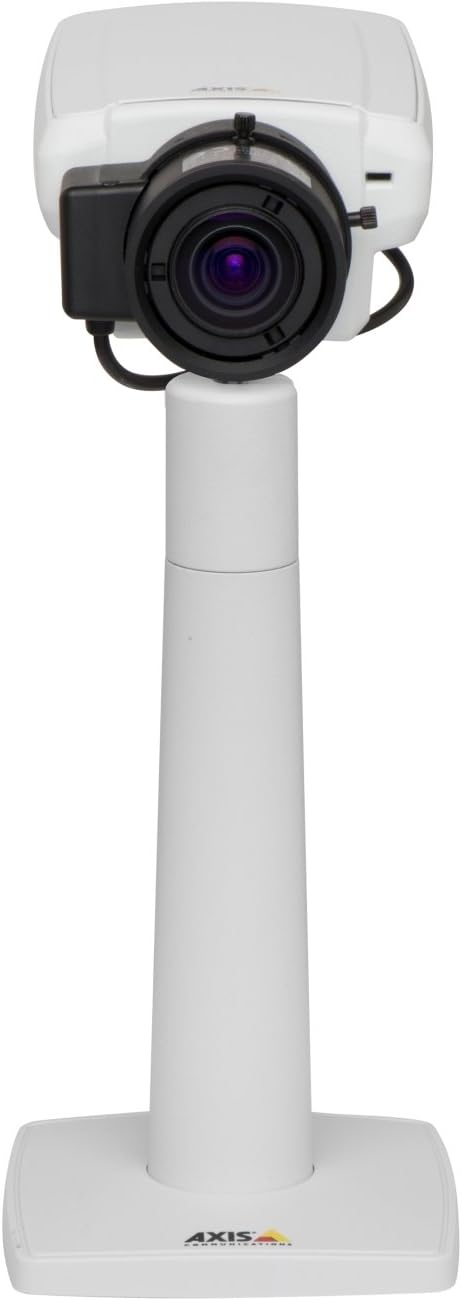
Figura 1: The Axis P1355 Surveillance Camera shown mounted on its stand. This image illustrates the camera's physical appearance and typical mounting configuration.
2. Informații de siguranță
Please read all safety instructions before installing or operating the camera.
- Ensure the power source matches the camera's requirements to prevent electrical hazards.
- Instalarea trebuie efectuată de către personal calificat, în conformitate cu codurile electrice locale.
- Do not expose the camera to extreme temperatures, humidity, or corrosive environments.
- Avoid direct exposure of the lens to strong light sources, such as the sun, as this may damage the image sensor.
- Disconnect power before cleaning or servicing the camera.
3. Configurare și instalare
The Axis P1355 camera is designed for both indoor and outdoor use and supports various mounting options.
3.1 Montare
The camera is typically designed for wall mount installation. Ensure the mounting surface is strong enough to support the camera's weight (approximately 2 pounds). Use appropriate screws and anchors for the chosen surface.
- Select a suitable location for optimal surveillance coverage.
- Securely attach the mounting bracket to the wall.
- Mount the camera onto the bracket, ensuring it is firmly in place.
- Adjust the camera's angle for the desired field of view.
3.2 Conexiuni
The Axis P1355 camera primarily uses wired connectivity for reliable data transmission and power.
- Conexiune de alimentare: Connect the provided power adapter to the camera's power input and then to a suitable electrical outlet. The camera operates on a corded electric power source.
- Conexiune retea: Connect an Ethernet cable from the camera's network port to your network switch or router. This provides wired connectivity for video streaming and control.
- Wireless Connectivity (Optional/Configuration): While primarily wired, the camera supports Wi-Fi for certain configurations. Refer to the Axis product documentation for specific wireless setup instructions if applicable to your model variant.
4. Instrucțiuni de utilizare
Once installed and connected, the Axis P1355 camera can be configured and operated via a network interface.
4.1 Acces inițial și configurare
- Use the Axis IP Utility or a similar network discovery tool to find the camera's IP address on your network.
- Deschide a web browser and enter the camera's IP address to access its web interfata.
- Log in using the default credentials (refer to Axis documentation for default username/password, typically 'root' and 'pass' or similar, which should be changed immediately).
- Follow the on-screen prompts to set up basic network settings, date/time, and user accounts.
4.2 Video Monitoring and Features
- Trăi View: Access the live video feed through the web interface or compatible video management software.
- Rezoluţie: The camera supports video capture resolutions up to 720p and effective video resolutions of 1080 pixels, with effective still resolution of 2 MP.
- Color and Monochrome Modes: The camera can operate in both color and monochrome (black and white) modes, automatically switching based on light conditions or configured manually.
- Vedere de noapte: Utilize the integrated night vision capabilities for surveillance in low-light or complete darkness.
- Zoom optic: Adjust the optical zoom for detailed views of specific areas.
- P-Iris Control: For models equipped with P-iris, this feature allows precise control over the iris position to optimize depth of field and lens resolution, enhancing image sharpness. This can be configured via the web interfata.
- Format video: Video is typically captured in MP4 format.
- Telecomanda: The camera supports remote control for various settings and adjustments.
5. Întreținere
Regular maintenance ensures optimal performance and longevity of your Axis P1355 camera.
- curatenie: Curățați ușor obiectivul și carcasa camerei cu o lavetă moale șiamp Evitați utilizarea de produse de curățare abrazive sau solvenți.
- Actualizări firmware: Periodically check the Axis Communications website pentru actualizări de firmware. Menținerea firmware-ului actualizat asigură accesul la cele mai recente funcții, corecții de securitate și îmbunătățiri de performanță.
- Verificarea cablului: Regularly inspect all cables for signs of wear or damage, especially for outdoor installations.
- Verificare de mediu: Ensure the camera's operating environment remains within specified temperature and humidity ranges.
6. Depanare
This section addresses common issues you might encounter with your Axis P1355 camera.
- Fără putere:
- Verify the power adapter is securely connected to both the camera and a working power outlet.
- Verificați cablul de alimentare pentru orice deteriorare.
- Fără conexiune la rețea:
- Ensure the Ethernet cable is properly connected to the camera and the network switch/router.
- Check network switch/router status.
- Confirm the camera has a valid IP address and is on the same network segment as your viewdispozitiv de ing.
- Calitate slabă a imaginii:
- Curățați obiectivul camerei.
- Adjust focus and zoom settings via the web interfata.
- Check lighting conditions; enable night vision or adjust exposure settings if necessary.
- Ensure P-iris control is correctly configured for optimal sharpness (if applicable).
- Nu se poate accesa Web Interfata:
- Verify the camera's IP address.
- Ensure your computer is on the same network as the camera.
- Try restarting the camera and your network equipment.
7. Specificații
| Caracteristică | Detaliu |
|---|---|
| Marca | Axis Communications |
| Numărul de model | AXIS P1355 |
| Utilizare în interior/exterior | În interior, în aer liber |
| Tehnologia de conectivitate | Wired (Wi-Fi capable for certain configurations) |
| Caracteristica specială | Vedere de noapte |
| Sursa de alimentare | Corded Electric (7.1 watts) |
| Rezoluție captură video | 720p |
| Rezoluție video eficientă | 1080 pixeli |
| Rezoluție statică efectivă | 2 MP |
| Tip de zoom | Optical Zoom (2.9x Optical) |
| Tip controler | Iris (P-iris control) |
| Tip de montare | Montare pe perete |
| Dimensiuni produs (L x l x H) | 3.07 x 5.94 x 1.69 inci |
| Greutatea articolului | 2 lire sterline |
| Evaluarea internațională de protecție | IP54 |
| Format de captură video | MP4 |
8. Garanție și asistență
For detailed warranty information and technical support, please refer to the official Axis Communications website-ul lor sau contactați direct serviciul lor de asistență pentru clienți.
Producător: AXIS COMMUNICATION INC.
Website: www.axis.com (Vă rugăm să vizitați site-ul oficial website for the most current support resources, drivers, and documentation.)


