1. Introducere
This manual provides detailed instructions for the Gembird KB-BT-001-W-DE Slimline Bluetooth Keyboard. Please read this manual thoroughly before using the product to ensure proper operation and to maximize its lifespan. This keyboard is designed for seamless wireless connectivity with various Bluetooth-enabled devices.
2. Conținutul pachetului
- Gembird KB-BT-001-W-DE Bluetooth Keyboard (German QWERTZ Layout, White)
- Cablu USB
- Manual de utilizare
3. Caracteristici cheie
- Slimline Bluetooth V 3.0 Wireless Keyboard (German QWERTZ Layout)
- Ultra-flat and ergonomic design
- Supports common Bluetooth-enabled devices: smartphones, tablets, PCs, and laptops
- Soft-touch keys for comfortable typing
- Convenient multimedia keys
- Compact size (28.7 x 2 x 13.7 cm) ideal for travel
- Compatible with Windows (XP, Vista, 7, 8) and Apple (iPad, iPhone, iPod Touch, MAC OS)
- Rază de acțiune: Până la 10 metri
4. Cerințe de sistem
- Device with Bluetooth connectivity (e.g., PC, laptop, tablet, smartphone)
- Supported Operating Systems: Windows XP/Vista/7/8, Apple iOS (iPad, iPhone, iPod Touch), Mac OS
5. Configurare și asociere
5.1. Pornirea tastaturii
Locate the power switch on the keyboard, usually on the side or back. Slide it to the "ON" position. The keyboard's indicator light (often blue or green) should illuminate briefly, indicating it is powered on and ready for pairing.
5.2. Împerecherea cu dispozitivul dvs.
- Activați Bluetooth pe dispozitivul dvs.: Accesați setările dispozitivului și asigurați-vă că Bluetooth este activat.
- Intrați în modul de asociere: On the Gembird keyboard, press the Conectați-vă or Împerechere button (if available, typically a small button on the back or bottom, or a key combination like Fn + C). The indicator light should start blinking rapidly, signifying it is in pairing mode.
- Caută Dispozitive: On your device, search for available Bluetooth devices. The keyboard should appear as "Gembird KB-BT-001-W-DE" or similar.
- Selectați și conectați: Select the keyboard from the list. Your device may prompt you to enter a pairing code displayed on the screen. Type this code using the Gembird keyboard and press Intră.
- Confirmare: Once successfully paired, the indicator light on the keyboard will stop blinking and remain solid or turn off, and your device will show the keyboard as "Connected."
Note: The exact pairing process may vary slightly depending on your device's operating system. Refer to your device's manual for specific Bluetooth pairing instructions.
6. Instrucțiuni de utilizare
6.1. Utilizare de bază
Once paired, the keyboard functions like a standard QWERTZ keyboard. Simply begin typing. Ensure the keyboard is within the 10-meter operating range of your device for optimal performance.
6.2. Taste multimedia și funcționale
The Gembird KB-BT-001-W-DE keyboard includes dedicated function keys (F1-F12) and multimedia shortcuts. To activate the secondary functions (blue icons) on the F-keys, press and hold the Fn key (located near the left Ctrl key) and then press the desired F-key.
| Combinație de taste | Funcţie | Descriere |
|---|---|---|
| Fn + F1 | F11 | Standard F11 key function. |
| Fn + F2 | F12 | Standard F12 key function. |
| Fn + F3 | Deschide clientul de e-mail implicit. | |
| Fn + F4 | Browser/Pagina principală | Se deschide implicit web browser or navigates to home page. |
| Fn + F5 | Media Player | Launches default media player. |
| Fn + F6 | Piesa anterioară | Skips to the previous track in media playback. |
| Fn + F7 | Redare/Pauză | Toggles play/pause for media playback. |
| Fn + F8 | Următoarea piesă | Skips to the next track in media playback. |
| Fn + F9 | Mut | Dezactivează/activează sunetul. |
| Fn + F10 | Reducerea volumului | Reduce volumul sistemului. |
| Fn + F11 | Creșterea volumului | Mărește volumul sistemului. |
| Fn + F12 | Blocare ecran | Locks the computer screen. |
| Fn + Num Lock | Numeric Keypad Toggle | Activates/deactivates the embedded numeric keypad (U, I, O, J, K, L, M keys). |
6.3. Keyboard Layout (German QWERTZ)
This keyboard features a German QWERTZ layout. Key positions for special characters and symbols may differ from standard QWERTY layouts. Refer to the keycaps for specific character placements.
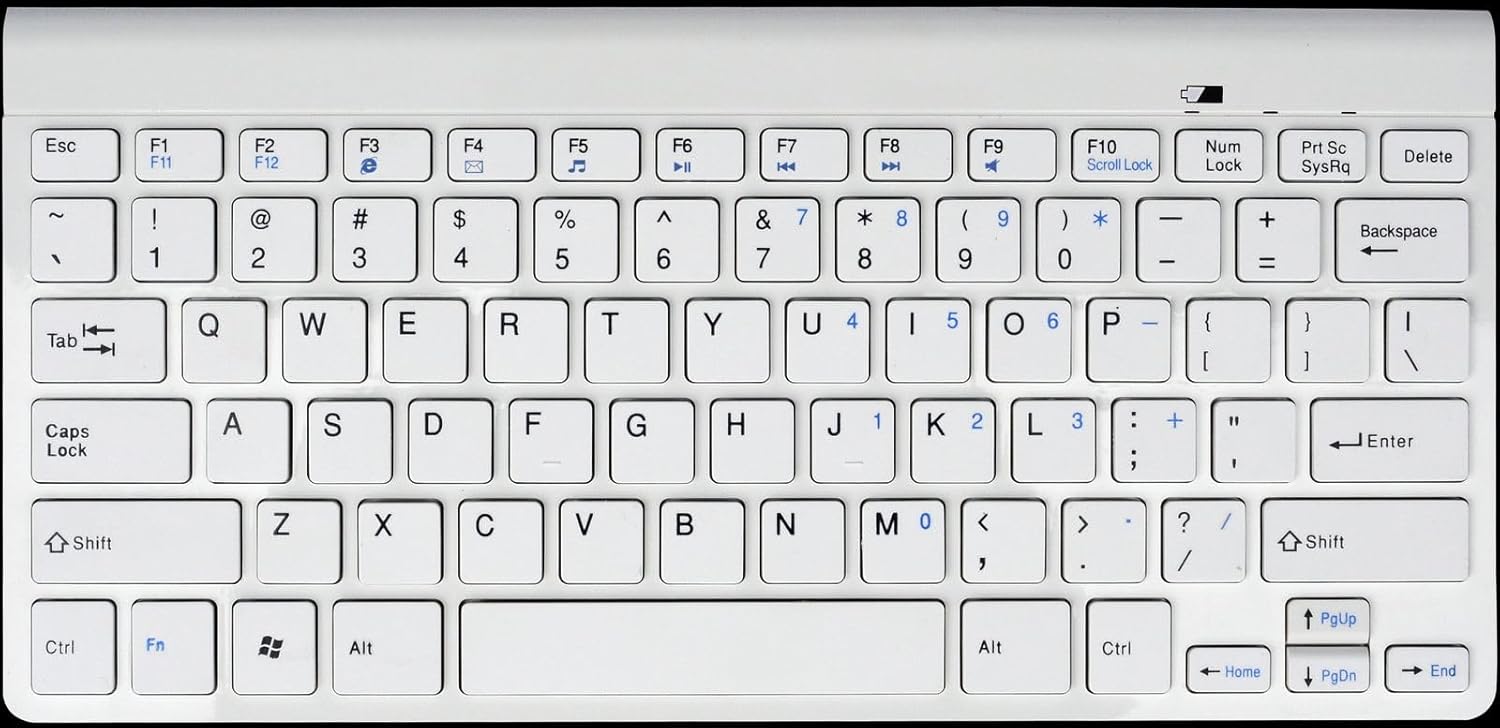
Figura 1: Gembird KB-BT-001-W-DE Slimline Bluetooth Keyboard. This image displays the full keyboard, highlighting its compact design and German QWERTZ key layout, including function keys with multimedia shortcuts and the embedded numeric keypad on the right side.
7. Întreținere
7.1. Curatenie
- Disconnect the keyboard from power and turn it off before cleaning.
- Folosiți o cârpă moale, fără scame dampcu apă sau cu o soluție de curățare blândă.
- Evitați umiditatea excesivă și nu pulverizați produse de curățare direct pe tastatură.
- Pentru praf și resturi între taste, folosiți aer comprimat.
7.2. Îngrijirea bateriei
- If the keyboard uses rechargeable batteries, charge it regularly using the provided USB cable.
- If it uses disposable batteries, replace them when the low battery indicator (if present) illuminates or performance degrades.
- Turn off the keyboard when not in use for extended periods to conserve battery life.
8. Depanare
| Problemă | Cauza posibila | Soluţie |
|---|---|---|
| Keyboard not connecting/pairing. | Bluetooth is off on device; keyboard not in pairing mode; low battery; too far from device. | Ensure Bluetooth is enabled. Put keyboard in pairing mode. Charge/replace batteries. Move keyboard closer to device (within 10m). Try re-pairing. |
| Keys not responding or delayed input. | Low battery; interference; out of range. | Charge/replace batteries. Move away from other wireless devices. Ensure keyboard is within range. |
| Incorrect characters typed (e.g., Y and Z swapped). | Device's keyboard layout is set to QWERTY instead of QWERTZ. | Change your device's keyboard input language/layout to German (QWERTZ). |
| Multimedia keys not working. | Fn key not pressed; software incompatibility. | Ensure you are holding the Fn key while pressing the F-key. Update device drivers if applicable. |
9. Specificații
| Caracteristică | Detaliu |
|---|---|
| Marca | Gembird |
| Numărul de model | KB-BT-001-W-DE |
| Tehnologia de conectivitate | Bluetooth v3.0 |
| Dispozitive compatibile | PC, Smartphone, Tabletă |
| Descrierea tastaturii | Multimedia |
| Numărul de chei | 78 |
| Aspectul tastaturii | QWERTZ (germană) |
| Componente incluse | Cablu USB |
| Interval de operare | Până la 10 metri |
| Dimensiuni (aprox.) | 28.7 x 13.7 x 2 cm (11.3 x 5.4 x 0.8 țoli) |
10. Garanție și asistență
For warranty information and technical support, please refer to the documentation included with your purchase or visit the official Gembird webDatele de contact pentru asistență sunt de obicei furnizate pe ambalajul produsului sau pe eticheta producătorului. website-ul.
- Producător: Gembird
- Sprijin: Telephone support and email support are mentioned in the product features. Please check the included manual or Gembird's official website pentru informații de contact actuale.


