Introducere
Thank you for choosing the Baseus Qpow Power Bank. This portable power bank with an integrated USB-C cable and 10000mAh capacity is designed to provide convenient and efficient charging for your mobile devices on the go. Please read this manual carefully before using the product to ensure proper operation and maintenance.
Informații de siguranță
- Do not expose the power bank to extreme temperatures (hot or cold), direct sunlight, or humid environments.
- Nu dezasamblați, modificați și reparați dispozitivul singur. Adresați-vă personalului de service calificat.
- Țineți banca de alimentare departe de apă și alte lichide.
- Evitați să scăpați sau să supună powerbank-ului la impacturi puternice.
- Folosiți doar cabluri și adaptoare de încărcare certificate.
- A nu se lăsa la îndemâna copiilor.
- Aruncați bateria externă conform reglementărilor locale privind deșeurile electronice.
Conținutul pachetului
- Baseus Qpow Power Bank (Model: PPQD-A02)
- Manual de utilizare
Produs terminatview
Familiarize yourself with the components of your Baseus Qpow Power Bank.

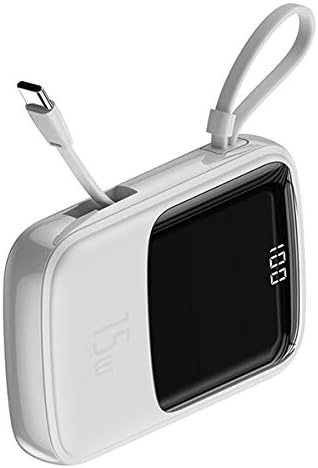
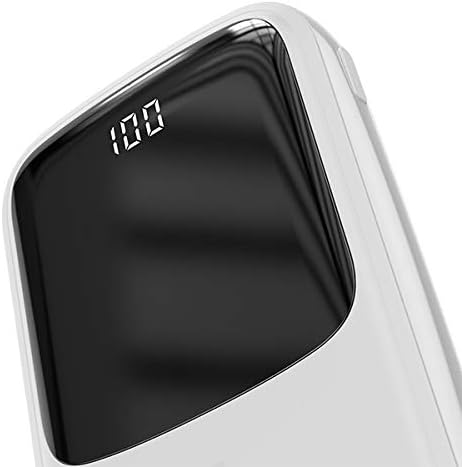

Key features include a digital display for battery percentage, multiple output ports (USB-A, Type-C), and an integrated USB-C cable for convenience.
Înființat
Încărcare inițială
- Înainte de prima utilizare, încărcați complet bateria externă.
- Connect the power bank to a USB wall charger (not included) using a compatible USB-C cable or the integrated USB-C cable.
- The digital display will show the charging progress. Once it reaches "100", the power bank is fully charged.
Instrucțiuni de operare
Încărcarea dispozitivelor dvs
- Identify the correct charging port on your device (e.g., USB-C, Lightning).
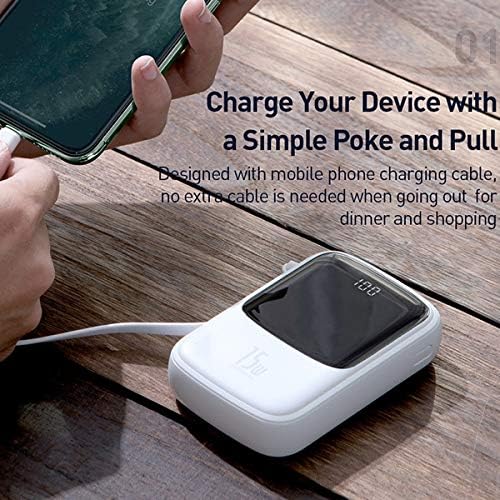
- For USB-C devices, use the integrated USB-C cable from the power bank. For other devices, connect your device's charging cable to one of the USB Output ports on the power bank.
- Conectați celălalt capăt al cablului la dispozitiv.
- Acumulatorul extern va începe automat încărcarea dispozitivului. Afișajul digital va afișa procentul rămas al bateriei.tage.
- Deconectați dispozitivul după ce este complet încărcat sau când nu mai este nevoie să îl încărcați.
Reîncărcarea Power Bank
When the digital display shows a low battery percentage, recharge the power bank.
- Connect a USB-C cable to the Type-C Input/Output port on the power bank, or an iP cable to the iP Input port.
- Connect the other end of the cable to a suitable power source, such as a USB wall adapter or a computer's USB port.
- Afișajul digital va indica starea de încărcare.
- Once the display shows "100", the power bank is fully charged and ready for use.
Întreţinere
- curatenie: Ștergeți bateria externă cu o lavetă moale și uscată. Nu folosiți produse de curățare abrazive sau solvenți.
- Depozitare: Store the power bank in a cool, dry place away from direct sunlight and extreme temperatures. If storing for extended periods, charge the power bank to about 50-70% every three months to preserve battery life.
- Îngrijirea bateriei: To maximize battery lifespan, avoid fully discharging the power bank frequently.
Depanare
| Problemă | Cauza posibila | Soluţie |
|---|---|---|
| Power Bank nu se încarcă | Problemă cu cablul sau adaptorul; baterie externă complet încărcată; port defect. | Try a different cable and adapter. Ensure the power bank is not already at 100%. Try a different input port if available. |
| Dispozitivul nu se încarcă de la power bank | Power bank battery low; incorrect cable; device not compatible; faulty port. | Recharge the power bank. Ensure you are using the correct cable for your device. Try a different output port. Check device compatibility. |
| Afișajul digital nu funcționează | Acumulatorul extern este oprit; problemă internă. | Ensure the power bank is turned on (if it has a power button, though this model seems automatic). If problem persists, contact support. |
Specificații
| Marca | Baseus |
| Numărul de model | PPQD-A02 |
| Capacitatea bateriei | 10000 Miliamperestunden (mAh) |
| Tip conector | USB Typ-C (integrated cable), USB Typ-A (output), iP (input) |
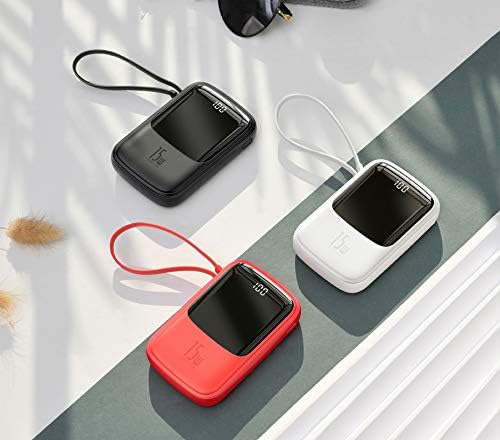
| Culoare | Alb |
| Caracteristica specială | Afișaj digital |
| Dimensiunile produsului | 20 x 3 x 5 cm |
| Greutate | 100 grame |
| Bateriile necesare | 1 Lithium-Polymer (included) |
Garanție și suport
Produsele Baseus sunt fabricate la cele mai înalte standarde de calitate. Pentru informații despre garanție sau asistență tehnică, vă rugăm să consultați cardul de garanție inclus odată cu achiziția sau să vizitați site-ul oficial Baseus. website. Vă rugăm să păstrați dovada achiziției pentru orice reclamații în garanție.
Pentru asistență suplimentară, puteți contacta serviciul clienți Baseus prin canalele lor oficiale.


