1. Introducere
This manual provides detailed instructions for the setup, operation, and maintenance of your Vibe Axcess 5-in-1 Universal Remote. Please read this manual thoroughly before using the remote control to ensure proper functionality and to maximize your user experience. This remote is designed to control up to five different audio/video devices.
2. Produs terminatview
The Vibe Axcess 5-in-1 Universal Remote is designed to consolidate control of multiple home entertainment devices into a single unit. It features dedicated buttons for various functions and device types.
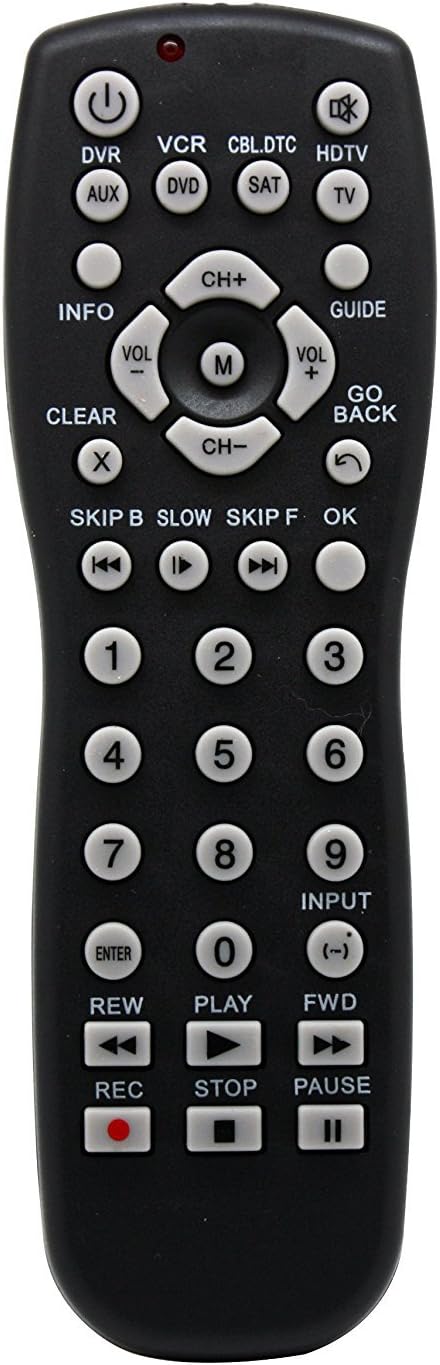
Figura 1: Faţă view of the Vibe Axcess 5-in-1 Universal Remote. This image displays the remote's layout, including device selection buttons (DVR, VCR, CBL.DTC, HDTV, AUX, DVD, SAT, TV), navigation pad, number keys, and media control buttons (REW, PLAY, FWD, REC, STOP, PAUSE).

Figura 2: Packaging of the Vibe Axcess 5-in-1 Universal Remote. The packaging highlights the remote's 5-in-1 capability and compatibility with various device types such as DVD/VCR, HDTV, DVD, AUX, and CBL/SAT/CABLE.
3. Configurare
3.1 Instalarea bateriei
- Localizați capacul compartimentului bateriei de pe spatele telecomenzii.
- Glisați capacul în jos sau apăsați zăvorul și ridicați-l pentru a-l deschide.
- Introduceți două (2) baterii AAA, asigurându-vă că bornele pozitive (+) și negative (-) corespund diagramelor din interiorul compartimentului.
- Puneți la loc capacul compartimentului bateriei, glisându-l înapoi în poziție până când se aude un clic sigur.
Nota: Always use fresh batteries and replace both batteries at the same time. Do not mix old and new batteries or different types of batteries.
3.2 Programming the Remote
To control your devices, the universal remote must be programmed with the correct codes for each device. There are typically two methods for programming:
3.2.1 Introducerea codului direct
This method involves entering a specific code from a code list (usually provided with the remote or available online) for your device's brand.
- Porniți dispozitivul pe care doriți să îl controlați (de exemplu, televizor, DVD player).
- Press and hold the desired device button on the remote (e.g., TV, DVD) for approximately 3 seconds until the indicator light (usually red) illuminates and stays on.
- While the indicator light is on, enter the 3-digit or 4-digit code for your device's brand using the number keys.
- If the code is valid, the indicator light will turn off. If the light flashes and remains on, the code was invalid; re-enter the code.
- Testați telecomanda apăsând butonul PUTERE button. If the device turns off, the code is correct. If not, try the next code listed for your brand.
3.2.2 Căutare automată cod
If you cannot find a code or direct code entry fails, use the auto code search method.
- Porniți dispozitivul pe care doriți să îl controlați.
- Apăsați și mențineți apăsat butonul dispozitivului dorit (de exemplu, TV) for approximately 3 seconds until the indicator light illuminates and stays on.
- În timp ce țineți apăsat butonul dispozitivului, apăsați PUTERE button once. The indicator light will start flashing, indicating it is searching for a code.
- Point the remote at the device and wait for the device to turn off. This may take several minutes as the remote cycles through codes.
- După ce dispozitivul se oprește, apăsați imediat butonul ENTER Apăsați butonul pentru a salva codul. Indicatorul luminos se va stinge.
- Test the remote's functions. If some functions do not work, repeat the auto search process to find a more compatible code.
4. Instrucțiuni de utilizare
Once programmed, operating your Vibe Axcess 5-in-1 Universal Remote is straightforward.
- Selecteaza dispozitivul: Apăsați butonul dispozitivului corespunzător (de exemplu, TV, DVD, CBL.DTC) for the device you wish to control. The indicator light will briefly illuminate to confirm selection.
- Pornire/Oprire: Apăsați tasta PUTERE buton pentru a porni sau opri dispozitivul selectat.
- Controlul volumului: Utilizați VOL+ şi VOL- butoane pentru reglarea volumului.
- Control canal: Utilizați CH+ şi CH- butoane pentru a schimba canalele.
- Taste numerice: Use the number keys (0-9) to directly enter channel numbers or other numerical inputs.
- Navigare: Use the directional pad (up, down, left, right) and OK buton pentru navigare în meniu.
- Comenzi media: Utilizare JUCA, PAUZĂ, STOP, REW, FWD, și REC for controlling media playback on compatible devices.
5. Întreținere
5.1 Curățare
To clean your remote, gently wipe it with a soft, dry cloth. Do not use abrasive cleaners, solvents, or harsh chemicals, as these can damage the remote's finish or internal components.
5.2 Înlocuirea bateriei
When the remote's performance degrades or the indicator light fails to illuminate, it is time to replace the batteries. Follow the battery installation steps in Section 3.1. Dispose of used batteries responsibly according to local regulations.
6. Depanare
- Telecomanda nu funcționează:
- Verificați dacă bateriile sunt introduse corect și nu sunt descărcate. Înlocuiți-le dacă este necesar.
- Asigurați-vă că ați selectat butonul corect al dispozitivului (de exemplu, TV pentru televizorul dumneavoastră).
- Verify that the remote is programmed with the correct code for your device. Re-program if unsure.
- Ensure there are no obstructions between the remote and the device's infrared sensor.
- Unele funcții nu funcționează:
- Some universal remote codes may not support all original remote functions. Try another code for your device brand using the programming steps.
- Ensure the device you are trying to control supports the specific function (e.g., not all TVs have a dedicated 'INFO' button function).
- Martorul luminos nu se aprinde:
- Verificați și înlocuiți bateriile.
- If the issue persists after battery replacement, the remote may be faulty.
7. Specificații
- Model: OT795-KO
- Marca: Vibe
- Dimensiuni produs: 10.7 x 4 x 0.8 inci
- Greutatea articolului: 4 uncii
- Baterii: Sunt necesare 2 baterii AAA (nu sunt incluse)
- Numărul maxim de dispozitive acceptate: 5
- Tehnologie de conectivitate: Infraroşu
- Caracteristica speciala: Universal
8. Garanție și asistență
For information regarding warranty coverage or technical support, please refer to the documentation included with your purchase or contact the retailer where the product was acquired. Specific warranty terms may vary.