Introducere
Thank you for choosing the BAZZ Smart Home Wi-Fi RGB 10W LED BR30 Bulbs. These smart bulbs offer a wide spectrum of colors, tunable white light, and dimming capabilities, all controllable via Wi-Fi through the BAZZ Smart Home app. This manual provides detailed instructions for installation, operation, maintenance, and troubleshooting to ensure you get the most out of your new smart lighting system.

Ghid de instalare
Ce este în cutie
- 4 x BAZZ Smart Home Wi-Fi RGB 10W LED BR30 Bulbs
- 1 x Manual de utilizare
Instalare
- Ensure the power to the light fixture is turned OFF before installation.
- Carefully screw the BAZZ Smart Home BR30 LED bulb into a standard E26/E27 screw-base fixture.
- Turn the power to the light fixture ON. The bulb should flash, indicating it is in pairing mode.
Descărcare și împerechere a aplicației
To control your BAZZ Smart Home bulbs, you need to download the BAZZ Smart Home app and pair the devices.
- Download the BAZZ Smart Home app from the Apple App Store or Google Play Store.
- Înregistrează-te pentru un cont nou sau autentifică-te dacă ai deja unul.
- Tap the '+' icon in the top right corner of the app to add a device.
- Select 'Lighting' and then 'Light Source (Wi-Fi)'.
- Follow the on-screen instructions to connect the bulb to your Wi-Fi network. Ensure your Wi-Fi network is 2.4GHz.
- Once successfully paired, you can rename your bulb for easier identification.


Operațiunea
Controale de bază
- Pornit/Oprit: Atingeți pictograma de alimentare din aplicație pentru a aprinde sau a stinge becul.
- Luminozitate: Use the slider in the app to adjust the brightness level from 1% to 100%.
Color Control (RGB)
Access the color wheel in the app to select from millions of colors. Drag your finger across the wheel to choose your desired hue.
Alb reglabil
Switch to the white light mode to adjust the color temperature from warm white (2700K) to cool daylight (6500K), creating the perfect ambiance for any activity.
Crearea scenei
The app allows you to create custom scenes with specific colors, brightness levels, and color temperatures. Save your favorite settings for quick access.
Programare
Set schedules for your bulbs to turn on/off or change settings at specific times, enhancing convenience and energy efficiency.
Integrare cu control vocal
Your BAZZ Smart Home bulbs are compatible with popular voice assistants. Link your BAZZ Smart Home account to Amazon Alexa or Google Assistant for hands-free control.
- For Amazon Alexa: Enable the 'BAZZ Smart Home' skill in the Alexa app.
- For Google Assistant: Link the 'BAZZ Smart Home' service in the Google Home app.
Întreţinere
The BAZZ Smart Home Wi-Fi RGB 10W LED BR30 Bulbs are designed for long-lasting performance with minimal maintenance.
- curatenie: Asigurați-vă că becul este răcit și că alimentarea este oprită înainte de curățare. Ștergeți becul cu o cârpă moale și uscată. Nu utilizați agenți de curățare lichizi sau materiale abrazive.
- Depozitare: If storing the bulbs for an extended period, keep them in their original packaging in a cool, dry place.
- Eliminare: Aruncați becul conform reglementărilor locale privind deșeurile electronice.
Depanare
| Problemă | Cauza posibila | Soluţie |
|---|---|---|
| Becul nu se aprinde. | Nu există curent la dispozitivul de iluminat; Becul nu este înșurubat corect; Becul este defect. | Check power switch and circuit breaker; Ensure bulb is securely screwed in; Test bulb in another fixture. |
| Bulb is not flashing for pairing. | Not in pairing mode; Power cycle issue. | Turn the bulb off and on 3 times (on-off-on-off-on) with 2-second intervals until it flashes rapidly. |
| Nu se poate conecta la Wi-Fi. | Incorrect Wi-Fi password; Not 2.4GHz network; Too far from router. | Verify Wi-Fi password; Ensure you are connecting to a 2.4GHz network; Move bulb closer to router or use a Wi-Fi extender. |
| Comanda vocală nu funcționează. | Account not linked; Incorrect device name. | Ensure BAZZ Smart Home account is linked in Alexa/Google Home app; Use the exact device name set in the BAZZ app. |
Specificatii tehnice
| Caracteristică | Caietul de sarcini |
|---|---|
| Model | Bec BR30 |
| Putere | 10W |
| Tip de lumină | LED RGB + Tunable White |
| Temperatura de culoare | 2700K - 6500K |
| Conectivitate | Wi-Fi (doar 2.4 GHz) |
| Tip de bază | E26/E27 Standard Screw Base |
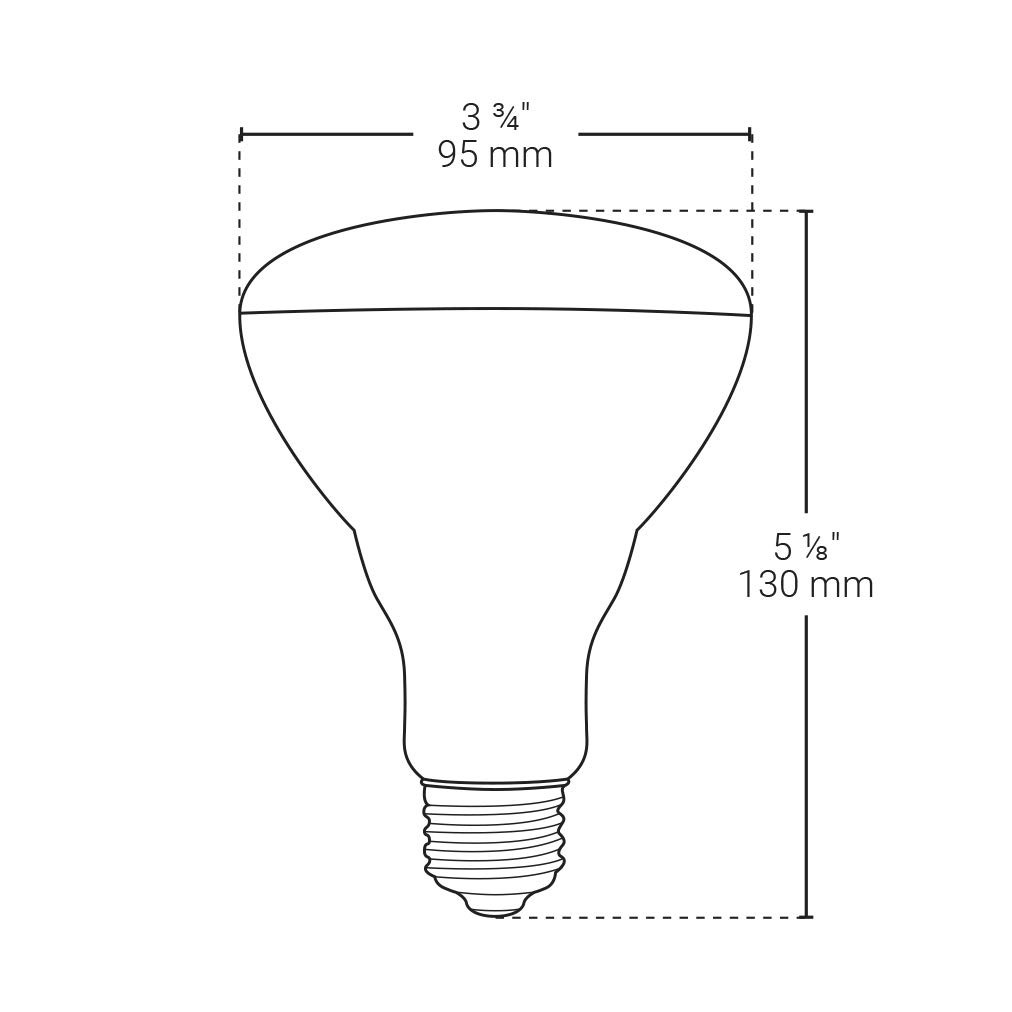
| Dimensiuni | 9.53 x 9.53 x 13.02 cm (3.75 x 3.75 x 5.13 țoli) |
| Greutate | 77.8 g (0.17 lbs) |
Garanție și suport
BAZZ products are manufactured to the highest quality standards. This product comes with a limited warranty against defects in materials and workmanship from the date of purchase. Please refer to the warranty card included in your product packaging for specific terms and conditions.
For technical support, troubleshooting assistance, or warranty claims, please visit the official BAZZ Smart Home website or contact their customer service. Contact details can typically be found on the product packaging or the official website-ul.
Website: www.bazzsmarthome.com


