1.view
The Canon EF-M 22mm f/2 STM is a moderate wide-angle lens designed for the EOS M Digital Camera series. Its ultra-slim and compact form factor makes it highly portable. Featuring a bright f/2.0 aperture, this lens excels in low-light conditions and produces attractive background blur (bokeh). An aspheric lens element contributes to high resolution and contrast. The built-in Stepping Motor (STM) ensures smooth and quiet continuous autofocus, particularly beneficial for video recording. With a short minimum focusing distance, it allows for close-up photography.

Figura 1: Față view of the Canon EF-M 22mm f2 STM Compact System Lens.
2. Ce se află în cutie
- EF-M22mm 1:2 STM Lens
- Capac obiectiv E-43
- Capac de praf pentru obiectiv EB
- Cartea de instrucțiuni
- Card de garanție
3. Caracteristici cheie
- Moderate Wide-Angle: Equivalent to 35mm on a full-frame camera, offering a versatile field of view.
- Focalizare automată lină și silențioasă: Built-in Stepping Motor (STM) provides silent and fluid continuous autofocus, ideal for video recording.
- Bright f/2.0 Aperture: Excellent for low-light performance and creating beautiful, soft background blur with its 7-blade circular aperture.
- Calitate ridicată a imaginii: An aspheric lens element ensures high resolution and contrast.
- Close-Up Capabilities: Minimum focusing distance of 5.9 inches (0.15 meters) allows for detailed close-up shots.
- Design compact: Ultra-slim and lightweight, making it easy to carry and suitable for travel.
4. Configurare și instalare
Atașarea lentilei
- Asigurați-vă că camera este oprită.
- Remove the rear lens cap from the EF-M 22mm f/2 STM lens and the body cap from your EOS M camera.
- Aliniați punctul roșu de pe obiectiv cu punctul roșu de pe montura camerei.
- Introduceți obiectivul în montura camerei și rotiți-l în sensul acelor de ceasornic până când se fixează în poziție cu un clic.
Detașarea lentilei
- Asigurați-vă că camera este oprită.
- În timp ce apăsați butonul de eliberare a obiectivului de pe corpul camerei, rotiți obiectivul în sens invers acelor de ceasornic până se oprește.
- Carefully remove the lens from the camera.
- Attach the rear lens cap to the removed lens and the body cap to the camera to protect the sensor.

Figura 2: lateral view of the Canon EF-M 22mm f2 STM lens, showing the mount.
5. Operarea obiectivului
Focalizare automată (AF) și focalizare manuală (MF)
The EF-M 22mm f/2 STM lens supports both autofocus and manual focus. The STM (Stepping Motor) technology provides exceptionally smooth and quiet autofocus, which is particularly advantageous when shooting video, as it minimizes distracting focus motor noise. For precise control, switch to manual focus mode on your camera.
Aperture and Low-Light Performance
With a wide maximum aperture of f/2.0, this lens allows a significant amount of light to reach the camera's sensor. This makes it highly effective for shooting in challenging low-light conditions without needing to drastically increase ISO sensitivity. The wide aperture also enables shallow depth of field, creating a pleasing background blur that isolates your subject.
Fotografie în prim plan
The lens features a minimum focusing distance of just 0.15 meters (5.9 inches). This allows you to get very close to your subjects, capturing intricate details and achieving a near-macro effect. Experiment with this feature for creative close-up shots.
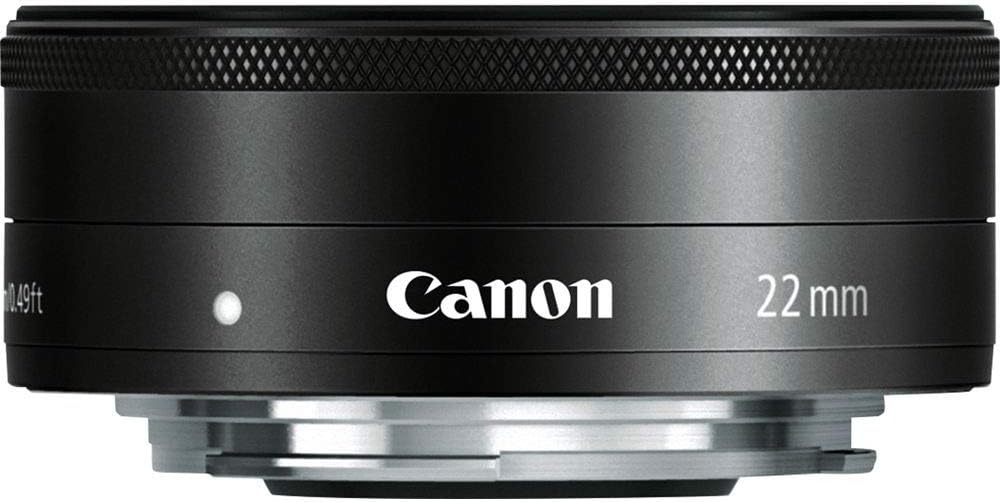
Figura 3: Față view of the Canon EF-M 22mm f2 STM lens, illustrating the aperture blades.
Understanding STM Lenses
The Stepping Motor (STM) is a type of autofocus motor designed by Canon to provide smooth and quiet focusing, especially during video recording. Unlike traditional ultrasonic motors (USM) which can be noisy, STM lenses are optimized for silent operation, preventing unwanted audio interference in your videos.
Video 1: Un overview of Canon STM Lenses, explaining their benefits for smooth and quiet autofocus.
6. Întreținere și îngrijire
- Curățarea lentilei: Use a soft, lint-free cloth or a lens brush to remove dust. For smudges, use a lens cleaning solution and a microfiber cloth. Avoid touching the glass elements directly with your fingers.
- Depozitare: When not in use, keep the lens attached to the camera or with both front and rear caps on. Store in a cool, dry place away from direct sunlight and extreme temperatures.
- Evitați impactul: Protect the lens from drops or impacts, which can damage internal components.
- Protecție la umiditate: Avoid exposing the lens to excessive moisture or humidity. If it gets wet, dry it immediately with a soft cloth.
7. Depanare
- Autofocalizarea nu funcționează: Ensure the lens is securely mounted to the camera. Check the camera's focus mode settings (AF/MF). Clean the electrical contacts on both the lens and camera body with a clean, dry cloth.
- Probleme de calitate a imaginii: Ensure the lens elements are clean and free from dust or smudges. Check camera settings for appropriate aperture, ISO, and shutter speed.
- Lens Not Recognized: Power off the camera, detach and reattach the lens, then power on the camera again. Ensure camera firmware is up to date.
8. Specificații
| Caracteristică | Caietul de sarcini |
|---|---|
| Distanța focală și diafragma maximă | 22 mm, f / 2 |
| Construcția lentilelor | 7 elemente în 6 grupe |
| Unghiul diagonal de View | 63°30' |
| Ajustarea focalizării | Inner Focusing System |
| Distanța de focalizare cea mai mică | 0.49 ft. / 0.15 m |
| Dimensiunea filtrului | 43mm |
| Max. Diametru x lungime | 2.4 x 0.9 inchi / 60.9 x 23.7 mm |
| Greutate | 3.7 oz. / 105 g |
| Numărul de model al articolului | 5985B002 |
| ASIN | B008NF8BRI |
9. Garanție și asistență
This product is subject to a 14-day return policy. For detailed warranty information and customer support, please refer to the Warranty Card included in the product packaging or visit the official Canon support website. Ensure you register your product to activate any applicable warranties.


