1. Introducere
The First Alert SCO500B is a battery-powered, wireless interconnected photoelectric smoke and carbon monoxide (CO) combo alarm designed to provide early warning of smoke and elevated carbon monoxide levels. This device features a voice and location alert system, enhancing safety by clearly indicating the type and location of the detected hazard. Its wireless interconnectivity allows multiple compatible alarms to communicate, creating a comprehensive safety network throughout your home without the need for complex wiring.
This manual provides essential information for the proper installation, operation, and maintenance of your First Alert SCO500B alarm. Please read it thoroughly before installation and retain it for future reference.
2. Informații importante privind siguranța
AVERTIZARE: This unit is designed to detect smoke and carbon monoxide. It is not designed to detect fire, heat, or other gases. Improper installation or placement may prevent the alarm from functioning correctly.
- Testați alarma săptămânal pentru a vă asigura că funcționează corect.
- Never paint over the alarm. Paint can clog the sensing chambers and prevent the unit from detecting smoke or CO.
- Do not remove batteries unless replacing them. Operating the alarm without batteries will prevent it from functioning.
- This alarm has a limited service life. It must be replaced 7 years after the installation date.
Plasare recomandată
For optimal protection, install smoke alarms on every level of your home and in every bedroom. Carbon monoxide alarms should also be installed on every level and in every bedroom. Refer to local codes and regulations for specific requirements.

Descrierea imaginii: A diagram illustrating a house layout with recommended locations for smoke and carbon monoxide alarms. It suggests placing one smoke alarm on every level and in every bedroom, and one CO alarm on every level and in every bedroom.
3. Produs terminatview
The First Alert SCO500B combines photoelectric smoke sensing technology with an advanced electrochemical CO sensor. It features a test/silence button, power indicator, and wireless communication capability.

Descrierea imaginii: Faţă view of the First Alert SCO500B combination smoke and carbon monoxide alarm. It is white with a central test/silence button, and indicators for CO, Smoke, Power, and Wireless status. The text 'DO NOT PAINT' is visible on the side.
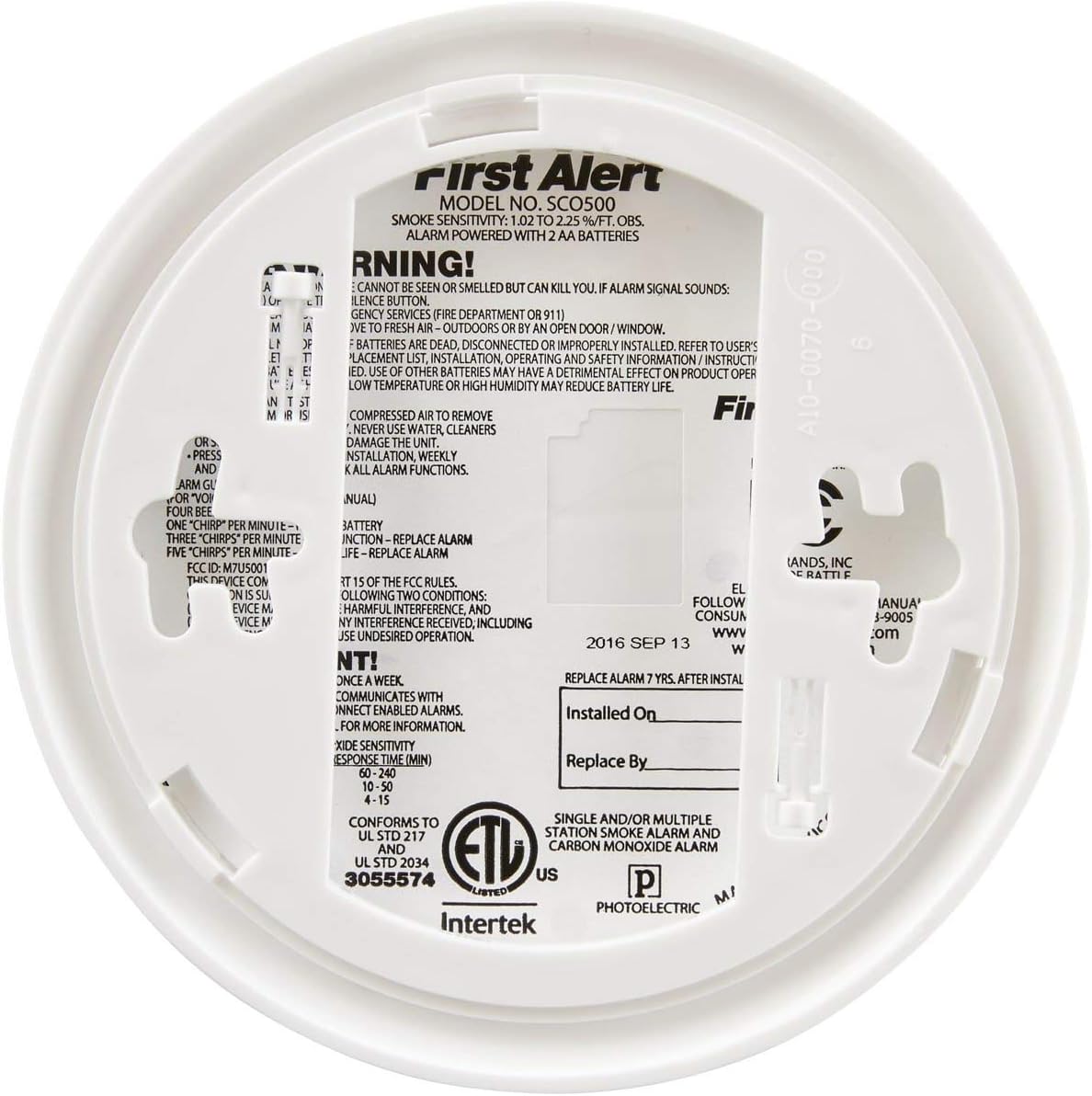
Descrierea imaginii: Spate view of the First Alert SCO500B alarm, showing the mounting bracket, battery compartment, and product label with model number SCO500 and other specifications.
Conținutul pachetului
- First Alert SCO500B Smoke and Carbon Monoxide Alarm
- Suport de fixare
- 2 AA Lithium Metal Batteries
- Șuruburi și ancore de montare

Descrierea imaginii: The First Alert SCO500B alarm displayed alongside its mounting bracket, two AA batteries, and a set of screws and wall anchors, representing the complete package contents.
4. Configurare și instalare
4.1 Instalarea bateriei
- Open the battery compartment door on the back of the alarm.
- Insert the two AA Lithium Metal batteries, ensuring correct polarity (+ and -).
- Close the battery compartment door. The alarm will chirp once to indicate it is powered on.
4.2 Montarea alarmei
- Select a suitable mounting location according to local codes and the recommended placement guidelines. Avoid areas near vents, windows, or in dead air spaces.
- Attach the mounting bracket to the ceiling or wall using the provided screws and anchors.
- Align the alarm with the mounting bracket and twist clockwise until it locks securely into place.
4.3 Wireless Interconnection (Pairing)
This process connects multiple SCO500B units to create a synchronized alert system.
- Designate a 'Teacher' Unit: On one alarm, open and then close the battery drawer. This unit will act as the 'Teacher'.
- Prepare 'Student' Units: For all other alarms you wish to connect (the 'Student' units), open the battery drawer. While the drawer is open, press and hold the Test/Silence button, then close the drawer simultaneously. The light on the detector should begin blinking green.
- Asociere: Press and hold the Test/Silence button on the 'Teacher' unit. You should hear the 'Student' units chirp or begin speaking, indicating successful pairing.
- Test Interconnection: Press and hold the Test/Silence button on any paired unit until it chirps or says "Testing". All interconnected alarms should sound.
4.4 Setting Location (Voice Feature)
The SCO500B features a voice alert that can announce the location of the detected hazard.
- Open and close the battery drawer on the unit you wish to set the location for.
- When the unit says, "To change location, press and hold test button now," press and hold the Test/Silence button for approximately one second, then release.
- The alarm will cycle through available location options (e.g., "Kitchen", "Bedroom"). When you hear the desired location, press and hold the Test/Silence button until the unit confirms the setting (e.g., "Kitchen location has been programmed").
5. Instrucțiuni de utilizare
5.1 Testarea alarmei
Test your alarm weekly. Press and hold the Test/Silence button until the alarm sounds. The alarm will emit a loud siren and announce "Testing". If interconnected, all paired alarms should also sound.
5.2 Understanding Alarm Signals
The SCO500B provides distinct audible and voice alerts for different conditions.

Descrierea imaginii: An icon depicting an exclamation mark within a triangle, labeled "4 beeps and a pause". This signifies a Carbon Monoxide (CO) alarm.

Descrierea imaginii: An icon depicting a battery, labeled "1 beep every minute". This signifies a low battery warning.

Descrierea imaginii: An icon depicting a circular arrow, labeled "5 beeps every minute". This signifies the alarm has reached its end of life and needs replacement.
- Alarma de fum: Three loud beeps followed by a pause, repeating. Voice announcement: "Fire! Evacuate!"
- Alarma de monoxid de carbon: Four loud beeps followed by a pause, repeating. Voice announcement: "Carbon Monoxide! Move to fresh air!"
- Avertizare baterie descărcată: One chirp every minute. Voice announcement: "Low Battery." Replace batteries immediately.
- Avertisment de sfârșit de viață: Five chirps every minute. Voice announcement: "Replace Alarm." The alarm has reached the end of its operational life and must be replaced.
5.3 Funcția de tăcere
Press the Test/Silence button to temporarily silence nuisance alarms (e.g., from cooking smoke). The alarm will silence for approximately 10 minutes for smoke and 4 minutes for CO. If the smoke or CO concentration is still present after the silence period, the alarm will reactivate.
6. Întreținere
6.1 Curățarea alarmei
Clean your alarm regularly to prevent dust and debris from interfering with its operation. Use a soft brush or vacuum cleaner with a soft brush attachment to gently clean the exterior and vents. Do not use water, cleaners, or solvents.
6.2 Înlocuirea bateriei
When the alarm chirps once every minute and announces "Low Battery", replace the batteries immediately. Use only specified AA Lithium Metal batteries. Refer to Section 4.1 for battery installation steps.
6.3 End of Life Replacement
The alarm has a 7-year operational life. When it reaches the end of its life, it will chirp five times every minute and announce "Replace Alarm". You must replace the entire unit at this time.
7. Depanare
- Alarme false: If the alarm sounds without an apparent hazard, ensure it is not placed too close to cooking appliances, steamy bathrooms, or dusty areas. Use the silence feature if it's a nuisance alarm. If false alarms persist, clean the unit as described in Section 6.1.
- Alarm Not Sounding During Test: Ensure batteries are correctly installed and fully charged. If the issue persists, the unit may be faulty and require replacement.
- Probleme de interconectare: If alarms are not communicating, re-attempt the pairing process as described in Section 4.3. Ensure all units are within range of each other. To unpair an alarm: Insert batteries into the drawer but do not close it. Press and hold the test button while closing the battery drawer. Once you hear a chirp, release the test button. The green power LED will blink. Press and hold the test button again until the alarm chirps and the green LED stops blinking. This alarm is now unlinked.
- Voice Location Not Setting: Repeat the steps in Section 4.4 carefully. Ensure you press and hold the Test/Silence button at the correct prompt and release it when the desired location is announced.
8. Specificații
| Caracteristică | Caietul de sarcini |
|---|---|
| Numărul de model | SCO500B |
| Sursa de alimentare | 2 AA Lithium Metal Batteries (included) |
| Tip senzor | Fotoelectric (fum), Electrochimic (CO) |
| Tip alarmă | Audible (85 dB at 10 feet), Voice |
| Interconectivitate | Fără fir (radiofrecvență) |
| Dimensiunile produsului | 2.8" D x 5.13" L x 5.13" H |
| Greutatea articolului | 9.6 uncii |
| Viața de funcționare | 7 ani |

Descrierea imaginii: A diagram illustrating the dimensions of the First Alert SCO500B alarm, showing a depth of 2.8 inches and a width/height of 5.13 inches.
9. Garanție și asistență
9.1 Informații despre garanție
The First Alert SCO500B alarm comes with a 7-year limited warranty from the date of purchase. This warranty covers defects in materials and workmanship under normal use and service. For specific warranty details and limitations, please refer to the documentation included with your product or contact First Alert customer support.
9.2 Asistență pentru clienți
For technical assistance, troubleshooting, or warranty claims, please contact First Alert customer support. Contact information can typically be found on the product packaging or the official First Alert website-ul.


