1. Introducere
The Behringer XENYX 302USB is an ultra-compact, low-noise analog mixer designed for a variety of audio applications, from home recording to live podcasting. It features a high-quality XENYX microphone preamp and a built-in USB/audio interface, allowing direct connection to your computer for recording and playback. Its small footprint makes it ideal for setups where space is limited.

Figura 1.1: Sus view of the Behringer XENYX 302USB mixer, showing all controls and inputs/outputs.
2. Caracteristici cheie
- Design ultra-compact: Small footprint (approx. 117 x 135 mm) ideal for portable use or limited desktop space.
- XENYX Mic Preamp: State-of-the-art, phantom-powered microphone preamp for transparent, high-quality audio.
- Interfață USB/Audio: Built-in stereo USB interface for direct connection to PC or Mac, enabling recording and playback.
- Intrări versatile: Features an XLR & 1/4-inch combination input, a stereo USB/Line channel, and a dedicated 2-Track input.
- British EQ: Sublimely musical 2-band EQ on the Line/USB channel for sound shaping.
- Flexible Power: Can be powered directly via a laptop's USB socket or an included external power adapter.
- Software inclus: Comes with free audio recording, editing, and podcasting software (Tracktion) plus 150 instrument/effect plug-ins.
3. Configurare și conexiuni
This section details how to connect your XENYX 302USB mixer to various audio sources and destinations.
3.1 Conexiune la alimentare
The 302USB can be powered via its USB port from a computer or by using the included external power adapter. Connect the USB cable to your computer or the power adapter to a suitable power outlet and then to the mixer's USB port.
3.2 Conexiuni de intrare
- MICROFON CUPLAT: Connect a microphone using an XLR cable to the combination XLR/TRS input. This input provides phantom power for condenser microphones.
- LINE IN: Connect stereo line-level sources (e.g., keyboard, media player) to the RCA LINE IN jacks.
- 2-TRACK IN: Connect an external playback device (e.g., CD/DVD player, dedicated audio player) to the RCA 2-TRACK IN jacks.
3.3 Conexiuni de ieșire
- MAIN MIX OUT: Connect these RCA outputs to your monitoring system (e.g., powered speakers, ampmai în viață).
- Cască: Connect headphones to the 3.5mm HEADSET jack.

Figure 3.1: Basic setup diagram showing connections for a microphone, laptop (USB), powered speakers, and a DVD player.

Figure 3.2: Advanced setup diagram illustrating connections for a guitar, keyboard, digital recorder, and headphones.

Figure 3.3: Podcasting setup diagram showing connections for a microphone, laptop (USB), headphones, and an iPod.

Figure 3.4: Studio setup diagram with connections for a microphone, laptop (USB), studio monitors, headphones, a keyboard, and an iPod.
4. Operarea mixerului
Understanding the controls and signal flow is essential for optimal performance.
4.1 Controale asupraview
- GAIN (MIC): Adjusts the input sensitivity for the microphone channel. Use this to set a healthy signal level without clipping.
- LOW/HIGH (LINE/USB EQ): Two-band equalizer for the Line/USB channel, allowing adjustment of bass and treble frequencies.
- PAN (MIC): Pans the microphone signal between the left and right channels of the main mix.
- BAL (LINE/USB): Balances the stereo signal of the Line/USB channel between left and right.
- MIC Level: Controls the output level of the microphone channel to the main mix.
- LINE/USB Level: Controls the output level of the Line/USB channel to the main mix.
- MAIN MIX Level: Controls the overall output level of the main mix to the MAIN MIX OUT jacks.
- PHONES Level: Controls the volume of the headphones output.
4.2 Indicatori
- LED POWER: Illuminates when the mixer is receiving power.
- SIG/CLIP LEDs: Indicate signal presence (SIG) and clipping (CLIP) for the left and right channels. Adjust input gain to avoid consistent clipping.
- LED USB: Illuminates when the USB interface is active and connected to a computer.
4.3 Signal Routing
- LINE IN to USB Play: This switch routes the signal from the LINE IN jacks to the USB output for recording on your computer.
- MAIN MIX to PHONES: This switch routes the main mix signal to the headphones output.
- 2-TRACK to MAIN MIX/PHONES: This switch routes the signal from the 2-TRACK IN to either the main mix or the headphones output, depending on the position.
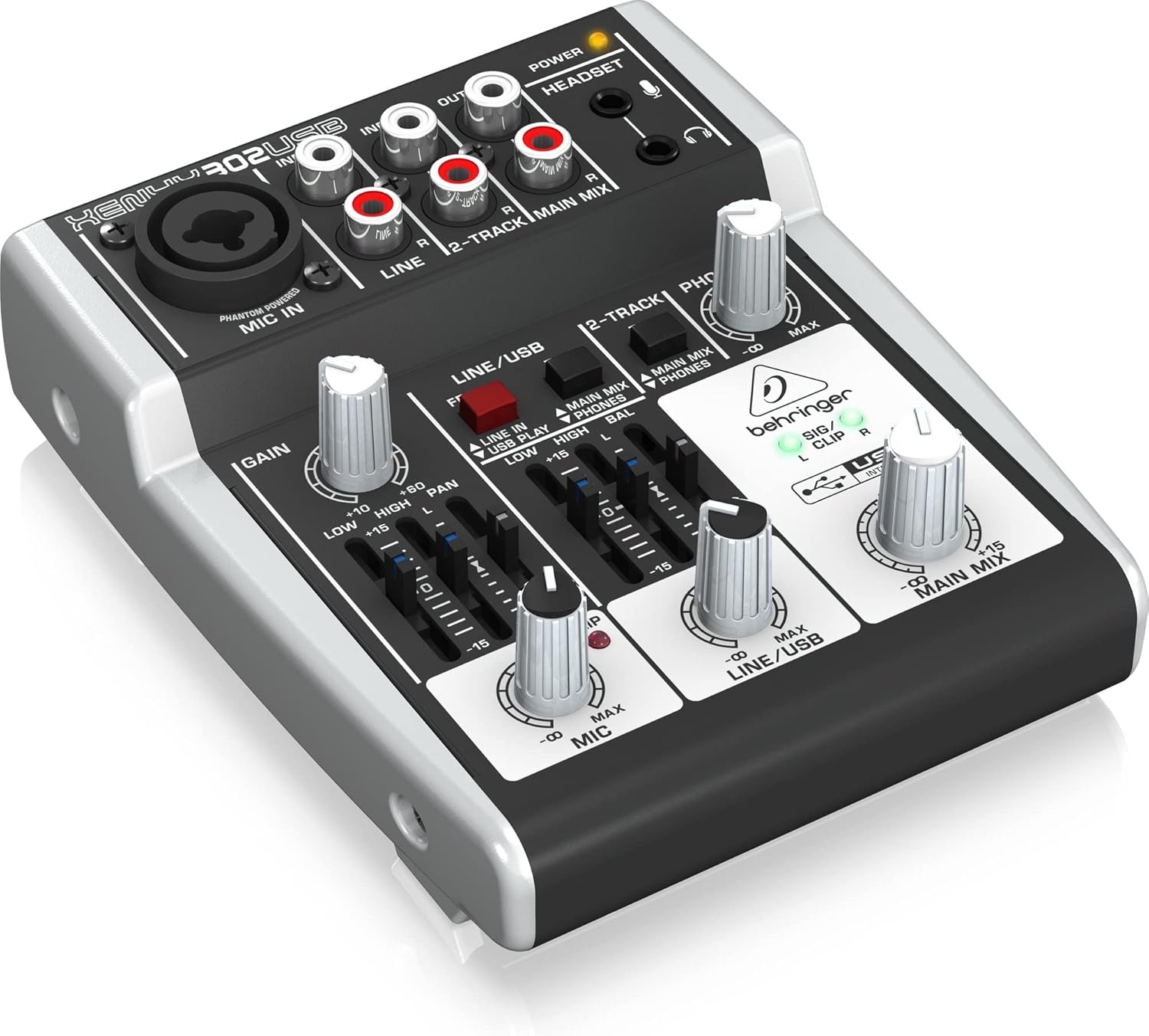
Figura 4.1: Înclinat view of the mixer, highlighting the various knobs and faders for control.
5. Întreținere
Proper care ensures the longevity and performance of your mixer.
- curatenie: Folosiți o lavetă moale și uscată pentru a curăța exteriorul mixerului. Evitați substanțele de curățare abrazive sau solvenții.
- Mediu: Operate and store the mixer in a clean, dry environment, away from direct sunlight, excessive heat, moisture, and dust.
- Ventilare: Asigurați o ventilație adecvată în jurul unității pentru a preveni supraîncălzirea.
- Organizare de cabluri: Avoid putting strain on cables and connectors. Disconnect cables by pulling the plug, not the cable itself.
6. Depanare
If you encounter issues, try these basic troubleshooting steps before seeking professional assistance.
- Fără ieșire de sunet:
- Verificați toate conexiunile cablurilor (intrări, ieșiri, alimentare).
- Ensure all level knobs (GAIN, MIC, LINE/USB, MAIN MIX, PHONES) are turned up.
- Verify that your monitoring system (speakers, headphones) is powered on and functioning.
- Check the signal routing switches (e.g., MAIN MIX to PHONES).
- Sunet distorsionat:
- Reduce input GAIN to prevent the CLIP LED from illuminating consistently.
- Lower the channel level or MAIN MIX level.
- Verificați dacă există cabluri deteriorate.
- USB nerecunoscut de computer:
- Asigurați-vă că ați conectat cablul USB în siguranță atât la mixer, cât și la computer.
- Încercați un alt port USB pe computer.
- Install the latest drivers from the Behringer website-ul.
- Reporniți computerul și mixerul.
- Problemă cu alimentarea fantomă:
- Ensure the mixer is powered on. The XENYX 302USB's phantom power is always active on the MIC IN. If a condenser mic isn't working, check the mic and cable.
7. Specificații
| Caracteristică | Caietul de sarcini |
|---|---|
| Dimensiunile produsului | 13.59 x 11.4 x 4.6 cm |
| Numărul de model al articolului | 302USB |
| Materialul corpului | Compozit |
| Nume Culoare | Negru |
| Tip conector | USB; 1 x XLR/TRS; 1 x 3.5mm |
| Interfață hardware | USB 2.0 |
| Country Produced In | Germania |
| Cantitatea canalului mixerului | 5 |
| Sursa de alimentare | Electric cu fir |
| Voltage | 15 volți |
| Greutatea articolului | 380 g |
| Numărul de canale | 5 |
| Tehnologia de conectivitate | Cable (XLR, TRS, RCA) |
| Tip conector de ieșire | XLR |
| Intrare audio | XLR (Mono) & Stereo |
| Nivel de zgomot | 130 dB |
8. Garanție și asistență
Behringer offers a generous 3-Year Warranty program for its products, reflecting confidence in their manufacturing quality. For detailed warranty terms and conditions, please refer to the official Behringer website-ul.
For technical support, driver downloads, software updates, and additional resources, please visit the official Behringer website. A comprehensive library of resources is available to assist you with your product.
Oficial Website: www.behringer.com


