Introducere
This manual provides comprehensive instructions for the installation, operation, and maintenance of your Mount-It! Dual Monitor Mount, model MI-752. Please read these instructions carefully before assembly and use to ensure proper functionality and safety. This product is designed to securely hold two computer monitors, enhancing your workspace ergonomics.

Image: The Mount-It! Dual Monitor Mount MI-752, featuring its black finish, central pole, adjustable arms, and desk clamp mecanism.
Informații de siguranță
- Ensure all components are present and undamaged before assembly. Do not use if any parts are missing or faulty.
- Verify that your desk surface is strong enough to support the combined weight of the mount and two monitors.
- Do not exceed the maximum weight capacity of 22 pounds (10 kg) per monitor arm.
- Ensure monitors are VESA compatible (75x75mm or 100x100mm) before attempting to attach them.
- Țineți copiii și animalele de companie departe în timpul instalării.
- Strângeți ferm toate șuruburile, dar nu le strângeți prea tare pentru a evita dezizolarea filetului.
Conținutul pachetului
Please check that all the following components are included in your package:
- Central Pole with Desk Clamp/Grommet Base
- Două brațe pentru monitor
- VESA Mounting Plates (pre-attached to arms)
- Hardware Kit (screws, washers, spacers for monitor attachment)
- Tools (Allen wrenches)
- Cleme de gestionare a cablurilor
Configurare și instalare
Follow these steps to correctly install your dual monitor mount.
Step 1: Choose Mounting Method
The MI-752 supports two installation methods: C-Clamp or Grommet Base. Select the method suitable for your desk.
C-Clamp Instalare
- Atașați C-clamp assembly to the bottom of the central pole.
- Position the mount on the edge of your desk. Ensure the desk thickness is between 0.4 inches (1 cm) and 4 inches (10 cm).
- Strângeți C-clamp screws until the mount is securely fastened to the desk. Do not overtighten.
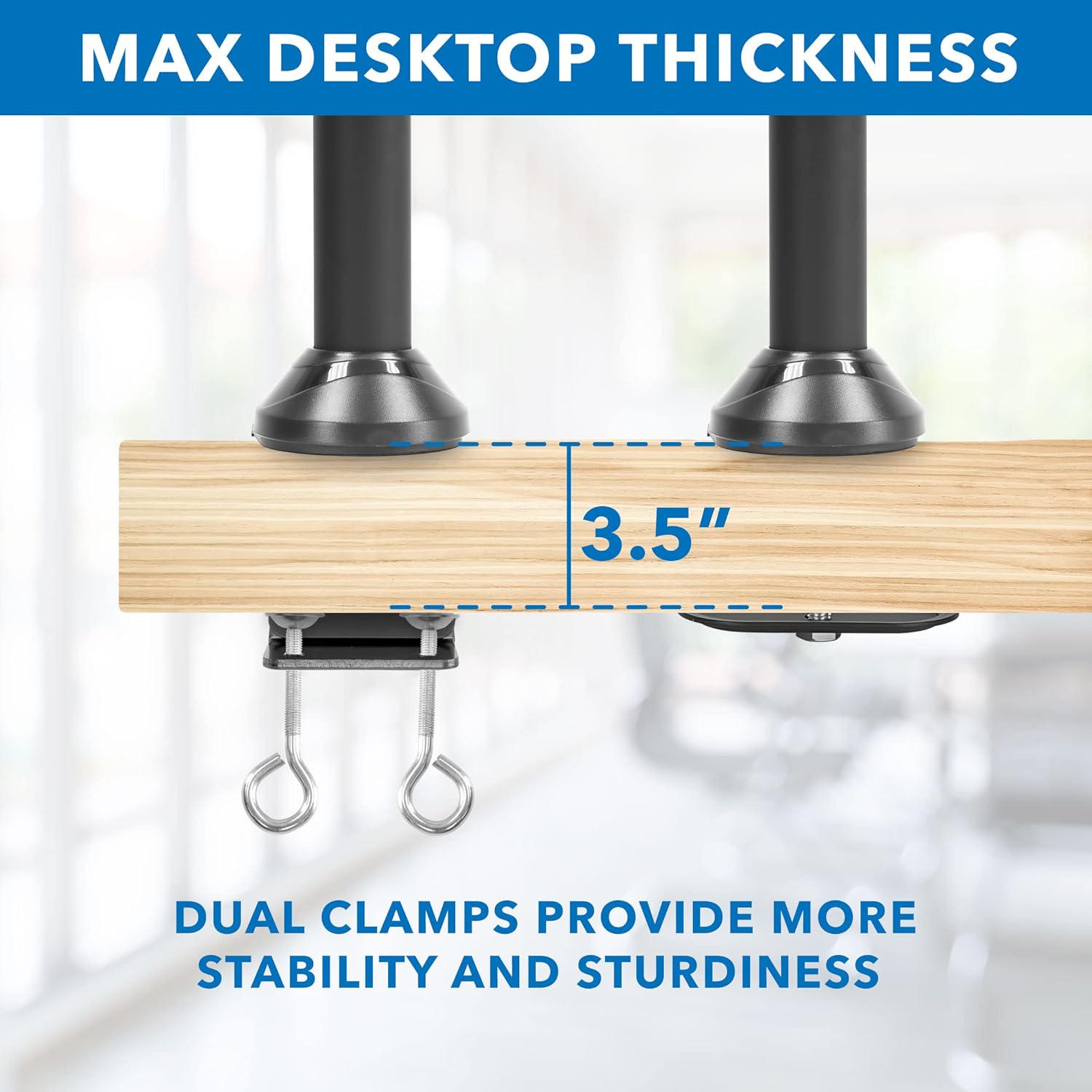
Image: Detail of the C-clamp mechanism securing the mount to a desktop, illustrating maximum compatible desk thickness.
Instalarea bazei bucșelor
- If your desk has a grommet hole, disassemble the C-clamp and attach the grommet base plate to the central pole.
- Insert the central pole through the grommet hole.
- Secure the grommet base from underneath the desk using the provided hardware.
Step 2: Attach Monitor Arms
Slide the monitor arms onto the central pole at your desired height. Use the included Allen wrench to tighten the set screw on each arm to secure its position.
Pasul 3: Atașați monitoare
- Carefully attach the VESA mounting plates (pre-attached to the arms) to the back of your monitors using the appropriate screws from the hardware kit. Ensure the VESA pattern (75x75mm or 100x100mm) matches your monitor.
- Once the VESA plates are secured to the monitors, slide the monitors onto the arms.
- Tighten any remaining screws to ensure the monitors are firmly attached to the arms.

Image: Visual guide for VESA mounting patterns and weight capacity per arm.
Instrucțiuni de utilizare și ajustări
The Mount-It! MI-752 offers various adjustment options for optimal viewconfort.
Reglarea înălțimii
To adjust the height of the monitors, loosen the set screw on the monitor arms where they attach to the central pole. Slide the arms up or down to the desired height, then re-tighten the set screw firmly.
Tilt, Swivel, and Rotation
The monitor arms allow for flexible positioning:
- Înclinare: Monitors can tilt up or down by 15 degrees. Adjust the tilt mechanism on the VESA plate.
- pivotare: The arms can swivel 360 degrees left and right.
- Rotaţie: Monitors can rotate 180 degrees for landscape or portrait orientation without removal.
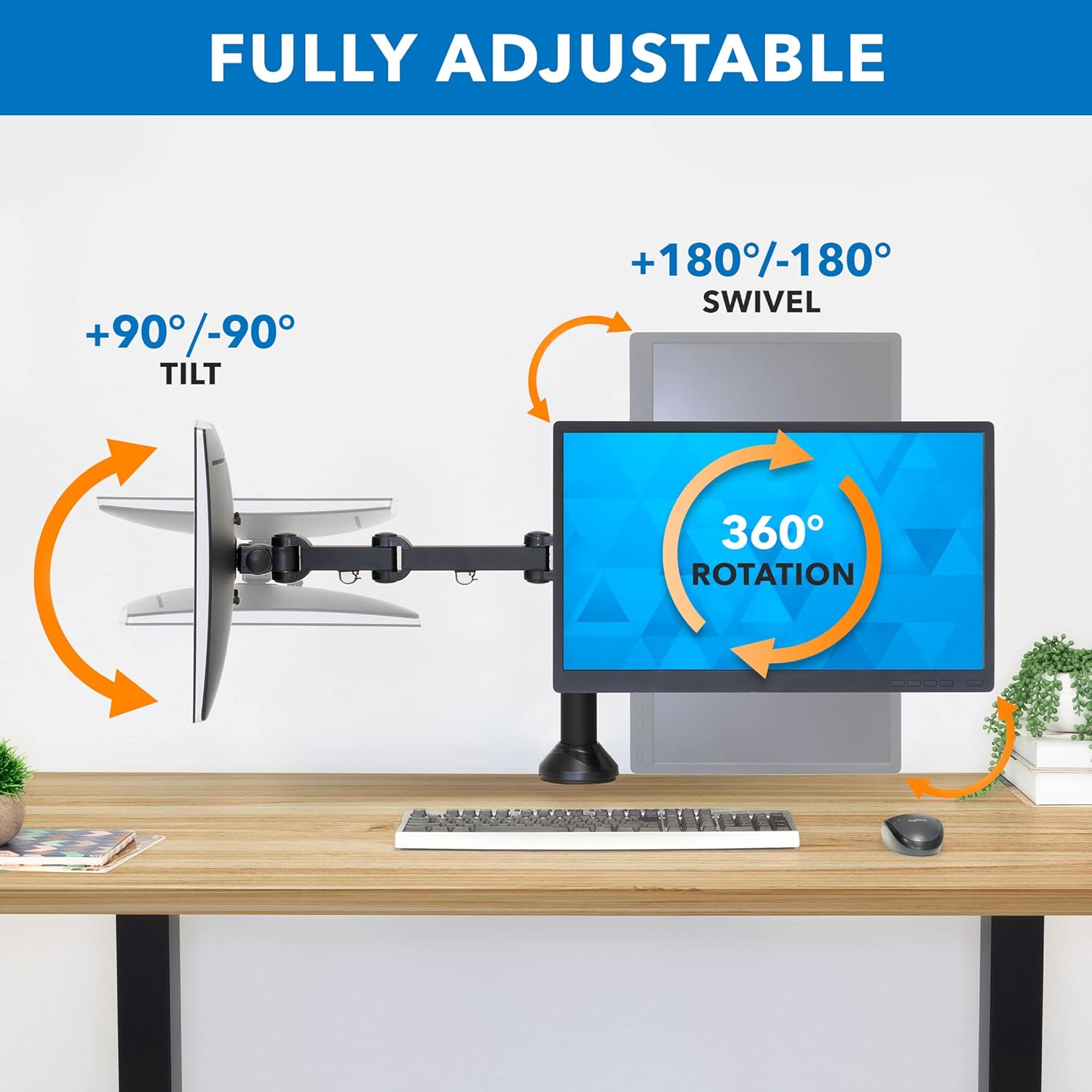
Image: Visual representation of the tilt, swivel, and rotation capabilities of the monitor arms.
Managementul cablurilor
Integrated cable management clips are located on each arm and along the central pole. Route your monitor and power cables through these clips to maintain a tidy and organized workspace.

Imagine: Example of cable routing using the integrated cable management system.
Întreţinere
To ensure the longevity and safe operation of your monitor mount:
- Verificați periodic toate șuruburile și conexiunile pentru a vă asigura că rămân strânse. Strângeți-le din nou dacă este necesar.
- Curățați suportul cu o lavetă moale,amp Evitați utilizarea de produse de curățare abrazive sau solvenți.
- Do not apply excessive force when adjusting the arms or monitors.
Depanare
Monitors are not level or sag
- Ensure all VESA plate screws are securely tightened to the monitor and the arm.
- Check the tightness of the pivot points on the monitor arms. Adjust with the provided Allen wrench if needed.
- Verify that the desk surface itself is level. Minor desk imperfections can be amplified by the mount.
Montura pare instabilă
- Re-check the C-clamp or grommet base installation. Ensure it is firmly secured to the desk and the desk thickness is within the specified range.
- Confirm that the combined weight of your monitors does not exceed the mount's capacity.
Difficulty adjusting monitor position
- Asigurați-vă că niciun cablu nu este agățat sau nu obstrucționează mișcarea.
- Check the tension of the joints. Some joints may have adjustable tension screws that can be loosened slightly with an Allen wrench if movement is too stiff.
Specificații
| Numărul de model | MI-752 |
| Material | Oțel aliat, aluminiu |
| Tip de montare | Suport de masă (C-Cl)amp sau bază cu inele de fixare) |
| Compatible Monitor Sizes | 13 - 27 inci |
| Weight Capacity per Arm | 22 lbs (10 kg) |
| Compatibilitate VESA | 75x75mm, 100x100mm |
| Tipul de mișcare | Articulating, Rotate, Swivel, Tilt |
| Unghi maxim de înclinare | 15 de grade |
| Grosimea maximă a desktopului | 4 inchi (10 cm) |
| Dimensiunile produsului | 24 x 5 x 11 cm (aproximativ, asamblat) |
| Greutatea articolului | 13.2 lire sterline |

Image: Detailed dimensions of the monitor mount components.
Informații despre garanție
The Mount-It! Dual Monitor Mount MI-752 comes with a GARANTIE DE 5 ANAceastă garanție acoperă defectele de materiale și de fabricație în condiții normale de utilizare. Vă rugăm să păstrați dovada achiziției pentru reclamațiile în garanție.
Asistență pentru clienți
For any questions, assistance with installation, or troubleshooting, please contact our US-based customer support team. Our friendly and responsive team is available during normal business hours to provide support.
Please refer to the Mount-It! website-ul sau documentația achiziției pentru date de contact specifice.


