Introducere
This manual provides essential information for the setup, operation, and maintenance of your Microsoft Xbox 360 Wired Controller. Designed for use with both Windows PCs and Xbox 360 consoles, this controller offers a reliable and responsive gaming experience.

Figura 1: Față view of the Microsoft Xbox 360 Wired Controller.
The controller features an ergonomic design for comfortable extended play, precise thumb sticks, two pressure-point triggers, and an 8-way directional pad. It connects via a flexible nine-foot cable, providing a stable connection without the need for batteries during use.
Ce este în cutie
La deschiderea ambalajului produsului, vă rugăm să vă asigurați că sunt prezente toate următoarele elemente:
- Microsoft Xbox 360 Wired Controller
- 90-Day Limited Warranty Information

Figure 2: Product packaging for the Xbox 360 Wired Controller.
Caracteristici cheie
- Design ergonomic: A compact, ergonomic shape allows for comfortable gameplay for extended periods on both PC and Xbox 360.
- Feedback de vibrație: Integrated vibration motors provide a more immersive and responsive gaming experience.
- Controale precise: Features precise thumb sticks, two pressure-point triggers, and an 8-way directional pad for accurate input.
- Conectivitate prin cablu: Connects via a powered USB port, ensuring a stable and lag-free connection.
- Cablu flexibil: The thin, flexible nine-foot cord is designed to offer the sensation of wireless freedom with the consistent performance of a wired connection.
- Integrated Headset Port: Includes a port for connecting a headset, enabling Xbox LIVE® play and in-game communication.
Ghid de instalare
Connecting to Xbox 360 Console:
- Locate an available USB port on your Xbox 360 console.
- Insert the USB connector of the controller's cable firmly into the USB port.
- The Xbox Guide button on the controller will illuminate, indicating a successful connection and that the controller is ready for use.
Connecting to Windows PC:
- Localizați un port USB disponibil pe PC-ul dvs. cu Windows.
- Insert the USB connector of the controller's cable firmly into the USB port.
- Instalare driver:
- For most modern Windows operating systems (Windows 7, 8, 10, 11), drivers should install automatically upon connection.
- If automatic installation fails, use the provided driver disc (if included) or download the latest drivers from the official Microsoft support website-ul.
- Follow the on-screen prompts to complete the driver installation. A system restart may be required.
- Once drivers are installed, the Xbox Guide button on the controller will illuminate, indicating it is ready for use with your PC games.
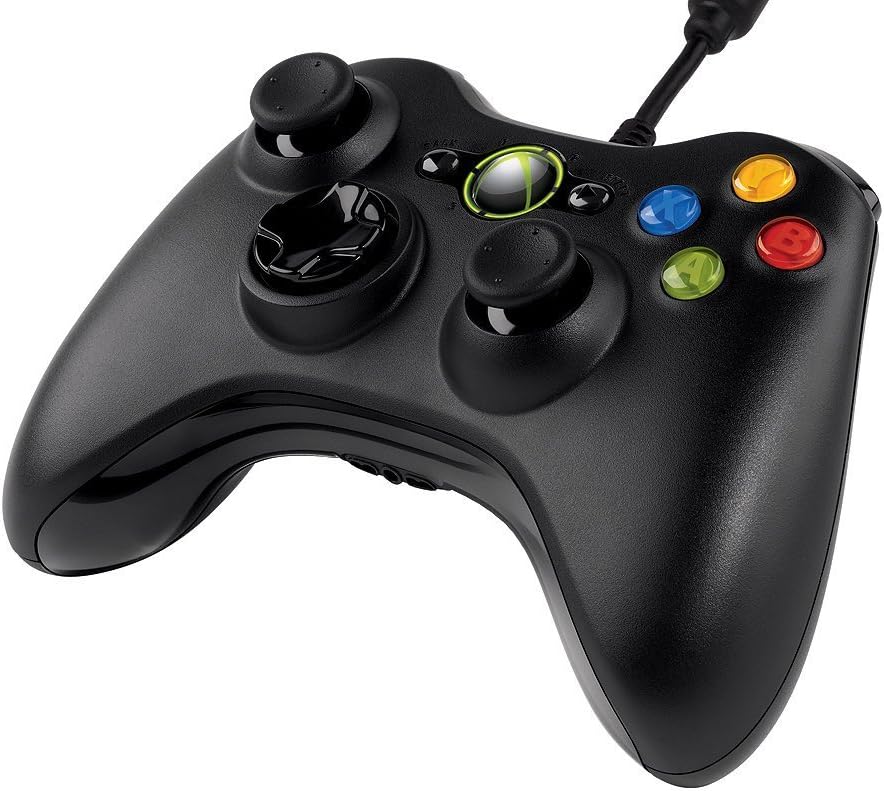
Figura 3: Înclinat în sus view of the controller, highlighting the cable connection point.
Instrucțiuni de operare
The Xbox 360 Wired Controller provides intuitive controls for a wide range of games. Familiarize yourself with the button layout for optimal gameplay.
- Manete analogice: Use the left and right analog sticks for movement, camera control, or other in-game actions.
- D-pad: The directional pad is typically used for menu navigation or specific in-game commands.
- Butoane frontale (A, B, X, Y): These colored buttons are used for primary actions, interactions, or specific game functions.
- Butoane de umăr (LB, RB) și trăgaci (LT, RT): Located on the top of the controller, these are commonly used for secondary actions, aiming, or firing.
- Start & Back Buttons: Used for pausing games, accessing menus, or confirming selections.
- Xbox Guide Button: Press the glowing Xbox Guide button in the center to access the Xbox Guide on your console or the Xbox Game Bar/overlay on PC.
Întreţinere
To ensure the longevity and optimal performance of your Xbox 360 Wired Controller, follow these maintenance guidelines:
- curatenie: Folosiți o cârpă moale și uscată pentru a șterge regulat controlerul. Pentru murdăria persistentă, ștergeți ușor.amp Se poate folosi o cârpă, dar asigurați-vă că nu pătrunde umezeală în componentele interne. Evitați substanțele chimice dure sau produsele de curățare abrazive.
- Depozitare: Store the controller in a clean, dry place away from extreme temperatures, direct sunlight, and excessive dust. Avoid wrapping the cable too tightly around the controller to prevent damage.
- Manipulare: Avoid dropping the controller or subjecting it to strong impacts, as this can damage internal circuitry or external components.
Depanare
If you encounter issues with your Xbox 360 Wired Controller, try the following common troubleshooting steps:
- Controllerul nu răspunde:
- Asigurați-vă că cablul USB este conectat corect atât la controler, cât și la consolă/PC.
- Încearcă să conectezi controlerul la un alt port USB.
- Restart your Xbox 360 console or PC.
- Vibrațiile nu funcționează:
- Verificați setările din joc pentru a vă asigura că feedback-ul prin vibrații este activat.
- Verify that your console/PC drivers are up to date.
- Buttons/Sticks Not Functioning Correctly:
- Asigurați-vă că nu există resturi blocate în jurul butoanelor sau bețelor.
- Test the controller on another game or system to determine if the issue is specific to one application.
- On PC, check controller calibration settings in your operating system.
If problems persist, refer to the official Microsoft support resources or the full user guide linked in the Support section.
Specificații
| Caracteristică | Detaliu |
|---|---|
| Marca | Microsoft |
| Numele modelului | MICROSOFT CORP/LICENSING |
| Numărul de model al articolului | 52A-00004 |
| Dispozitive compatibile | PC, Xbox 360 Console (Windows Operating System) |
| Tip controler | Gamepad |
| Tehnologia de conectivitate | USB (cu fir) |
| Platformă hardware | PC, Xbox 360 |
| Culoare | Negru |
| Greutatea articolului | 12.5 uncii (aproximativ 354 grame) |
| Dimensiunile produsului (Lxlxh) | 7.91 x 5.51 x 2.56 inci (aprox. 20.09 x 14.00 x 6.50 cm) |
| Sursa de alimentare | Electric cu fir (alimentat prin USB) |
Garanție și suport
Garantie limitata:
Your Microsoft Xbox 360 Wired Controller comes with a 90-Day Limited Warranty. Please refer to the warranty information included in your product packaging for full terms and conditions.
Resurse suplimentare:
- Pentru un ghid de utilizare mai detaliat, puteți descărca documentul oficial în format PDF: Ghidul utilizatorului (PDF)
- For further assistance, technical support, or to find updated drivers, please visit the official Microsoft Support website-ul.


