1. Introducere
Thank you for choosing the LTC 3-Channel 60W Public Address Amplifier with USB/SD-MP3. This manual provides essential information for the safe and efficient operation of your new amplifier. Please read it thoroughly before use and keep it for future reference. This amplifier is designed for public address applications, offering versatile input options including microphones, auxiliary devices, and integrated USB/SD card playback.
2. Instrucțiuni de siguranță
Pentru a asigura o funcționare în siguranță și a preveni deteriorarea, vă rugăm să respectați următoarele măsuri de siguranță:
- Sursa de alimentare: Conectați amplifier only to the specified power sources (12V DC or 220V AC) as indicated on the unit. Ensure the voltage se potrivește cu sursa de alimentare locală.
- Ventilare: Nu blocați niciun orificiu de ventilație. Asigurați o circulație adecvată a aerului în jurul unității pentru a preveni supraîncălzirea.
- Umiditate: Nu expuneți amplifier to rain, moisture, or excessive humidity. Keep it away from liquids.
- curatenie: Deconectați alimentarea înainte de curățare. Folosiți o cârpă uscată și moale. Nu utilizați agenți de curățare lichizi sau aerosoli.
- Service: Nu încercați să reparați singur acest produs. Apelați la personal de service calificat pentru toate intervențiile. Deschiderea unității vă poate expune la intensități periculoase.tages sau alte pericole.
- Plasare: Așezați ampAșezați recipientul pe o suprafață stabilă și plană. Evitați să îl așezați lângă surse de căldură sau în lumina directă a soarelui.
- Supraîncărcare: Nu supraîncărcați amplifier. Ensure connected speakers match the amplifier's impedance and power ratings.
3. Produs terminatview
The LTC 3-Channel 60W Public Address Amplifier is a versatile audio solution designed for various PA applications. It features multiple input options and an integrated MP3 player for convenience.
3.1 Controale și conexiuni pe panoul frontal
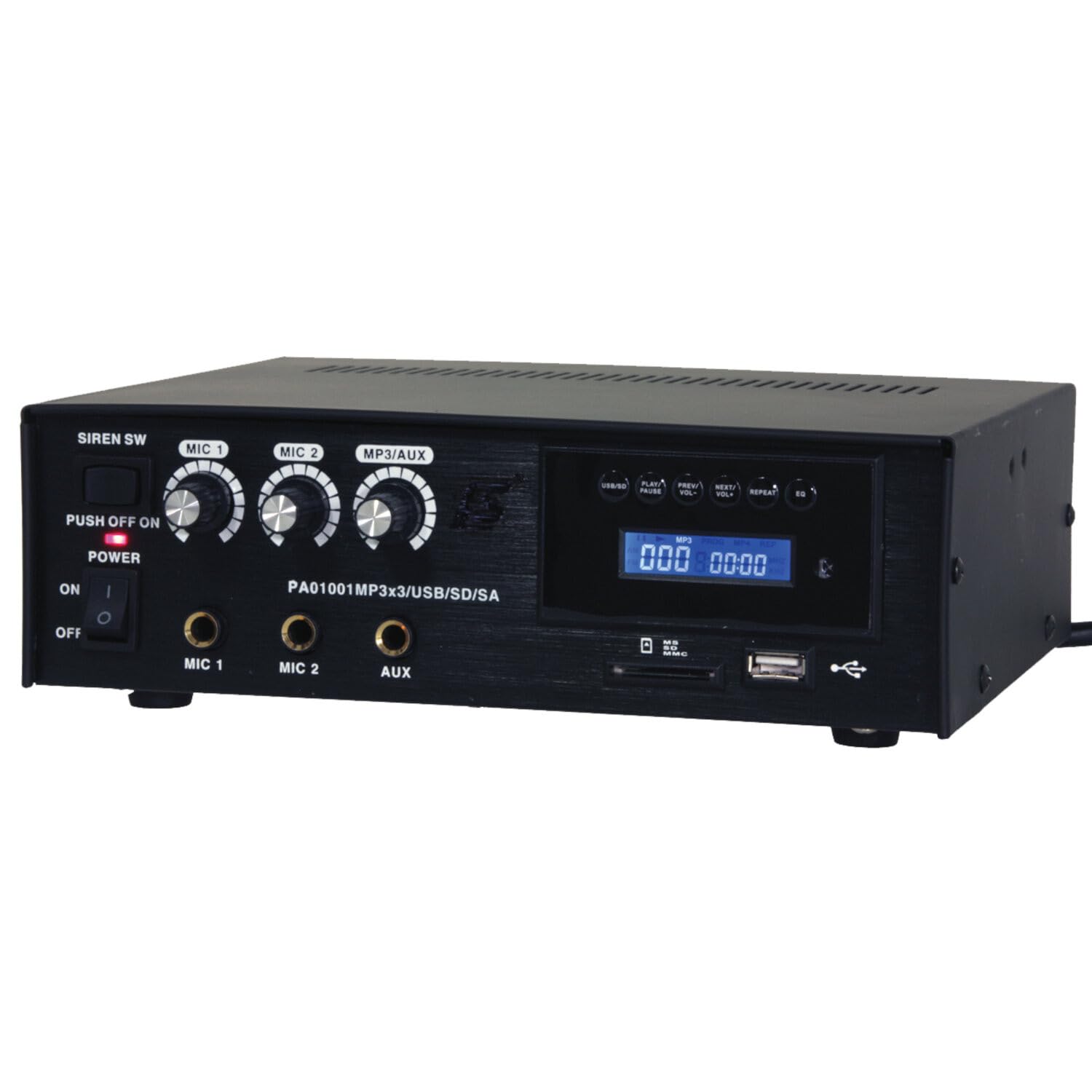
Image: Front panel of the LTC 3-Channel 60W Public Address Amplifier. Visible controls include volume knobs for MIC1, MIC2, and MP3/AUX, a Master volume knob, a Power switch, a Siren switch, and input jacks for MIC1, MIC2, and AUX. The MP3 player section features a display, USB port, and SD card slot.
- SIREN SW: Switch to activate the built-in siren sound.
- PUSH OFF / ON / OF Power Switch: Întrerupătorul principal de alimentare pentru ampmai în viață.
- MIC 1 Volume: Rotary knob to adjust the volume level for Microphone Input 1.
- MIC 2 Volume: Rotary knob to adjust the volume level for Microphone Input 2.
- MP3/AUX Volume: Rotary knob to adjust the volume level for the MP3 player and Auxiliary input.
- Volumul principal: Rotary knob to control the overall output volume of the ampmai în viață.
- Intrare MIC 1: 6.3mm jack for connecting Microphone 1.
- Intrare MIC 2: 6.3mm jack for connecting Microphone 2.
- Intrare AUX: 6.3mm jack for connecting external audio sources (e.g., CD player, smartphone).
- USB/SD MP3 Player: Integrated player with USB port and SD card slot for direct playback of audio files. Includes control buttons (Play/Pause, Prev/Vol-, Next/Vol+, Repeat, EQ) and an LCD display.
3.2 Caracteristici cheie
- Mobile or fixed amplifier with 12V battery (car, boat) or 220V mains power supply.
- Integrated MP3 player with USB and SD ports for music playback.
- Includes a siren for powerful sound and an MP3 control screen with a blue LCD display.
4. Configurare
Urmați acești pași pentru a configura ampmai în viață:
4.1 Conexiune la alimentare
- For 220V AC Operation: Connect the supplied power cord to the AC input on the rear panel of the amplifier and then to a standard 220V AC wall outlet.
- Pentru funcționare la 12 V DC: Connect a 12V DC power source (e.g., car battery) to the 12V DC input terminals on the rear panel. Ensure correct polarity (+ to + and - to -).
- Asigurați amplifier's power switch is in the 'OFF' position before connecting to power.
4.2 Conexiune difuzor
- Locate the speaker output terminals on the rear panel of the ampmai în viață.
- Connect your speakers to these terminals, ensuring correct polarity (positive to positive, negative to negative).
- Verify that the total impedance of the connected speakers is compatible with the amplifier's output specifications to prevent damage.
4.3 Conectarea intrării audio
- Microfoane: Insert your microphones into the MIC 1 and/or MIC 2 input jacks on the front panel.
- Dispozitive auxiliare: Connect external audio sources (e.g., smartphone, laptop, CD player) to the AUX input jack on the front panel using an appropriate 6.3mm audio cable.
- Carduri USB/SD: Insert a USB flash drive into the USB port or an SD card into the SD card slot on the front panel for MP3 playback.
5. Instrucțiuni de utilizare
Odată ce ampDupă ce este configurat lifizerul, urmați acești pași pentru operare:
5.1 Pornire/Oprire
- Asigurați-vă că toate conexiunile sunt sigure.
- Turn the MASTER volume knob to its minimum position.
- Rotiți comutatorul POWER în poziția „ON”. Indicatorul luminos de alimentare se va aprinde.
- To power off, turn the MASTER volume to minimum and then flip the POWER switch to 'OFF'.
5.2 Utilizarea microfonului
- Connect your microphone(s) to the MIC 1 and/or MIC 2 inputs.
- Slowly increase the MIC 1 and/or MIC 2 volume knob(s) to the desired level.
- Adjust the MASTER volume for overall output.
- Avoid pointing microphones directly at speakers to prevent feedback (howling).
5.3 Utilizarea intrării AUX
- Connect your external audio device to the AUX input.
- Ensure the volume on your external device is set to a moderate level.
- Slowly increase the MP3/AUX volume knob to the desired level.
- Adjust the MASTER volume for overall output.
5.4 MP3/USB/SD Playback
- Insert a USB flash drive into the USB port or an SD card into the SD card slot. The amplifier will automatically detect the media and begin playback.
- Folosiți butonul „PLAY/PAUSE” pentru a porni sau a întrerupe redarea.
- Use the 'PREV/VOL-' button to go to the previous track or press and hold to decrease volume.
- Use the 'NEXT/VOL+' button to go to the next track or press and hold to increase volume.
- Use the 'REPEAT' button to cycle through repeat modes (e.g., repeat one, repeat all).
- Use the 'EQ' button to cycle through equalizer presets.
- Adjust the MP3/AUX volume knob and MASTER volume for desired output.
5.5 Siren Function
- To activate the siren, flip the SIREN SW to the 'ON' position.
- To deactivate, flip the SIREN SW back to the 'OFF' position.
- Use the MASTER volume to control the siren's output level.
6. Întreținere
Proper maintenance ensures the longevity of your ampmai în viață:
- curatenie: Ștergeți regulat unitatea cu o cârpă moale și uscată. Nu utilizați produse de curățare abrazive, ceruri sau solvenți.
- Ventilare: Ensure that the ventilation grilles are free from dust and debris. Use a soft brush or vacuum cleaner to clear them if necessary.
- Depozitare: Dacă stocați amplifier for an extended period, disconnect it from power and store it in a cool, dry place away from direct sunlight and extreme temperatures.
- Conexiuni: Verificați periodic toate conexiunile cablurilor pentru strângerea și prezentarea semnelor de uzură.
7. Depanare
Dacă întâmpinați probleme cu amplifier, refer to the table below for common problems and solutions:
| Problemă | Cauza posibila | Soluţie |
|---|---|---|
| Fără putere | Power cable not connected; Power outlet faulty; Power switch off; 12V DC battery depleted or incorrectly connected. | Check power cable connection; Try a different outlet; Ensure power switch is ON; Check 12V DC battery charge and polarity. |
| Fără ieșire de sunet | Master volume too low; Input volume too low; Speakers not connected or faulty; Incorrect input selected (for MP3/AUX); Mute activated. | Increase Master and input volumes; Check speaker connections and functionality; Ensure correct input source is active; Check if any mute function is engaged. |
| Sunet distorsionat | Volume too high (clipping); Speaker impedance mismatch; Faulty cables or connections. | Reduce volume; Verify speaker impedance compatibility; Check and replace faulty cables. |
| MP3/USB/SD not playing | Incorect file format; USB drive/SD card faulty or not inserted correctly; MP3/AUX volume too low. | Asigura files are MP3 format; Reinsert USB/SD card; Try a different USB/SD card; Increase MP3/AUX volume. |
| Feedback (howling) from microphones | Microphone too close to speakers; Microphone volume too high. | Reposition microphones away from speakers; Reduce microphone volume. |
Dacă problema persistă după ce încercați aceste soluții, vă rugăm să contactați serviciul de asistență pentru clienți.
8. Specificații
Technical specifications for the LTC 3-Channel 60W Public Address Ampmai în viață:
| Caracteristică | Caietul de sarcini |
|---|---|
| Numărul de model | LTCAUDIO95-1000 |
| Putere de ieșire (12V) | RMS 35W, Max. 45W |
| Putere de ieșire (220V) | RMS 45W, Max. 60W |
| Numărul de canale | 3 (MIC1, MIC2, AUX/MP3) |
| Voltage | 220 volți (CA), 12 volți (CC) |
| Volumul maxim de alimentaretage | 240 volți |
| Vol. aprovizionare minimătage | 220 volți (AC) |
| Dimensiuni produs (L x l x H) | 48 x 9 x 35 cm (18.9 x 3.5 x 13.8 țoli) |
| Greutatea produsului | 3.26 kilograme (7.19 lbs) |
| Tip de montare | Suport de masă |
| Caracteristici integrate | USB/SD MP3 Player, Siren |
9. Garanție și asistență
This product is manufactured by Ibiza and sold under the LTC brand. Spare parts availability is indicated for 2 years from the date of purchase. For technical support, troubleshooting assistance beyond what is provided in this manual, or warranty claims, please contact your retailer or the authorized service center. Keep your proof of purchase for warranty validation.


