Introducere
The My Weigh CTS-3000 Digital Counting Scale is a versatile and precise instrument designed for accurate weighing and counting of various items. With a robust 30,000 gram capacity and 0.5 gram resolution, it is suitable for a wide range of applications including kitchen use, business inventory, and educational purposes. This manual provides comprehensive instructions to help you set up, operate, and maintain your scale for optimal performance.
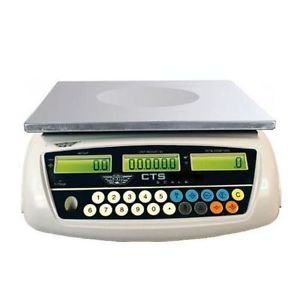
Image: The My Weigh CTS-3000 Digital Counting Scale, featuring a stainless steel platform and a blue backlit LCD display.
Înființat
- Despachetarea: Carefully remove the scale from its packaging. Ensure all components are present: the scale unit, stainless steel platform, clear protective cover, and AC adapter.
- Plasare: Place the scale on a stable, flat, and level surface. Avoid areas with excessive vibration, drafts, or direct sunlight, as these can affect accuracy. The scale features adjustable feet for leveling.
- Conexiune de alimentare:
- Putere AC: Connect the provided AC adapter to the scale's power input port and then plug it into a standard electrical outlet.
- Putere baterie: The scale can also operate on 5 AA batteries (not included). Open the battery compartment on the underside of the scale and insert the batteries, ensuring correct polarity. The scale features overcharge and over-discharge protection when using the rechargeable battery pack (if included).
- Instalarea platformei: Place the stainless steel weighing platform securely onto the scale base.
- Husa de protectie: Position the clear protective cover over the display and control panel to guard against spills and debris.
- Pornire inițială: Apăsați tasta ON/OFF button to power on the scale. The display will show a self-test sequence before settling at 0.00.
Instrucțiuni de operare
1. Cântărire de bază
- Pornire: Apăsați tasta ON/OFF button. Wait for the display to stabilize at 0.00.
- Loc articol: Gently place the item(s) to be weighed onto the center of the stainless steel platform.
- Citire măsurătoare: The weight will be displayed on the main LCD screen.
2. Changing Weighing Modes (Units)
The CTS-3000 supports multiple weighing modes: grams (g), ounces (oz), kilograms (kg), and pounds (lb).
- Apăsați MODE: Cu cântarul pornit, apăsați butonul MOD apăsați butonul în mod repetat pentru a parcurge unitățile disponibile.
- Selectați unitatea: Stop pressing when your desired unit (e.g., "g" for grams, "lb" for pounds) is displayed.
Video: Demonstration of the scale's accurate weighing and unit conversion functions. The video shows how to switch between grams, kilograms, and pounds.
3. Funcția de tară
The Tare function allows you to subtract the weight of a container, so only the weight of its contents is measured.
- Locați containerul: Așezați un recipient gol pe platforma de cântărire. Afișajul va afișa greutatea acestuia.
- Press TARE: Apăsați tasta TARĂ button. The display will reset to 0.00, effectively subtracting the container's weight.
- Adăugați articole: Adăugați în recipient articolele pe care doriți să le cântăriți. Afișajul va afișa doar greutatea netă a articolelor.
4. Funcția de numărare
The counting function allows you to count a large number of identical items quickly.
- Sample Cantitate: Plasați un număr cunoscut de sample items (e.g., 10, 20, 50, 100) on the platform. The more samples, the more accurate the count.
- Intrare Samppe: Using the numeric keypad, enter the exact number of samples you placed on the platform.
- Apăsați SAMPLE: Apăsați tasta SAMPLE button. The scale will calculate the average unit weight and display the quantity.
- Add More Items: Scoateți samples and add the bulk quantity of items. The scale will automatically count them.
Video: Demonstration of the counting function, showing how to input a sample quantity and then count a larger batch of items.
5. Alarm Function (Weight & Quantity)
The scale features an alarm function that can be set for both weight and quantity thresholds.
- Intrați în modul alarmă: Țineți apăsat butonul '.' tasta, apoi apăsați „5” pentru a intra în setarea modului alarmă.
- Select Alarm Type: Utilizați M+ key to cycle through alarm modes: "no" (alarm off), "in" (alarm within range), "out" (alarm outside range), "up" (alarm when exceeding set value).
- Set Alarm Value: Apăsați tasta SET ALARMĂ key. Input the desired alarm value using the numeric keypad. For weight, input the value in grams (e.g., 10000 for 1kg on a 0.1g scale). For quantity, input the number of pieces.
- Confirma: Apăsați tasta TARĂ tasta pentru a confirma setarea.
Video: Detailed instructions on setting up the weight and quantity alarm functions on the counting scale.
Întreţinere
- curatenie: Wipe the scale platform and display with a soft, damp cloth. Do not use abrasive cleaners or immerse the scale in water. The removable "gunk shield" protects the display from spills.
- Depozitare: Store the scale in a clean, dry environment away from extreme temperatures and humidity.
- Îngrijirea bateriei: If using battery power, ensure batteries are replaced when low to maintain accuracy. If storing for extended periods, remove batteries to prevent leakage.
Depanare
| Problemă | Cauza posibila | Soluţie |
|---|---|---|
| Scara nu pornește. | Fără curent, baterii descărcate sau adaptor defect. | Verificați conexiunea adaptorului de curent alternativ sau înlocuiți bateriile. |
| Citiri inexacte. | Unstable surface, drafts, or scale not level. | Place on a stable, level surface. Avoid drafts. Ensure feet are adjusted. |
| Afișajul arată „SUPERÎNCĂRCARE”. | Greutatea depășește capacitatea maximă. | Îndepărtați imediat excesul de greutate pentru a preveni deteriorarea. |
| Funcția de numărare este inexactă. | Insuficient sample size or inconsistent unit weight. | Folosiți un s mai mareample size (e.g., 50 or 100 pieces) for calibration. Ensure all items are identical. |
Specificații
- Marca: Greutatea mea
- Model: CTS-3000
- Capacitate: 30,000 grams (30 kg / 66.078 lb / 1057.24 oz)
- Rezoluţie: 0.5 grams (0.0005 kg / 0.001 lb / 0.02 oz)
- Moduri de cântărire: Grams (g), Ounces (oz), Kilograms (kg), Pounds (lb), Counting Mode
- Afişa: Three backlit LCD displays (Total Weight, Unit Weight, Number of Pieces)
- Materialul platformei: Oţel inoxidabil
- Caracteristici: Tare function, Batching feature, Counting feature, Removable "gunk shield", RS-232 serial port, Liquid level indicator
- Putere: Rechargeable battery pack and AC adapter included
- Dimensiuni produs: 14.5 x 7 x 15 inci
- Greutatea articolului: 8.9 lire sterline
Garanție și suport
For warranty information and technical support, please refer to the official My Weigh website-ul lor web sau contactați departamentul lor de asistență pentru clienți. Păstrați bonul fiscal ca dovadă a achiziției pentru orice reclamații în garanție.
Pentru resurse suplimentare și înregistrarea produsului, vizitați: www.myweigh.com