Introducere
Thank you for choosing the Unicorn CX2100 Electronic Dartboard. This manual provides essential information for the proper setup, operation, and maintenance of your dartboard. Please read these instructions carefully before use to ensure optimal performance and longevity of your product.
Informații de siguranță
- Use only soft-tip darts with this electronic dartboard. Hard-tip darts can damage the playing surface and electronic components.
- Keep the dartboard away from water and excessive moisture to prevent electrical hazards.
- Ensure the dartboard is securely mounted to prevent it from falling during play.
- Do not attempt to disassemble or repair the dartboard yourself. Refer to the troubleshooting section or contact support for assistance.
- Keep small children and pets away from the playing area during use.
- Requires 3 AA batteries (sold separately). Ensure correct battery polarity when inserting. Remove batteries if the dartboard will not be used for an extended period.
Ce este în cutie
La despachetare, vă rugăm să verificați dacă sunt prezente toate componentele următoare:
- Unicorn CX2100 Electronic Dartboard
- 6 Soft Tip Darts
- Hardware de montare
- Manual de utilizare (acest document)
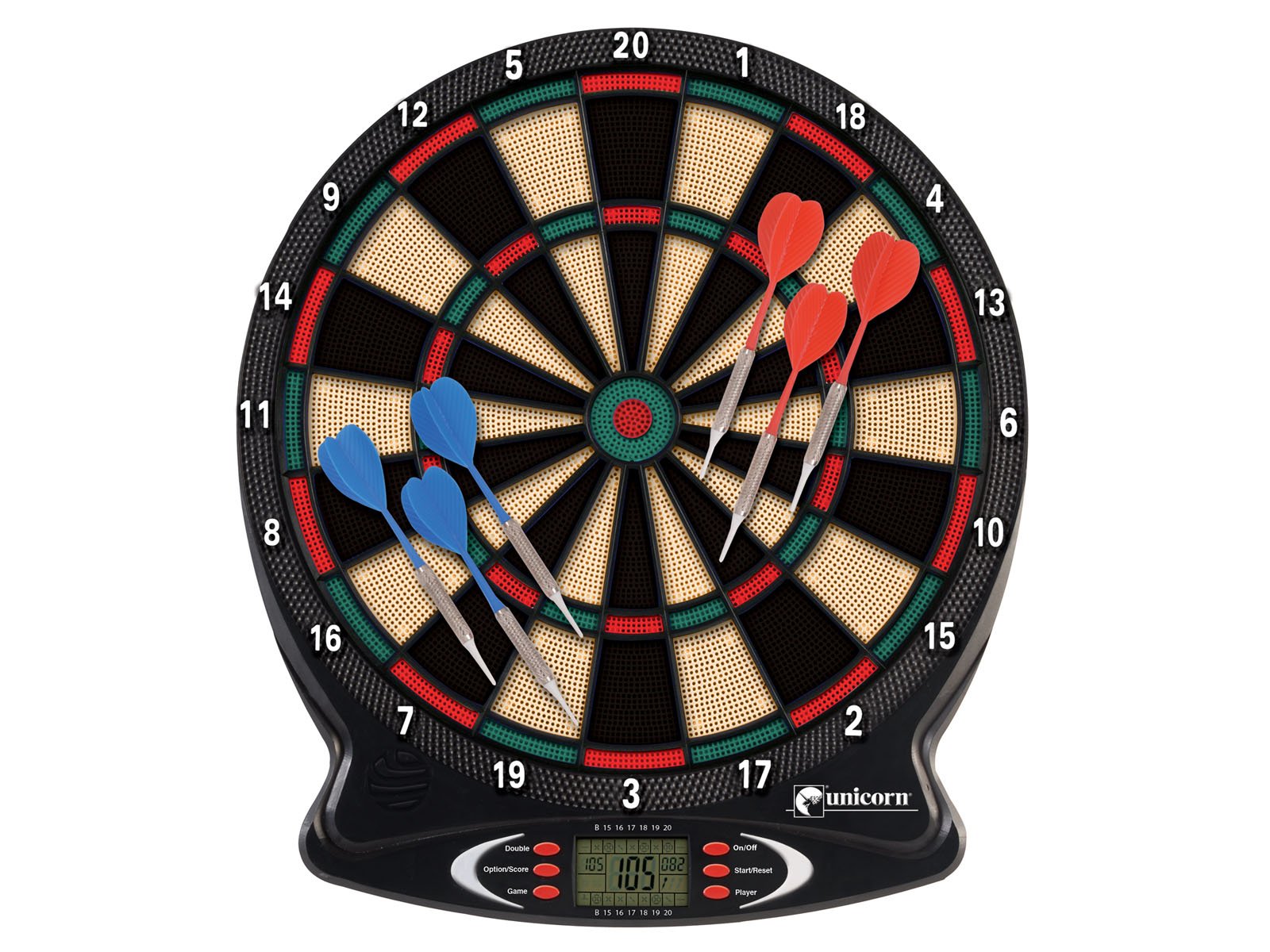
Image: The Unicorn CX2100 Electronic Dartboard, featuring a standard dartboard layout with numbered segments. Six soft-tip darts, three red and three blue, are shown embedded in various sections of the board. The control panel with an LCD display and buttons is visible at the bottom.
Înființat
- Alegeți o locație: Select a suitable wall space for mounting. Ensure there is enough clear space around the dartboard for safe play, typically 5-8 feet in front and to the sides.
- Montare:
- Using the provided mounting hardware, securely attach the dartboard to a sturdy wall. The center of the bullseye should be 5 feet 8 inches (1.73 meters) from the floor.
- The throwing line (oche) should be 7 feet 9 ¼ inches (2.37 meters) from the face of the dartboard.
- Introduceți bateriile: Open the battery compartment on the back of the dartboard. Insert 3 AA batteries (not included), ensuring correct polarity (+/-). Close the compartment securely.
Instrucțiuni de operare
Panou de control terminatview
The control panel located at the bottom of the dartboard features an LCD display and several buttons for game selection and player management.
- Buton Pornit/Oprit: Powers the dartboard on or off.
- Game Button: Cycles through the available games.
- Option/Score Button: Selects game variations or displays scores.
- Player Button: Selects the number of players (up to 8).
- Start/Reset Button: Starts a new game or resets the current game.
- Buton dublu: Used in specific games for double-out options.
Pornirea unui joc
- Pornire: Apăsați tasta Pornit/Oprit button to turn on the dartboard. The LCD display will illuminate.
- Selectați jocul: Apăsați tasta Joc button repeatedly to cycle through the 35 available games. The game number or name will appear on the LCD.
- Select Options (if applicable): For games with variations (176 total variations), press the Option/Score button to choose your preferred variation.
- Selectați jucătorii: Apăsați tasta Player button to select the number of players (1-8).
- Începeți jocul: Apăsați tasta Start / Reset button to begin the game. The dartboard will announce the first player.
Gameplay-ul
- Throw darts at the board. The electronic scoring system will automatically register hits.
- The LCD display will show the current player's score and remaining points.
- Voice and sound effects will enhance the gameplay experience.
- After each player's turn, the dartboard will prompt the next player.
- To pause or reset a game, press the Start / Reset buton.
Regulile jocului
The Unicorn CX2100 offers 35 distinct games with 176 playing variations. While specific rules for each game are typically detailed in a separate game rule booklet (if included) or can be found online, here are general principles:
- Standard Scoring: Each segment on the dartboard corresponds to a numerical value. The outer ring doubles the score, and the inner ring triples it. The bullseye typically scores 50 points (outer bull) or 25 points (inner bull).
- Cricket: A popular game where players aim to "close" numbers (15-20 and bullseye) by hitting them three times.
- '01 Games (e.g., 301, 501): Players start with a set score and subtract points with each dart thrown, aiming to reach exactly zero. Often requires a "double out" to finish.
- Consult the dartboard's display and accompanying documentation for specific game objectives and scoring methods for each of the 35 games.
Întreţinere
- curatenie: Ștergeți suprafața tablei de darts și panoul de control cu o cârpă moale și uscată. Nu utilizați produse de curățare abrazive sau solvenți.
- Sfaturi pentru darts: Regularly inspect soft-tip darts for wear and tear. Replace broken or bent tips to prevent damage to the dartboard segments.
- Depozitare: When not in use, store the dartboard in a dry, cool place, away from direct sunlight and extreme temperatures.
- Înlocuire baterie: Replace batteries when the display dims or the dartboard functions erratically. Always replace all batteries at the same time with new ones of the same type.
Depanare
| Problemă | Cauza posibila | Soluţie |
|---|---|---|
| Tabla de darts nu pornește. | No batteries or incorrect battery insertion. Dead batteries. | Ensure 3 AA batteries are correctly inserted with proper polarity. Replace with new batteries. |
| Darts are not registering. | Worn dart tips. Dart not fully penetrating segment hole. | Check dart tips and replace if worn. Ensure darts are thrown with sufficient force to fully enter the segment. |
| Incorrect scoring. | Stuck segment. | Gently remove any stuck darts. If a segment remains stuck, try gently pressing it in and out. |
| Butoanele nu răspund. | Low batteries. System glitch. | Replace batteries. Try turning the dartboard off and on again (power cycle). |
Specificații
- Model: Unicorn CX2100
- Marca: Inorog
- Sursa de alimentare: 3 x baterii AA (nu sunt incluse)
- Jocuri: 35
- Variante: 176
- Jucători: Până la 8
- Componente incluse: Dartboard, 6 Soft Tip Darts, Mounting Hardware
- Greutate aproximativă a articolului: 454 g
- Interval de vârstă: Adult
Garanție și suport
For warranty information or technical support, please refer to the documentation provided at the point of purchase or contact Unicorn customer service. Keep your purchase receipt as proof of purchase.


