Introducere
The Belkin F4U016 4-Port Desktop USB Hub provides convenient expansion for your computer's USB connectivity. This self-powered hub allows you to connect multiple USB devices, supporting both USB 1.1 and USB 2.0 standards. It is designed for plug-and-play operation with both Mac and PC systems, facilitating easy integration of peripherals.
Conținutul pachetului
- Belkin F4U016 4-Port Desktop USB Hub
- Adaptor de alimentare
- Cablu de conexiune USB
Caracteristici cheie
- Four Downstream USB Ports: Provides expanded connectivity for multiple USB devices.
- Plug-and-Play Compatibility: No software installation required for Mac and PC systems.
- Suport pentru schimbarea la cald: Allows devices to be connected and disconnected without restarting your computer.
- Funcționare autoalimentată: Includes a power supply for reliable performance with power-intensive devices.
- Compatibilitate largă a dispozitivelor: Fully compatible with USB 1.1 and USB 2.0 devices.
- Cascading Capability: Connect additional hubs to expand connectivity up to 127 USB devices from a single port.
Instrucțiuni de configurare
- Conectați sursa de alimentare: Insert the power supply adapter into the designated power input port on the Belkin F4U016 USB Hub. Plug the power supply into a standard electrical outlet.
- Conectare la computer: Use the provided USB connection cable to link the upstream port on the Belkin F4U016 USB Hub to an available USB port on your computer (desktop or laptop).
- Recunoașterea sistemului: Your operating system (Mac or PC) will automatically detect and install the necessary drivers for the USB hub. This process is typically quick and requires no user intervention.
- Conectați dispozitive USB: Once the hub is recognized, you can connect your USB devices (e.g., mouse, keyboard, printer, external hard drive) to any of the four downstream USB ports on the hub.
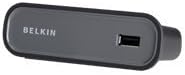
Figura 1: Belkin F4U016 4-Port Desktop USB Hub. This image illustrates the compact design of the hub, featuring its USB port for device connection.
Instrucțiuni de operare
The Belkin F4U016 USB Hub operates on a plug-and-play basis. Simply connect your USB devices to the available ports on the hub. The hub supports "hot-swapping," meaning you can connect or disconnect devices while your computer is running without causing system errors or requiring a restart. The self-powered design ensures stable power delivery to connected devices, which is particularly beneficial for devices that require more power, such as external hard drives or certain peripherals.
To maximize performance, ensure that the hub's power adapter is always connected when using power-intensive devices or when multiple devices are connected simultaneously.
Întreţinere
The Belkin F4U016 USB Hub requires minimal maintenance. Keep the device clean by wiping it with a soft, dry cloth. Avoid using liquid cleaners or abrasive materials. Ensure the hub is placed in a well-ventilated area and away from direct sunlight or excessive heat to prevent overheating. Do not expose the hub to moisture.
Depanare
- Dispozitiv nerecunoscut:
- Ensure the USB hub is properly connected to your computer and the power adapter is securely plugged into both the hub and a working electrical outlet.
- Try connecting the device directly to your computer's USB port to verify the device itself is functioning correctly.
- Disconnect and reconnect the hub from your computer.
- Try connecting the device to a different port on the hub.
- Insufficient Power for Devices:
- Ensure the external power supply is connected and functioning. The hub is self-powered, but some high-power devices require the external adapter.
- If using multiple power-intensive devices, consider reducing the number of devices connected to the hub or connecting some directly to your computer.
- Transfer lent de date:
- Verify that both the hub and your connected devices are USB 2.0 compatible for optimal speeds.
- Ensure your computer's USB port is also USB 2.0 compatible.
Specificații
| Numărul de model | F4U016 |
| Marca | Belkin |
| Total porturi USB | 4 |
| Interfață hardware | USB, USB 2.0 |
| Rata de transfer de date | 480 de megabiți pe secundă |
| Dispozitive compatibile | Desktops (and other USB-enabled devices) |
| Dimensiunile produsului | 3 x 8 x 8.3 inci |
| Greutatea articolului | 1.12 uncii |
| Producător | Belkin Inc. |
| Data primului disponibil | 27 noiembrie 2009 |
Garanție și suport
Pentru informații despre garanție și asistență tehnică, vă rugăm să consultați site-ul oficial Belkin. website or contact Belkin customer service. Details regarding product registration, warranty claims, and support resources can typically be found on the manufacturer's support pages.
Belkin Official Website: www.belkin.com


