1.view
The Memorex MVD2047 Progressive Scan DVD Player is a versatile multimedia device designed for home entertainment. It supports playback of various disc formats including DVD, CD, MP3 CD, and picture CDs. Featuring Dolby Digital output and an intuitive on-screen graphical user interface, this player offers essential functions such as zoom and multi-angle menu options for an enhanced viewexperiență.
Caracteristici cheie
- DVD, DVD+R/+RW, DVD-R/-RW, audio CD, CD-R/RW, MP3 CD, and picture CD playback
- Dolby Digital output and On-Screen graphical user interface
- Zoom function and VFD display
- Full function remote control and audio/video cables included
- 16:9/4:3 picture select for aspect ratio adjustment
- HDMI upconverting for high-definition viewing up to 1080p
- Progressive scan capability for smooth, flicker-free images
- Parental lock function for content control
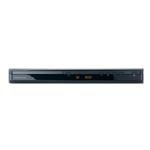
Figura 1: Față view of the Memorex MVD2047 Progressive Scan DVD Player. This image displays the sleek, black design of the DVD player, highlighting its compact form factor and front panel controls.
2. Ghid de instalare
Despachetarea
Before setting up your DVD player, ensure all components are present and undamaged. The package should include:
- Memorex MVD2047 DVD Player unit
- Full-function remote control (batteries sold separately)
- Audio/Video cables (RCA type)
Connecting Your DVD Player
Proper connection is crucial for optimal performance. Ensure your television and DVD player are turned off before making any connections.
Conexiuni video
- Ieșire HDMI: For the highest quality digital video and audio, connect an HDMI cable (not included) from the DVD player's HDMI OUT port to an HDMI IN port on your TV. This connection supports upconverting to 1080p.
- Ieșire video componentă (YPbPr): For high-quality analog video, connect component video cables (red, green, blue) from the DVD player's COMPONENT VIDEO OUT ports to the corresponding COMPONENT VIDEO IN ports on your TV.
- Ieșire S-Video: Connect an S-Video cable (not included) from the DVD player's S-VIDEO OUT port to the S-VIDEO IN port on your TV. S-Video provides better quality than composite video.
- Ieșire video compozit: Connect the yellow RCA video cable from the DVD player's VIDEO OUT port to the VIDEO IN port on your TV. This is a standard analog video connection.
Conexiuni audio
- Audio HDMI: If using an HDMI connection, audio is transmitted digitally through the same cable.
- Ieșire audio analogică (RCA): Connect the red and white RCA audio cables from the DVD player's AUDIO OUT (L/R) ports to the corresponding AUDIO IN (L/R) ports on your TV or audio receiver.
- Dolby Digital Output: The player supports Dolby Digital output for surround sound systems. Connect the appropriate digital audio cable (coaxial or optical, not included) to your compatible audio receiver.
3. Instrucțiuni de utilizare
Redare de bază
- Pornire: Press the POWER button on the front panel or remote control to turn on the DVD player.
- Inserați disc: Press the OPEN/CLOSE button to open the disc tray. Place a DVD, CD, or compatible disc onto the tray with the label side facing up. Press OPEN/CLOSE again to close the tray.
- Redare: The player will typically begin playback automatically. If not, select the PLAY button on the remote control.
- Oprire/Pauză: Use the STOP or PAUSE buttons on the remote to control playback.
- Ejectare disc: Press the OPEN/CLOSE button to eject the disc.
Caracteristici avansate
- Funcția de zoom: Use the ZOOM button on the remote to magnify a portion of the screen during playback.
- Multi-Angle Menu: For discs that support multiple camera angles, use the ANGLE button to switch between available views.
- Mișcare lentă: During playback, press the SLOW button to play video at 1/2, 1/4, or 1/8 speed.
- Fast-Forward/Rewind: Use the FF (Fast-Forward) and REW (Rewind) buttons to navigate through content at x2, x4, or x8 speed.
- Raport de aspect: Adjust the display aspect ratio between 16:9 (widescreen) and 4:3 (standard) using the ASPECT button on the remote or through the on-screen menu.
Control parental
The Memorex MVD2047 includes a parental lock function to restrict access to certain content. This feature allows you to set a rating level, preventing playback of discs above that level without a password. Refer to the on-screen graphical user interface for setting up and managing parental controls.
4. Întreținere
To ensure the longevity and optimal performance of your Memorex MVD2047 DVD player, follow these simple maintenance guidelines:
- Curățarea unității: Use a soft, dry cloth to wipe the exterior of the DVD player. Do not use liquid cleaners or aerosol sprays, as they may damage the finish or internal components.
- Îngrijirea discurilor: Manipulați discurile de margini pentru a evita amprentele și zgârieturile. Depozitați discurile în carcasele lor atunci când nu le utilizați. Curățați discurile murdare cu o lavetă moale, fără scame, ștergând din centru spre exterior.
- Ventilare: Ensure the DVD player is placed in a well-ventilated area. Do not block the ventilation openings on the unit, as this can lead to overheating.
- Opriți când nu este utilizat: For extended periods of inactivity, it is recommended to power off the unit and unplug it from the power outlet.
5. Depanare
If you encounter issues with your Memorex MVD2047 DVD player, consult the table below for common problems and their solutions.
| Problemă | Cauza posibila | Soluţie |
|---|---|---|
| Fără putere | Cablul de alimentare nu este conectat corect. | Ensure the power cord is firmly plugged into the wall outlet and the player. |
| Nicio poză | Incorrect video connection or input selection on TV. | Check video cables (HDMI, Component, S-Video, Composite) are securely connected. Select the correct input source on your TV (e.g., HDMI 1, AV, Component). |
| No sound (especially via HDMI) | Incorrect audio connection; TV or receiver volume too low; HDMI audio setting issue. | Verify audio cables (RCA, digital) are connected correctly. Increase volume on TV/receiver. If using HDMI, ensure your TV/receiver supports HDMI audio and check the player's audio output settings. Try a different HDMI cable or port. |
| Tava de disc nu se deschide/închide | Obstruction in tray; mechanical issue. | Check for any foreign objects blocking the tray. Power cycle the unit (unplug, wait 30 seconds, plug back in). If the problem persists, service may be required. |
| Discul nu se redă | Discul este murdar, zgâriat sau formatat incompatibil. | Clean the disc with a soft cloth. Try a different disc. Ensure the disc format (DVD, CD, MP3 CD, Picture CD) is supported by the player. |
| Telecomanda nu funcționează | Bateriile sunt descărcate sau introduse incorect; obstrucție între telecomandă și player. | Replace batteries with new ones, ensuring correct polarity. Remove any obstacles between the remote and the player's front panel sensor. |
6. Specificatii tehnice
| Caracteristică | Caietul de sarcini |
|---|---|
| Numărul de model | MVD2047 (Internal: 01233) |
| Tipuri de suport acceptate | DVD, DVD+R/+RW, DVD-R/-RW, Audio CD, CD-R/RW, MP3 CD, Picture CD |
| Ieșire video | HDMI, Component Video (YPbPr), S-Video, Composite Video |
| Ieșire audio | HDMI Audio, Analog Stereo (RCA L/R), Dolby Digital Output |
| Resolution (HDMI Upconverting) | Up to 1080p (1920x1080) |
| Raport de aspect | 16:9, 4:3 |
| Caracteristici speciale | Progressive Scan, Zoom Function, Multi-Angle Menu, Parental Control |
| Afişa | Afișaj LED |
| Greutatea articolului | 8 uncii (aproximativ 227 grame) |
| Dimensiuni pachet | 16.5 x 10 x 3.5 inci (aprox. 41.9 x 25.4 x 8.9 cm) |
7. Garanție și asistență
For information regarding product warranty, technical support, or service, please refer to the documentation included with your purchase or visit the official Imation (Memorex) support webPăstrați dovada achiziției pentru reclamații în garanție.


