1. Produs terminatview
The Macally Icetune is a portable speaker system designed specifically for Sansa MP3 players, offering both audio playback and charging capabilities. Its compact design allows for flexible placement, either stacked vertically or spread out horizontally, making it suitable for various environments.
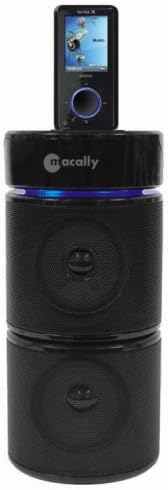
Figure 1.1: Macally Icetune Speakers with Sansa MP3 Player Docked
This image displays the Macally Icetune speaker system in its stacked configuration, with a Sansa MP3 player securely docked on the top unit. The system features a sleek black finish and a blue indicator light visible below the docked player.
2. Conținutul pachetului
Verificați dacă toate articolele sunt prezente în colet:
- Macally Icetune Speaker Unit (Base with dock and integrated speaker)
- Macally Icetune Speaker Unit (Top speaker)
- Adaptor de curent alternativ
- Manual de utilizare (acest document)
3. Configurare
- Conexiune de alimentare: Connect the supplied AC power adapter to the DC input port on the rear of the Icetune base unit. Plug the other end of the adapter into a standard wall outlet.
- Configurație difuzor: The Icetune speakers can be used in two configurations:
- Stivuite: Place the top speaker unit directly on top of the base unit. Ensure the units are aligned for stability.
- Alăturat: Place the two speaker units next to each other.
- Sansa MP3 Player Placement: Carefully insert your Sansa MP3 player into the docking connector located on the top of the Icetune base unit. Ensure it is seated firmly.
- Firmware Update (Important): For optimal compatibility and functionality, especially with Sansa e200 series players, ensure your Sansa MP3 player has the latest firmware installed. Firmware updates can typically be downloaded from the official Sansa (SanDisk) website. Failure to update firmware may result in the player charging but not playing audio through the speakers.
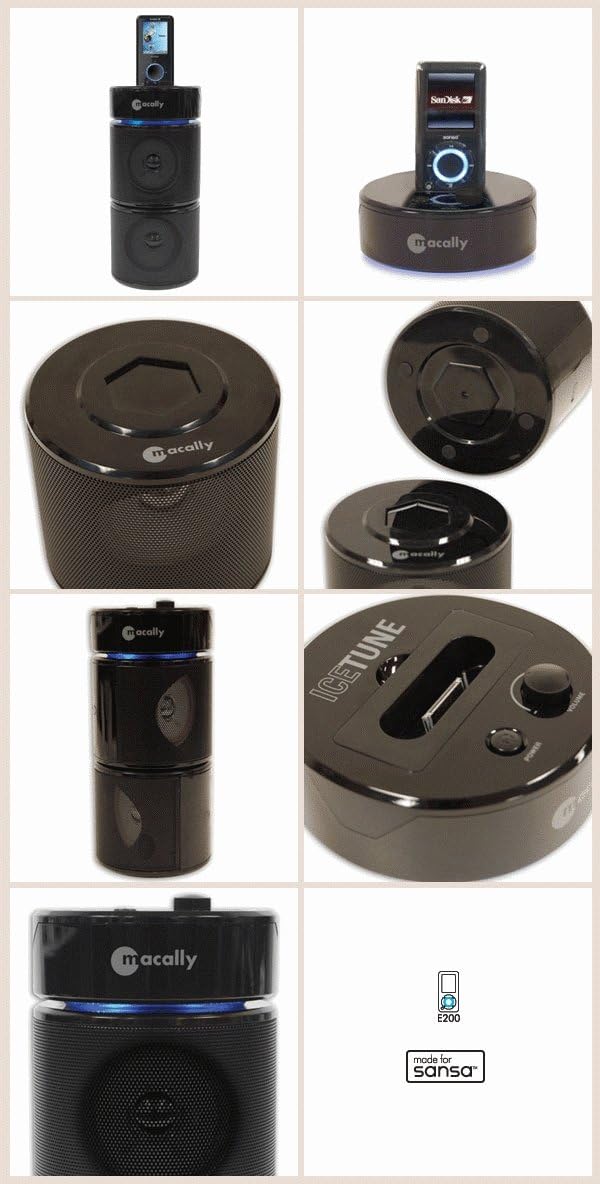
Figure 3.1: Macally Icetune Various Views
This composite image shows several perspectives of the Macally Icetune. It includes the full stacked unit with a Sansa player, a close-up of the docking station, and views of the top and bottom of the speaker units, highlighting the design and connection points.
4. Instrucțiuni de utilizare
- Pornire/Oprire: Press the Power button located on the Icetune base unit to turn the speakers on or off. A blue indicator light will illuminate when the unit is powered on. Remember to also power on your Sansa MP3 player separately.
- Redare audio: Once your Sansa MP3 player is docked and both the player and the Icetune speakers are powered on, begin playback on your Sansa player. Audio will be routed through the Icetune speakers.
- Controlul volumului: Adjust the volume using the volume controls on your Sansa MP3 player. The Icetune speakers do not have independent volume controls.
- Funcția de încărcare: When your Sansa MP3 player is docked and the Icetune unit is connected to power, your player will automatically begin charging. This allows for continuous music playback while simultaneously recharging your device.
- Personalizare sunet: Utilize the Equalizer (EQ) settings available on your Sansa MP3 player to adjust the audio output to your preference. This can help optimize sound quality for different music genres or listening environments.
- Accessing Player Controls: Be aware that some bottom control buttons on the Sansa player (e.g., power, menu) may be partially obscured by the docking base. You may need to slightly lift or adjust the player to access these buttons while docked.
5. Întreținere
- curatenie: Disconnect the power adapter before cleaning. Use a soft, dry, lint-free cloth to wipe the exterior surfaces of the speakers. Do not use liquid cleaners, aerosols, or abrasive materials, as these may damage the finish or internal components.
- Depozitare: When not in use for extended periods, store the Icetune speakers in a cool, dry place, away from direct sunlight and extreme temperatures.
- Manipulare: Handle the units with care. Avoid dropping or subjecting them to strong impacts, which could damage the internal electronics or the docking connector.
6. Depanare
| Problemă | Cauza posibila | Soluţie |
|---|---|---|
| Player charges but no sound from speakers. | Sansa MP3 player firmware is outdated or incompatible. | Ensure your Sansa MP3 player has the latest firmware installed from the manufacturer's website-ul. |
| No power to the Icetune unit. | Adaptorul de alimentare nu este conectat sau priza este defectă. | Check that the AC power adapter is securely connected to both the Icetune unit and a working wall outlet. |
| Low or distorted sound quality. | Sansa player volume too low; EQ settings; player not fully docked. | Increase volume on your Sansa player. Adjust EQ settings on your Sansa player. Ensure the Sansa player is fully seated in the docking connector. |
| Sansa player buttons are hard to access when docked. | Design characteristic of the docking station. | This is a known design aspect. Slightly lift or adjust the player as needed to access the buttons. |
7. Specificații
- Model: SN-ICETUNE
- Marca: Macally
- Compatibilitate: Sansa MP3 Players (specifically e200 series and compatible models)
- Culoare: Negru
- Product Dimensions (stacked, approx.): 1.3 x 1.3 x 2.59 cm (0.51 x 0.51 x 1.02 țoli) (Note: These dimensions seem unusually small for a speaker system and might refer to a component. Please refer to product packaging for exact overall dimensions.)
- Greutatea articolului: 1.07 kg (2.36 lbs)
- Putere de intrare: AC Power Adapter (specifications typically on adapter)
8. Informații despre garanție
Macally products typically come with a limited warranty. For detailed information regarding the warranty period, coverage, and terms and conditions for your Icetune Speakers, please refer to the warranty card included with your purchase or visit the official Macally website-ul.
Official Macally Website: www.macally.com/support
9. Asistență pentru clienți
If you encounter any issues or have questions not covered in this manual, please contact Macally customer support. Support resources, including FAQs, drivers, and contact information, are available on the official Macally website-ul.
Macally Support Page: www.macally.com/support


