1. Introducere
This manual provides detailed instructions for the installation, operation, and maintenance of your Clarion MCD360 3-Way 6-Channel Electronic Crossover. Designed to optimize your car audio system, this electronic crossover allows for precise control over audio frequencies, ensuring a balanced and high-quality sound output.
2. Caracteristici cheie
- Front/Rear/Subwoofer Level Control
- Intrări RCA 6/4/2 canale
- Ieșiri RCA cu 6 canale/5 volți (față/spate/subwoofer)
- Egalizatorul subwooferului și comenzile nivelului de amplificare
- High-Pass Crossover Frequency Multiplier
- Remote Subwoofer Level Control (Included)
- Gold Plated Terminals
3. Ce se află în cutie
Your Clarion MCD360 package includes the following components:
- Clarion MCD360 Electronic Crossover Unit
- Remote Subwoofer Level Control Knob
- Ham de cabluri
- Hardware de montare
- Manual de instructiuni

Image: Clarion MCD360 Electronic Crossover unit with remote bass knob, wiring, and mounting hardware.
4. Configurare și instalare
4.1. Conexiuni de cablare
Ensure all power, ground, and remote connections are secure and correctly polarized to prevent damage to the unit or your audio system.
- Putere (+12V): Connect to a constant +12V power source from your vehicle's battery.
- Masa (GND): Connect to a solid chassis ground point on your vehicle.
- La distanță (REM): Connect to the remote turn-on lead from your head unit or ignition switch.
Imagine: Spate view of the Clarion MCD360 showing power, ground, and remote terminals, along with RCA inputs and outputs.
4.2. RCA Input/Output Connections
Connect your head unit's RCA outputs to the corresponding inputs on the MCD360, and then connect the MCD360's outputs to your ampliificatori.
- Intrări: The MCD360 features 6/4/2 channel RCA inputs. Connect your head unit's front, rear, and subwoofer RCA outputs to the respective inputs on the crossover.
- Ieșiri: The unit provides 6-channel / 5 Volt RCA outputs for Front, Rear, and Subwoofer. Connect these to your external ampliificatori.

Imagine: față view of the Clarion MCD360 showing RCA input connections for front, rear, and subwoofer channels.

Imagine: Spate view of the Clarion MCD360 showing RCA output connections for front, rear, and subwoofer channels.
5. Instrucțiuni de utilizare
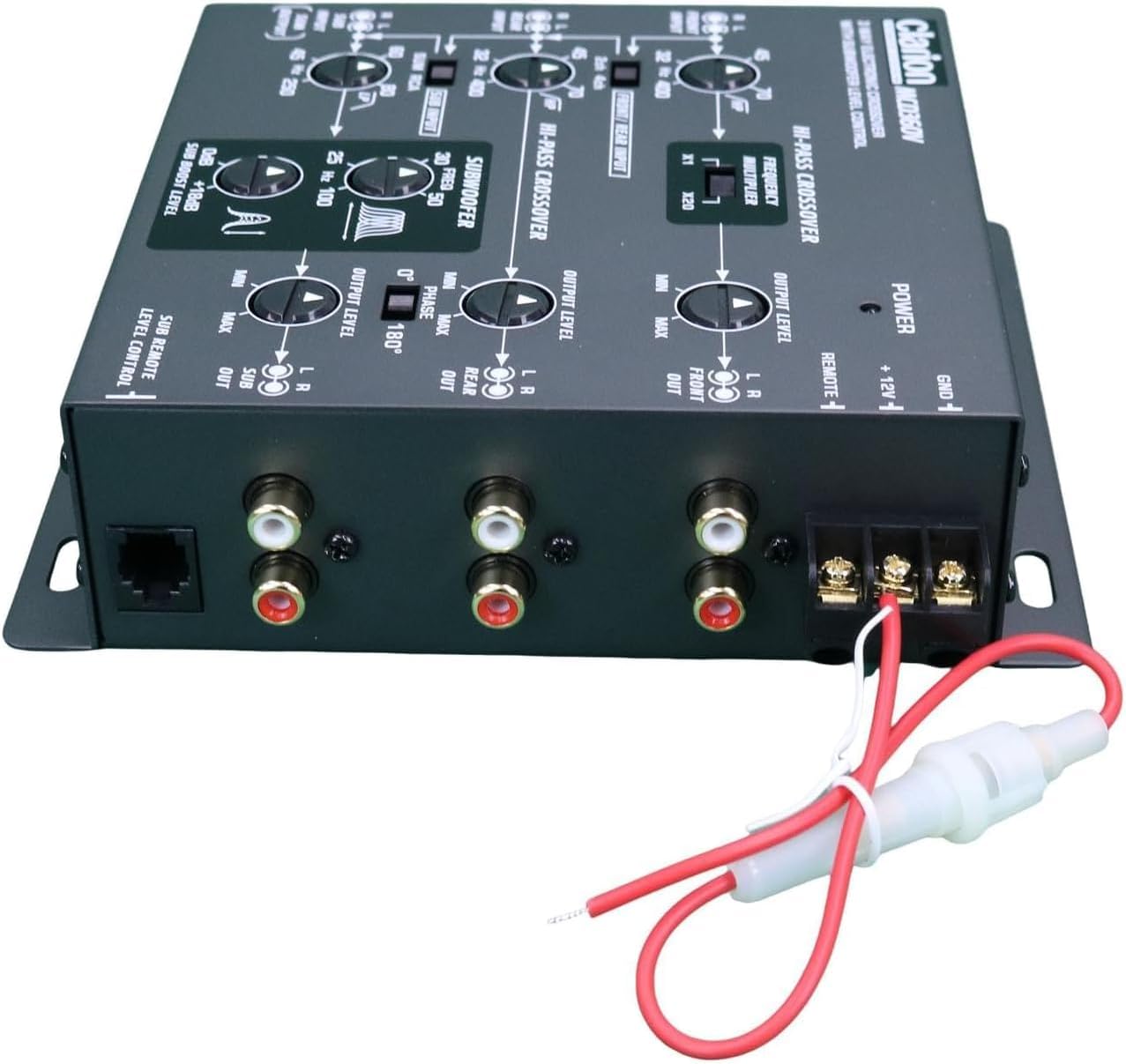
The Clarion MCD360 offers extensive control over your audio frequencies. Familiarize yourself with the controls for optimal sound tuning.

Image: Top panel of the Clarion MCD360 showing various control knobs and switches for frequency and level adjustments.
- Front/Rear/Subwoofer Level Control: Adjust the output level for each channel independently to match your amplifier's input sensitivity and achieve desired volume balance.
- High-Pass Crossover Frequency Multiplier: Use this control to set the high-pass filter frequency for your front and rear speakers, preventing low frequencies from reaching them.
- Subwoofer Equalizer and Boost Level Controls: Fine-tune your subwoofer's performance with dedicated equalizer and boost controls. This allows you to enhance bass response at specific frequencies.
- Control nivel subwoofer de la distanță: The included remote knob allows for convenient adjustment of the subwoofer output level from your driving position.

Image: Clarion MCD360 unit displayed with its remote subwoofer level control and connecting cable.
5.1. Video Guides
For visual guidance on setting up and operating your electronic crossover, please refer to the following videos:
PRV Audio EX4.6 PRO 4 Way Electronic Crossover Overview
Descriere: Acest videoclip oferă pesteview of the PRV Audio EX4.6 PRO 4-Way Electronic Crossover, demonstrating its features and controls. While not the exact MCD360 model, it offers general insights into electronic crossover functionality.
Skar Audio SKEC23 3-Way 6 Channel Electronic Crossover
Description: This video showcases the Skar Audio SKEC23 3-Way 6 Channel Electronic Crossover, highlighting its various adjustments and connections. It can serve as a helpful reference for understanding similar crossover units.
Gudronamps Big Bass DSP Audio Processor
Description: This video introduces the Taramps Big Bass DSP Audio Processor, focusing on its bass enhancement capabilities. While a different product type, it demonstrates how external processors can refine audio output.
Gudronamps DSP Pro 2.4s Processor
Description: This video highlights the features of the Taramps DSP Pro 2.4s Processor, including its equalization and crossover functions. It provides a good understanding of digital signal processing in car audio.
Gudronamps TS 1200X4 2 Ohms multi-channel ampmai în viață
Description: This video presents the Taramps TS 1200X4 multi-channel amplifier, showing its connections and features. Understanding amplifier connections is crucial for integrating the MCD360 into your system.
CLARION EQS755V 7-Band Car Audio Graphic Equalizer/Crossover
Description: This video features the Clarion EQS755V Graphic Equalizer/Crossover, a related product that demonstrates Clarion's approach to audio processing. It can help users understand the brand's interface and functionality.
Big Bass Restoration module improving deep bass in car audio
Description: This video explains the function of a Big Bass Restoration module, which improves deep bass in car audio systems. This is relevant for users looking to maximize their subwoofer's performance with the MCD360.
6. Întreținere
To ensure the longevity and optimal performance of your Clarion MCD360, follow these simple maintenance guidelines:
- curatenie: Folosiți o cârpă moale și uscată pentru curățarea unității. Evitați substanțele de curățare abrazive sau solvenții.
- Conexiuni: Verificați periodic toate conexiunile cablurilor pentru a vă asigura că sunt sigure și fără coroziune.
- Mediu: Ensure the unit is installed in a location that is free from excessive heat, moisture, and direct sunlight.
7. Depanare
If you experience issues with your MCD360, consult the following common troubleshooting steps:
| Problemă | Cauza posibila | Soluţie |
|---|---|---|
| Fără ieșire de sunet | Incorrect wiring (power, ground, remote), RCA cables disconnected, gain settings too low. | Check all power, ground, and remote connections. Ensure RCA cables are securely connected. Verify gain levels on the crossover and ampliificatori. |
| Sunet distorsionat | Gain settings too high, improper crossover settings, faulty speakers/ampliificatori. | Reduce gain levels on the crossover and amplifiers. Adjust crossover frequencies to match speaker capabilities. Test speakers and amplifiers for proper function. |
| Loud Pop on Turn On/Off | Incorrect remote turn-on sequence. | Ensure the head unit turns on before the amplifier and off after the amplifier. The MCD360's remote output sequencing helps prevent this. |
| Subwoofer Not Responding | Subwoofer level control too low, low-pass filter set too high, phase issue. | Increase subwoofer level on the unit and remote. Adjust low-pass filter to appropriate frequency. Check subwoofer phase setting. |
8. Specificații
| Caracteristică | Detaliu |
|---|---|
| Vol. De intraretage | 5 volți |
| Tip de montare | Muntele raftului |
| Material | Gold (for terminals) |
| Tip difuzor | Subwoofer (control) |
| Caracteristica specială | Egalizator |
| Dimensiunile produsului | 7" D x 6" L x 0.75" H |
| Greutatea articolului | 2.2 lire sterline |
| Culoare | Negru |
| Metoda de control | Telecomanda |
| Raportul semnal-zgomot | 100 dB |
| Raspuns in frecventa | 50000 Hz |
| Tehnologia de conectivitate | Cablat |
| Mod ieșire audio | Surround |
| Număr de circuite | 6 |
9. Garantie
The Clarion MCD360 comes with a 1 ani garanție limitată. Please retain your proof of purchase for any warranty claims. For detailed warranty terms and conditions, refer to the documentation included with your product or contact Clarion customer support.
10. Suport
For further assistance, technical support, or service inquiries, please visit the official Clarion website-ul lor sau contactați departamentul lor de asistență pentru clienți. De asemenea, puteți consulta Magazinul Clarion pe Amazon pentru informații și resurse suplimentare despre produse.


