1. Introducere
The Yamaha EZ-250i Portatone Lighted Musical Keyboard is designed to make learning and playing music accessible and enjoyable. Featuring touch-sensitive, lighted keys and the Yamaha Educational Suite, this instrument offers a comprehensive platform for musical development. This manual provides essential information for setting up, operating, maintaining, and troubleshooting your EZ-250i keyboard.
2. Configurare
2.1 Despachetarea
Scoateți cu grijă toate componentele din ambalaj. Cutia trebuie să conțină următoarele articole:
- Yamaha EZ-250i Keyboard
- Repaus muzical
- Cartea de cântece
- CD-ROM (containing software)
- Cablu USB
- Manual de utilizare
- Informații despre garanție
Please note that batteries and the PA-C3 power supply are not included and must be purchased separately.
2.2 Conexiune la alimentare
The EZ-250i can be powered using either an optional AC power adapter (Yamaha PA-C3 recommended) or batteries. Ensure the power source is correctly connected before use.
2.3 Conexiune la computer
To connect the keyboard to a computer, use the provided USB cable. The USB port functions as a MIDI interface, eliminating the need for additional MIDI peripherals. A dedicated PC button on the keyboard allows for quick recall of MIDI settings.
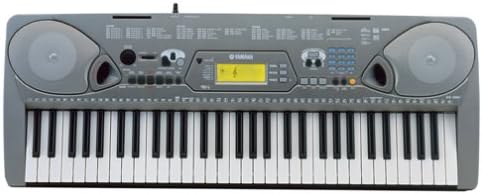
Imaginea 1: De sus în jos view of the Yamaha EZ-250i Portatone Lighted Musical Keyboard, showcasing its 61 keys, control panel, and integrated speakers.
3. Instrucțiuni de utilizare
3.1 Operare de bază
Press the Power button to turn the keyboard on or off. Adjust the master volume using the dedicated volume control.
3.2 Lighted Keys
The EZ-250i features lighted keys that illuminate to guide you during lessons and song playback, indicating which notes to play.
3.3 Yamaha Educational Suite (Y.E.S.2)
Y.E.S.2 offers seven types of lessons to assist in learning. Key features include:
- Mod de sincronizare: Play the melody or chord by pressing any key with the correct timing.
- Modul de așteptare: Playback pauses until you find and play the correct chord or melody note. Keys illuminate to guide you.
- Minus-One Mode: Mute the left-hand, right-hand, or both parts of a song and play along.
- Lesson Grading: Monitors your progress during practice.
- Chord Dictionary: Shows how to play various chords by lighting the appropriate keys.
3.4 Voices and Portable Grand
The keyboard includes 480 voices, encompassing orchestral sounds, synthesizer patches, 10 drum kits, and 2 sound-effects kits. It supports both General MIDI (GM) and XG Lite voices. The Portable Grand function provides a high-quality, stereo-sampled piano voice accessible via a dedicated button.
3.5 Styles (Auto-Accompaniment)
The EZ-250i features 100 built-in styles, acting as a virtual backing band. Select a style (e.g., rock, country) and play a chord or use single-finger mode; the keyboard will provide drums, bass, piano, guitar, and other instrumental parts.
3.6 Keyboard Modes: Split and Layer
The keyboard offers flexible playing modes:
- Mod împărțit: Divides the keyboard into two parts, allowing two different sounds simultaneously (e.g., piano on the right, bass on the left).
- Mod strat: Combines two sounds across the entire keyboard range (e.g., piano and strings played together).
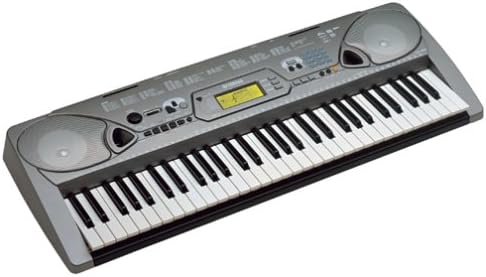
Imaginea 2: Înclinată view of the Yamaha EZ-250i Portatone Lighted Musical Keyboard, highlighting its slim profile și dispunerea tastelor.
3.7 Song Filer Software
The included Song Filer software allows you to transfer General MIDI files from your computer to the keyboard's built-in flash memory via USB. Once loaded, these songs can be played back with the lighted key guidance, similar to the built-in songs.
3.8 Konami Keyboard Mania Software
This interactive software provides a game-like approach to learning music, challenging users to find notes and practice timing. Note that some users have reported compatibility issues with older operating systems like Windows XP for the bundled version of this software.
4. Întreținere
To ensure the longevity and optimal performance of your Yamaha EZ-250i keyboard, follow these maintenance guidelines:
- curatenie: Wipe the surface of the keyboard with a soft, dry cloth. For stubborn dirt, use a slightly damp o lavetă și apoi uscați bine. Evitați substanțele de curățare abrazive sau solvenții.
- Depozitare: Store the keyboard in a cool, dry place away from direct sunlight, extreme temperatures, and high humidity. If not in use for extended periods, consider covering it with a dust cover.
- Manipulare: Evitați să scăpați tastatura sau să o supuneți la impacturi puternice. Nu așezați obiecte grele deasupra ei.
5. Depanare
If you encounter issues with your EZ-250i, refer to the following common solutions:
- Keyboard Not Powering On: Ensure the AC adapter is securely connected or that fresh batteries are installed correctly.
- Fără sunet: Check the master volume level. Ensure headphones are not plugged in if you expect sound from the speakers.
- Bundled Computer Game Not Starting: If the EZ-250i is connected to the computer and the game won't start, the Yamaha USB MIDI driver may not be selected as the preferred MIDI Music Playback Device in Windows. For Windows 2000/XP, navigate to My Computer/Control Panel/Sounds & Multimedia/Audio/MIDI Music Playback and select 'Yamaha USB OUT' as the default MIDI device.
- Probleme de conectare USB: Ensure the USB cable is properly connected. For older operating systems, verify that the correct drivers are installed. Note that 64-bit drivers may not be available for very old units.
For persistent issues, please contact Yamaha customer support or refer to the official Yamaha website pentru drivere actualizate și resurse de asistență.
6. Specificații
| Caracteristică | Caietul de sarcini |
|---|---|
| Numele modelului | EZ 250i |
| Marca | Yamaha |
| Numărul de chei | 61 |
| Tehnologia de conectivitate | USB |
| Mufă pentru căști | mufă de 3.5 mm |
| Tip instrument | Pian |
| Nivel de calificare | Începător |
| Caracteristica specială | Portabil |
| Dimensiunile produsului | 41 x 17 x 7.5 inci |
| Greutatea articolului | 0.01 uncii |
| UPC | 086792278346 |
| Data primului disponibil | 23 iulie 2003 |
7. Garanție și asistență
Warranty information for your Yamaha EZ-250i keyboard is included with the product documentation. Please refer to the provided warranty card or leaflet for details regarding coverage, terms, and conditions.
For technical support, service, or additional inquiries, please visit the official Yamaha website or contact Yamaha customer service directly. Keep your purchase receipt and product serial number handy when seeking support.


