Introducere
Mulțumesc pentru achizițieasing the GPX C3960 Personal CD/MP3 Player. This manual provides detailed instructions for the proper setup, operation, and maintenance of your device. Please read this manual thoroughly before use and retain it for future reference.
Conținutul pachetului
Asigurați-vă că toate articolele sunt prezente în colet:
- GPX C3960 Personal CD/MP3 Player
- Căști stereo
- Manual de utilizare (acest document)
Produs terminatview
Familiarize yourself with the components and features of your GPX C3960 player.
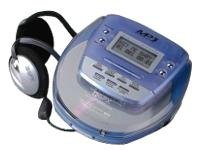
Image: The GPX C3960 Personal CD/MP3 Player, shown in a translucent blue casing, with a pair of silver over-ear headphones connected. The player features a small LCD screen and control buttons on its top surface.
Caracteristici cheie:
- CD-R/RW and MP3 disc playback compatibility
- Anti-skip protection: 45 seconds for audio CDs, 120 seconds for MP3 CDs
- Dynamic Bass Boost (DBB) for enhanced audio output
- 24-track programmable memory
- Low battery alert indicator
- Functioneaza cu 2 baterii AA
Înființat
1. Instalarea bateriei
- Locate the battery compartment on the bottom of the player.
- Deschideți capacul compartimentului bateriei.
- Introduceți două (2) baterii AA, asigurându-vă că polaritatea este corectă (+ și -), așa cum este indicată în interiorul compartimentului.
- Închideți bine capacul compartimentului bateriei.
- Nota: Replace batteries when the low battery indicator appears on the display or when playback performance degrades.
2. Conectarea căștilor
- Plug the stereo earbuds or your preferred headphones into the TELEFONURI jack located on the side of the player.
Instrucțiuni de operare
1. Pornire/Oprire
- Pentru a porni, apăsați tasta PLAY/PAUSE (►/‖‖) buton.
- Pentru a opri, apăsați tasta STOP (■) button twice, or wait for the auto-power off feature to activate after a period of inactivity.
2. Loading a CD/MP3 Disc
- Apăsați tasta DESCHIDE button to open the disc compartment lid.
- Carefully place a CD or MP3 disc onto the center spindle with the label side facing up.
- Apăsați ușor discul în jos până când se fixează în poziție cu un clic.
- Close the disc compartment lid firmly until it latches.
3. Redare de bază
- Redare/Pauză: Presa PLAY/PAUSE (►/‖‖) pentru a porni sau a întrerupe redarea.
- Oprire: Presa STOP (■) pentru a opri redarea.
- Sări peste piese: Presa SALIRE ÎNAINTE (►►) or SARI ÎNAPOI (◄◄) to move to the next or previous track.
- Căutare: Apăsați și mențineți apăsat SALIRE ÎNAINTE (►►) or SARI ÎNAPOI (◄◄) during playback to fast-forward or rewind within a track.
4. Controlul volumului
- Reglați VOLUM dial located on the side of the player to increase or decrease the audio output level.
5. Dynamic Bass Boost (DBB)
- Apăsați tasta DBB button to activate or deactivate the dynamic bass boost feature, which enhances low-frequency sounds.
6. Protecție anti-salire
The GPX C3960 features electronic anti-skip protection to prevent audio interruptions during movement. This provides approximately 45 seconds of protection for standard audio CDs and 120 seconds for MP3 CDs.
7. Programming Tracks
- With the player stopped, press the PROG Indicatorul programului va clipi.
- Utilizați SALIRE ÎNAINTE (►►) or SARI ÎNAPOI (◄◄) butoanele pentru a selecta piesa dorită.
- Presa PROG again to add the selected track to the program memory.
- Repetați pașii 2 și 3 pentru maximum 24 de piste.
- Presa PLAY/PAUSE (►/‖‖) pentru a începe redarea secvenței programate.
- To clear the program, open the disc compartment or press STOP (■) de două ori.
Întreţinere
Curățarea unității
- Wipe the exterior of the player with a soft, slightly damp pânză. Nu utilizați agenți de curățare abrazivi sau solvenți.
- Never open the disc compartment while the player is operating.
- Keep the lens clean. If the lens becomes dirty, use a soft camera lens brush to gently remove dust.
Îngrijirea bateriei
- Scoateți bateriile dacă unitatea nu va fi utilizată pentru o perioadă lungă de timp, pentru a preveni scurgerile.
- Nu amestecați baterii vechi cu noi sau diferite tipuri de baterii.
Manipularea discurilor
- Manevrați discurile de margini pentru a evita amprentele și zgârieturile.
- Păstrați discurile în cutia lor atunci când nu sunt utilizate.
- Curățați discurile cu o lavetă moale, fără scame, ștergând din centru spre exterior.
Depanare
| Problemă | Cauza posibila | Soluţie |
|---|---|---|
| Fără putere | Bateriile sunt descărcate sau introduse incorect. | Înlocuiți bateriile cu altele noi, asigurând polaritatea corectă. |
| Disc not playing / "NO DISC" error | Discul este murdar, zgâriat sau introdus incorect. | Clean the disc. Reinsert the disc with the label side up. Try a different disc. |
| Sound skipping or distorted | Disc is dirty, scratched, or player is subjected to excessive vibration. | Clean the disc. Ensure the player is on a stable surface or reduce movement. |
| Fără sunet de la căști | Headphones not properly connected or volume too low. | Ensure headphones are fully plugged in. Increase volume. Test with different headphones. |
Specificații
- Marca: GPX
- Model: C3960
- Media suportate: CD, CD-R, CD-RW, MP3-CD
- Protecție anti-sărire: 45 seconds (CD), 120 seconds (MP3-CD)
- Sursa de alimentare: 2 x baterii AA
- Caracteristica speciala: Portabil
- Greutatea articolului: Aproximativ 726 g
- Dimensiuni: Approximately 40.64 x 38.1 x 30.48 cm (Package Dimensions)
Garanție și suport
For warranty information or technical support, please refer to the documentation included with your purchase or visit the official GPX webPăstrați dovada achiziției pentru reclamații în garanție.


